The Logitech Lift is the best ergonomic Bluetooth mouse for comfort, control, and long daily work sessions.
A sore wrist, tight fingers, or a desk crowded with USB receivers can make computer work tiring. The right ergonomic Bluetooth mouse can help by supporting a more natural hand position and cutting cable clutter. I reviewed eight popular options for office work, travel, creative tasks, and multi-device use. I looked at shape, connection options, controls, charging, tracking, and value. Some use a vertical design, while others use a trackball or a classic full-size shell. That difference matters because the best ergonomic Bluetooth mouse for a small hand may not suit a large hand or a user who prefers a low-profile shape.
See the differences between my top picks at a glance.
| Mouse | Design | Devices | Power | Best For | Link |
|---|---|---|---|---|---|
| TECKNET Side Scroll | Classic ergonomic | 3 | Rechargeable | Office multitasking | View on Amazon |
| Logitech Lift | Vertical | Bluetooth/receiver | Battery | Wrist comfort | View on Amazon |
| ProtoArc EM11 NL | Vertical | Bluetooth | Rechargeable | Value seekers | View on Amazon |
| TECKNET Vertical | Vertical | 3 | Rechargeable | Adjustable control | View on Amazon |
| Logitech ERGO M575S | Trackball | Bluetooth/receiver | Battery | Small desks | View on Amazon |
| Lenovo Yoga Pro | Right-handed | Dual mode | USB-C rechargeable | Features | View on Amazon |
| Uineer Vertical | Vertical | 3 | Rechargeable | Multi-device value | View on Amazon |
| Logitech M720 | Full-size classic | Multi-device | Battery | Reliable work use | View on Amazon |
TECKNET Side Scroll Bluetooth Mouse

The TECKNET side-scroll mouse takes a familiar shape and adds useful controls for busy work. Its Bluetooth connection supports up to three devices, which suits people who move between a laptop, desktop, and tablet. The side scroll feature can help you move across wide sheets, timelines, and large web pages. Its rechargeable design also removes the need to keep spare batteries nearby.
I like this model for users who want ergonomic comfort without learning a steep vertical angle. The shell should feel familiar during long email, document, and browser sessions. As with any mouse, comfort depends on hand size and grip style. The extra controls also add value for office work, but users should check software support before expecting deep button customization.
Pros:
- Bluetooth connection for cable-free desk use
- Supports up to three paired devices
- Rechargeable design reduces battery waste
- Side scrolling helps with wide documents
- Familiar shape needs little adjustment
Cons:
- Classic shape may not ease every wrist issue
- Extra controls can take time to learn
- Not designed for left-handed use
What Amazon Buyers Are Saying
Buyer feedback for this type of TECKNET mouse often focuses on its smooth everyday use, multi-device switching, and rechargeable battery. Users who work with large pages tend to value the side scroll control. Some buyers may need time to adjust to the button layout or confirm that Bluetooth works well with their particular computer.
My Recommendation
This is a practical pick for office users who want several devices and useful side scrolling in a familiar shell. I would choose it over a basic mouse for spreadsheet work and daily multitasking.
Logitech Lift Vertical Ergonomic Mouse

The Logitech Lift is built around a compact vertical design. It places the hand in a handshake-like position, which may reduce the inward twist some people feel with a flat mouse. The thumb rest gives the hand a clear place to sit, while the scroll wheel and buttons remain easy to reach. Bluetooth and wireless receiver options add flexibility for modern laptops and desktop computers.
This is my strongest comfort pick for many right-handed users, especially those with small or medium hands. The shape feels unusual at first, so I suggest using it for short sessions during the first few days. It is not a medical device, and no mouse can fix poor desk height or bad posture. Still, its vertical form gives it a clear ergonomic purpose.
Pros:
- Vertical design encourages a more natural hand angle
- Comfortable thumb rest supports relaxed grip
- Compact size suits many small and medium hands
- Bluetooth and receiver options improve compatibility
- Quiet, simple controls suit office work
Cons:
- Learning curve for users of flat mice
- Right-handed shape limits hand choice
- Compact body may feel small to large-handed users
What Amazon Buyers Are Saying
Amazon buyers commonly praise the Lift for its comfortable vertical shape, compact size, and easy daily use. Many people report that the grip feels better after a short adjustment period. Common concerns include the unusual angle, the right-handed design, and the need to replace or manage a standard battery rather than charge the mouse by USB.
My Recommendation
I recommend the Logitech Lift to right-handed users who put wrist comfort first. It costs more than many basic vertical mice, but its shape, finish, and connection choices make it a strong long-term option.
ProtoArc EM11 NL Vertical Mouse

The ProtoArc EM11 NL uses a vertical design to change how the hand rests on the mouse. Its rechargeable battery is useful for users who dislike disposable batteries. Bluetooth support keeps the desk clear and works well with many newer laptops and tablets. The black finish also gives it a simple look that fits most workstations.
This mouse targets buyers who want an ergonomic vertical shape without moving into a premium price range. It can help reduce the habit of placing the palm flat on the desk, though comfort will vary by hand size. The buttons should feel familiar after a short learning period. I would use it for office work, study, browsing, and moderate daily computer tasks.
Pros:
- Vertical form supports a handshake-style grip
- Rechargeable power is convenient for daily use
- Bluetooth keeps USB ports free
- Simple black design suits home and office desks
- Good fit for buyers seeking an affordable ergonomic option
Cons:
- Vertical shape needs an adjustment period
- Large hands may need more palm room
- Wireless features may vary by operating system
What Amazon Buyers Are Saying
Common buyer comments for the ProtoArc EM11 NL focus on its comfortable angle, rechargeable design, and low desk clutter. Users often like the transition from a flat mouse to a vertical one. Some buyers may find the body too large or need time to build accuracy with the new grip. Checking return terms is wise when buying any unfamiliar shape.
My Recommendation
The EM11 NL is worth considering if you want a rechargeable vertical mouse at a sensible price. It offers the main ergonomic benefit without a complex control system, earning a strong value rating.
TECKNET 4800 DPI Vertical Mouse

This TECKNET model combines a vertical body with adjustable sensitivity up to 4800 DPI. That range gives users more control over cursor speed on different screens and desk spaces. It also supports up to three devices, which helps people who switch between work systems. The rechargeable battery keeps everyday use simple.
I see this as a flexible choice for users who want both posture support and cursor control. A higher DPI setting can make broad screen movement faster, while a lower setting can help with careful selection. DPI does not automatically mean better accuracy, so surface quality and sensor performance still matter. The vertical form remains the main reason to buy it.
Pros:
- Vertical design may reduce wrist rotation
- Up to 4800 DPI offers speed adjustment
- Three-device support helps multitasking
- Rechargeable design lowers battery maintenance
- Useful fit for work, browsing, and large displays
Cons:
- May feel tall for users with small hands
- Vertical design requires practice
- Not an ideal choice for left-handed users
What Amazon Buyers Are Saying
Buyers often highlight the adjustable cursor speed, multi-device pairing, and vertical grip. Office users tend to like the combination of comfort and practical controls. The main concerns are the tall shape and the adjustment time. Some users also prefer a smaller mouse for travel.
My Recommendation
I recommend this model for right-handed users who want a vertical mouse with more speed control. It is a well-rounded option for people who work across several Bluetooth devices.
Logitech ERGO M575S Trackball Mouse

The Logitech ERGO M575S takes a different path to ergonomic control. Instead of moving the full mouse, you move the thumb-operated trackball to guide the pointer. This saves desk space and works well when a large mouse pad is not available. Bluetooth and wireless receiver options add useful connection choice.
The trackball design can reduce repeated arm movement, which makes it attractive for small desks and limited work areas. It also takes practice because the thumb controls the pointer rather than the whole hand. The blue ball gives the mouse a clear visual identity. I would not choose it for users who strongly prefer traditional swipe movement, but it is excellent for stationary control.
Pros:
- Trackball saves valuable desk space
- Less arm movement during pointer control
- Bluetooth and receiver connection options
- Thumb ball supports precise stationary use
- Comfortable choice for many long work sessions
Cons:
- Trackball takes time to master
- Thumb control may not suit every user
- Requires regular cleaning around the ball
What Amazon Buyers Are Saying
Amazon buyers often praise the M575S for working well on small desks and reducing the need to move the mouse body. Many users enjoy the steady thumb control after the learning period. Common complaints tend to involve the adjustment curve and personal preference around trackballs. Cleaning and hand placement also affect the experience.
My Recommendation
This is one of my favorite choices for a cramped desk or a user who wants less arm travel. Buy it if you are open to learning a trackball. Skip it if you want normal swipe control.
Lenovo Yoga Pro Ergonomic Mouse

The Lenovo Yoga Pro Mouse is a feature-rich right-handed model with Bluetooth and dual-mode wireless support. Its USB-C rechargeable design fits well with newer laptops and chargers. The mouse includes six buttons, a programmable-button design, and a two-way metal scroll wheel. Its Tidal Teal finish gives it a more distinctive look than a standard black office mouse.
This mouse makes sense for users who want one device for work, travel, and advanced shortcuts. The extra buttons can save time in browsers and creative apps, but software support may affect how much control you get. Its right-handed shape should feel natural to the intended user. I would check the dimensions carefully because feature-rich mice often feel larger than simple travel models.
Pros:
- USB-C rechargeable power is convenient
- Bluetooth and dual-mode use add flexibility
- Six buttons support shortcut-heavy workflows
- Two-way metal scroll wheel feels substantial
- Distinctive finish suits modern workstations
Cons:
- Right-handed design limits flexibility
- Extra features may be more than basic users need
- Programmable functions depend on software support
What Amazon Buyers Are Saying
Buyer discussions commonly focus on the Yoga Pro Mouse’s premium look, USB-C charging, and useful button count. Users who switch between devices appreciate its dual-mode design. Some buyers may find the mouse less appealing if they want a simple plug-and-play model. The right-handed shape also remains an important buying consideration.
My Recommendation
I recommend this mouse for users who value features, charging convenience, and a polished design. It is less focused on a strong vertical posture change, but it offers excellent control for a busy workstation.
Uineer 3-Device Vertical Mouse

The Uineer vertical mouse focuses on a simple ergonomic shape and multi-device use. Its three-device support suits users who split time between a work laptop, home computer, and tablet. The vertical body aims to keep the wrist in a more neutral position than a flat design. Its rechargeable format also helps reduce desk clutter.
This is a useful choice for buyers who want the key features of a modern Bluetooth mouse without a long list of advanced controls. The shape may feel tall at first, but a steady grip can become natural with practice. I would place it on a desk for email, writing, study, and general browsing. It may not be the best fit for users who need gaming-grade response or a left-handed model.
Pros:
- Vertical shape supports a relaxed grip
- Three-device switching helps home-office users
- Rechargeable design saves on disposable batteries
- Simple controls make the transition easier
- Good choice for everyday office work
Cons:
- May feel bulky for small hands
- Right-handed shape limits use options
- Less suitable for users seeking advanced software
What Amazon Buyers Are Saying
Buyers commonly mention the comfortable vertical angle, easy multi-device use, and rechargeable battery. Users who want a basic ergonomic mouse often like its simple approach. The most likely concerns involve the tall body and the time needed to build accuracy. Experience can also vary with hand size and grip habits.
My Recommendation
The Uineer is worth a look when multi-device Bluetooth use and vertical comfort matter more than premium software. It offers a practical balance for home and office work.
Logitech M720 Triathlon Mouse
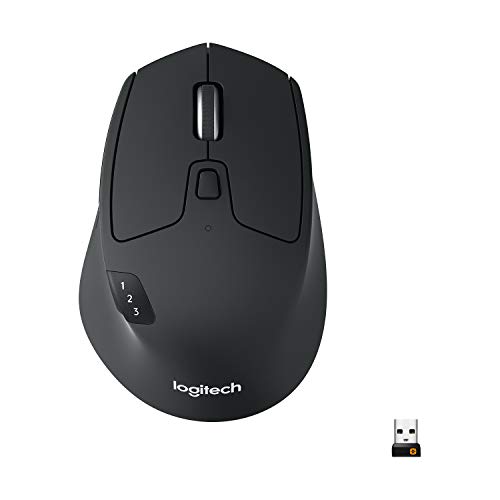
The Logitech M720 Triathlon uses a full-size classic shape rather than a vertical body or trackball. It is built for multi-device work and offers a familiar feel for users who do not want a major change in grip. The contoured shell gives the palm room, while the multi-device design suits people who move between computers. Bluetooth support helps keep a laptop setup clean.
I recommend this mouse for users who value proven everyday control and a roomy hand fit. It may feel more natural than a vertical mouse for people who type, browse, and work across many hours. However, it does not create the same wrist angle as a vertical ergonomic mouse. Choose it for broad comfort, reliable switching, and a classic pointer experience.
Pros:
- Full-size shell supports a relaxed palm position
- Multi-device use suits busy workstations
- Familiar shape needs little adjustment
- Bluetooth connection reduces cable clutter
- Strong choice for long general office sessions
Cons:
- Classic shape may not help every wrist concern
- Full-size body is less travel-friendly
- Battery power requires occasional replacement
What Amazon Buyers Are Saying
Amazon buyers often value the M720 for its comfortable full-size body, smooth switching, and dependable work use. Many users prefer its familiar shape over a vertical design. Common limitations include its larger travel size and the lack of a rechargeable battery. Comfort also depends on whether the user prefers a palm grip or a smaller fingertip grip.
My Recommendation
The M720 is a sensible buy for users who want a full-size multi-device mouse with a familiar shape. It is not the most posture-focused option here, but it remains a strong office tool.
How to Choose the Best Ergonomic Bluetooth Mouse
Choosing the best ergonomic Bluetooth mouse means matching the shape to your hand and work style. A high button count does not guarantee comfort. I suggest focusing on wrist angle, palm support, connection stability, power, and the way you move the pointer. The right choice should feel easy after a short adjustment period, not force your hand into a new position all day.
1. Match the Shape to Your Grip
Vertical mice suit people who want a handshake-style grip. They can reduce the inward turn of the forearm, but they need practice. Trackballs suit small desks because the mouse body stays still. Classic ergonomic mice feel more familiar and often work well for palm users. Check the product size against your hand. A mouse that feels too small can cause finger tension, while one that feels too large can make button access hard.
2. Check Bluetooth, Device Support, and Controls
Bluetooth is useful because it saves a USB port. Still, check your computer before buying. Some desktop PCs need a Bluetooth adapter. Multi-device support matters if you switch between a laptop, tablet, and desktop. Also look at button placement. Side buttons, horizontal scrolling, DPI control, and programmable buttons can save time, but only if you will use them. A simple mouse may be better for a clean, low-stress setup.
3. Compare Power, Tracking, and Long-Term Value
Rechargeable mice reduce battery waste and make charging simple. Battery-powered models can work well when you need long periods between changes. Look for a sensor that tracks well on your desk surface, then use a mouse pad if the cursor skips. Higher DPI gives more speed range, but it does not alone prove better quality. Finally, consider warranty coverage, software support, return rules, and hand comfort. Those details often matter more than a low launch price.
Final Verdict: Which Should You Buy?
The Logitech Lift is my top pick for the best ergonomic Bluetooth mouse because its vertical shape, compact fit, and connection choices balance comfort and daily control. Choose the Logitech ERGO M575S for a small desk, or the TECKNET vertical model for three-device use and DPI control.
Before you buy, match the mouse to your hand size and grip. A comfortable shape, stable Bluetooth link, and easy controls will make any ergonomic mouse more useful over time.
FAQs Of best ergonomic bluetooth mouse
What is the best ergonomic Bluetooth mouse for wrist comfort?
The Logitech Lift is my top choice for many right-handed users because its vertical design supports a handshake-style grip. Comfort still depends on hand size, posture, and personal preference.
Are vertical Bluetooth mice hard to use?
They can feel unusual at first. Most users need a short adjustment period to build smooth pointer control, especially when moving from a flat mouse.
Is a trackball mouse good for a small desk?
Yes. The Logitech ERGO M575S stays in one place, so it needs far less desk space than a mouse that you move across a pad.
Do ergonomic Bluetooth mice work with laptops?
Most work with laptops that support Bluetooth. Check the laptop’s Bluetooth settings and the mouse pairing instructions before purchase.
Is a rechargeable ergonomic mouse better than a battery mouse?
A rechargeable model reduces the need for spare batteries and is convenient for daily use. A battery model can be useful when you prefer long periods between battery changes.