Use mild soap, water, and soft cloths to clean a laptop case safely and effectively.
I’ve cleaned dozens of laptop cases for myself and for clients. Over the years I learned what works and what damages material. This guide on How to clean a laptop case gives clear, tested steps. You’ll find safe supplies, step-by-step methods for fabric, leather, and hard shells, tough stain fixes, and simple upkeep tips. Read on for practical advice that protects your gear and extends the life of your case.
Why clean a laptop case?
A clean laptop case looks better and protects your device from dirt, spills, and germs. Dust, skin oils, and food particles don’t just look bad. They wear down fabric and leather over time. Regular cleaning prevents stains from setting and keeps smells away. Learning how to clean a laptop case means you pick the right method for each material. That avoids costly mistakes and keeps your sleeve or bag working well.

Source: reddit
What you’ll need
Gather supplies before you start. Using the wrong product can ruin fabric or finish. Below I list everything I use regularly. These items cover most laptop cases: sleeves, backpacks, and hard shells.
- Microfiber cloth — soft and lint-free. Great for all surfaces.
- Soft-bristled brush — lifts dirt from fabric naps and seams.
- Mild dish soap or gentle laundry soap — a few drops mixed with water for fabric and nylon.
- Isopropyl alcohol 70% — for disinfecting and spot-removing ink or pen marks on hard surfaces.
- White vinegar — diluted for deodorizing and mild fabric stains.
- Leather cleaner or saddle soap — use these on genuine leather cases only.
- Cotton swabs and a soft toothbrush — reach tight seams, stitches, and zipper tracks.
- Compressed air can — blow out crumbs and dust from pockets and seams.
- Clean water — for rinsing away soap residue.
- Paper towels or absorbent cloths — for blotting spills quickly.
- Optional: baking soda or cornstarch — for oil and odor removal.
Having the right tools makes laptop case cleaning faster and much safer. It also helps prevent accidental color loss or surface damage.
Step-by-step cleaning guide
Work in small, safe steps. Always test cleaners on a hidden spot first. Each material needs a slightly different approach. Below I walk through pre-checks and specific methods for hard shells, fabric, and leather.
1. Pre-clean checks
- Empty the case and remove all loose items like pens, chargers, and cards.
- Read the manufacturer’s care label or instructions if available.
- Test your cleaner on an unseen area to check colorfastness and finish reaction.
How to clean a laptop case starts with a quick test. That simple step avoids surprises and keeps materials intact.
2. Cleaning a hard-shell or plastic case
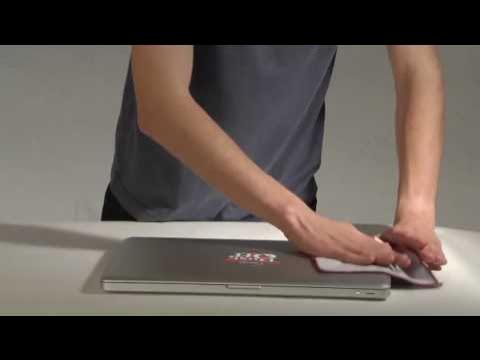
- Wipe dust off with a dry microfiber cloth.
- Mix a few drops of mild dish soap in warm water.
- Dip the cloth, wring it well, and wipe the surface. Use light pressure.
- For stubborn spots or sticky residue, use isopropyl alcohol sparingly.
- Dry quickly with a clean cloth to prevent water marks and streaks.
This method removes scuffs and smudges without harming protective coatings or paint. It’s good for hard laptop shells, polycarbonate cases, and many plastic accessories.
3. Cleaning a fabric or nylon case
- Vacuum or brush out loose dirt and crumbs first.
- Mix 1 teaspoon mild soap with 1 cup warm water in a bowl.
- Gently scrub with a soft brush or microfiber cloth. Work small areas at a time.
- Blot stains—don’t rub—to lift them without spreading or damaging fibers.
- Rinse the cloth, wipe away soap, then air dry away from direct sun.
When you clean a laptop case made of fabric, go slow. Too much water or aggressive scrubbing can cause color loss or shrinkage. For delicate mesh pockets or padded areas, use light dabs and low moisture.
4. Cleaning a leather case
- Dust off with a dry microfiber cloth.
- Apply a small amount of leather cleaner or diluted saddle soap to a cloth.
- Rub gently in small circles. Wipe away residue with another clean cloth.
- Condition leather afterward with a leather conditioner to keep it supple and prevent cracking.
- Avoid soaking leather and don’t use undiluted vinegar on it.
Leather needs gentler care. Over-wetting weakens glue and can warp structure. I always finish leather cleaning with a conditioner to restore oils and shine.
5. Zippers, straps, and hardware
- Use a toothbrush or cotton swab to remove debris inside zipper teeth.
- Lightly oil metal zippers with a dry lubricant if they stick. Wipe excess oil away.
- Clean metal or plastic hardware with a soft cloth and a little isopropyl alcohol if needed.
Small parts trap dirt and grime. Care for them and you prevent jams, snags, and early corrosion.
6. Drying and reassembly
- Air dry fabric and leather completely before using or storing them.
- Avoid direct heat and sunlight to prevent warping, fading, or cracking.
- Only reinsert accessories when the case is fully dry to stop mildew and glue failure.
Drying well is a key step in How to clean a laptop case. Skipping it invites mildew and weak glue joints.
Best cleaners for each material (quick reference)
I keep this short list near my cleaning kit. It helps me pick the right cleaner fast.
- Hard plastic or polycarbonate: mild dish soap and water, or 70% isopropyl for spots.
- Fabric/nylon: mild laundry soap or dish soap diluted in warm water.
- Leather: a dedicated leather cleaner or saddle soap, followed by leather conditioner.
- Metal hardware: isopropyl alcohol on a cloth. Avoid bleach or abrasive pads.
Source: youtube.com
Deep cleaning and stain removal
Some spots need special care. Work fast and test first. Here are the practical fixes I use for the most common stains.
- Oil or grease stains: Sprinkle cornstarch or baking soda over the spot. Let it sit 15–30 minutes to absorb oil. Brush off and clean with mild soap solution.
- Ink stains: Dab isopropyl alcohol with a cotton swab. Work from the outer edge toward the center. Blot and repeat until faded. Rinse with a damp cloth and air dry.
- Mold or mildew: Mix one part white vinegar with three parts water. Gently wipe the area. Let it air dry in a well-ventilated spot. Only use sunlight if the material can handle it.
- Persistent odors: Sprinkle baking soda inside, leave overnight, then vacuum. For strong smells, repeat or use a gentle fabric freshener made for gear.
When tackling tough spots, always test on a hidden seam first. These methods remove marks while keeping materials intact. For expensive or antique leather, consider a professional cleaner.

Source: wikihow.com
Maintenance tips and prevention
Small habits make a big difference. These tips keep your sleeve, bag, or case fresh and reduce the need for deep cleaning.
- Clean lightly every 1–2 weeks if you use the case daily. A monthly wipe-down works for light use.
- Use a dedicated pouch for chargers and cables to avoid grease transfer and tangles.
- Avoid eating or drinking over your laptop to reduce spills and crumbs.
- Store in a cool, dry place. Use silica gel packs for long-term storage to cut humidity and mildew risk.
- Condition leather twice a year to maintain suppleness and prevent cracks.
Regular care is the easiest and fastest way to keep your case looking new. Preventive steps save time later.
Common mistakes to avoid
Watch out for shortcuts that cause damage. I’ve seen all of these mistakes in the field.
- Using bleach or harsh cleaners. They strip color and finish and can corrode hardware.
- Soaking leather or structured cases. Excess water weakens glue and distorts shape.
- Scrubbing stains hard. Aggressive rubbing spreads the stain and damages fibers.
- Ignoring manufacturer care instructions. Always follow label guidance when present.
- Using abrasive scouring pads on plastic or metal. They leave scratches and dull finishes.
Avoid these errors when you clean a laptop case. They preserve both function and looks.
Source: com my
Read About How Much Does An Average Laptop Weigh: Real Truth for 2026
Frequently Asked Questions of How to clean a laptop case
How often should I clean my laptop case?
Clean lightly every 1–2 weeks if you use the case daily. Do a deeper clean every 1–3 months. Adjust based on material and how dirty it gets.
Can I machine wash my laptop case?
Only machine wash if the manufacturer label explicitly allows it. Most leather and structured cases should never go in a washing machine. Even some fabric sleeves are better hand-washed to protect padding.
What is the safest cleaner for most cases?
A mild dish soap mixed with warm water is safe for many surfaces. Use isopropyl alcohol sparingly on hard surfaces and only after testing on a hidden area.
How do I remove ink stains from a fabric laptop case?
Blot with isopropyl alcohol using a cotton swab. Work from the edge inward to avoid spreading. Repeat and rinse with a damp cloth, then air dry.
Is it OK to use vinegar on a laptop case?
Diluted white vinegar can deodorize and treat mild stains on fabric. Do not use vinegar on leather or coated surfaces without testing first.
Conclusion
Keeping your laptop case clean protects your device and keeps the case looking new. Use mild cleaners, test first, and match the method to the material when you learn How to clean a laptop case. Small, regular care beats rare deep cleanings. Follow the steps above and you’ll avoid common mistakes and extend the life of your sleeve, bag, or hard case.
Try these steps this week and set a simple routine to keep your case fresh. Leave a comment with your cleaning wins or questions, and consider subscribing for more practical gear-care tips.