The HP 14 is worth considering for basic everyday computing, especially when affordability matters more than performance.
If you need an inexpensive laptop for browsing, email, documents, online classes, and everyday home tasks, a premium machine can feel unnecessary. The HP 14 offers a familiar 14-inch format and Windows 11 experience aimed at those straightforward needs.
For a student, casual home user, or someone who mainly works with web apps and Microsoft Office, its simple hardware can be practical. The main trade-off is that the 4GB of RAM and 64GB SSD leave limited room for demanding multitasking and large software installations.

Is HP 14 HD Laptop Good?
The HP 14 HD Laptop is a basic Windows 11 notebook built around an Intel Celeron dual-core processor, 4GB of RAM, and a 64GB SSD. Its 14-inch HD display, webcam, Wi-Fi, Bluetooth, USB ports, and SD card reader cover many of the everyday features buyers expect from an affordable laptop.
Its strongest point is practical simplicity. It makes sense for web browsing, email, word processing, streaming, video calls, and light schoolwork, but buyers should not expect it to behave like a modern performance-focused laptop. The limited memory and storage are the biggest considerations before buying.

My First Impression of the HP 14 HD Laptop
This particular listing is a renewed HP 14 model, so packaging and cosmetic details can vary from a brand-new retail unit. Amazon Renewed products may arrive in generic packaging, while compatible accessories can be supplied instead of original accessories.
The Dale Blue finish gives the laptop a more distinctive appearance than a typical plain black notebook. Setup should be familiar for anyone who has used Windows 11, with the main task being to complete the Windows setup, connect to Wi-Fi, install updates, and configure the apps needed for daily work.
The 14-inch size is a useful middle ground for a home desk, kitchen counter, classroom, or occasional trip. The non-touch HD display is functional for documents and browsing, although its 1366 x 768 resolution is modest by current laptop standards.
What Makes It Stand Out / Key Features
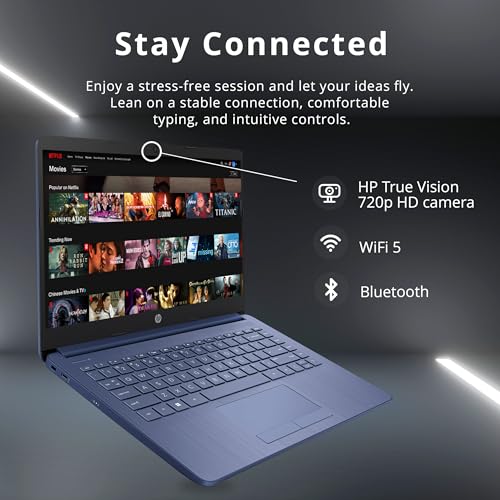
- 14-inch HD Display: The 14-inch HD BrightView WLED-backlit display uses a 1366 x 768 resolution, providing a practical screen size for browsing, documents, email, and everyday Windows tasks.
- Intel Celeron Dual-Core Processor: The Intel Celeron dual-core processor is designed for basic computing rather than demanding workloads, making it better suited to everyday applications, web browsing, and light productivity.
- 4GB RAM: The 4GB of memory is sufficient for lighter workloads but can become restrictive when many browser tabs or applications are open at the same time.
- 64GB SSD: The solid-state drive provides faster everyday storage access than a traditional hard drive, but 64GB is limited, so buyers should manage files and installed applications carefully.
- Windows 11: Windows 11 provides a familiar desktop environment with access to common productivity software, browsers, media apps, and other Windows-compatible programs.
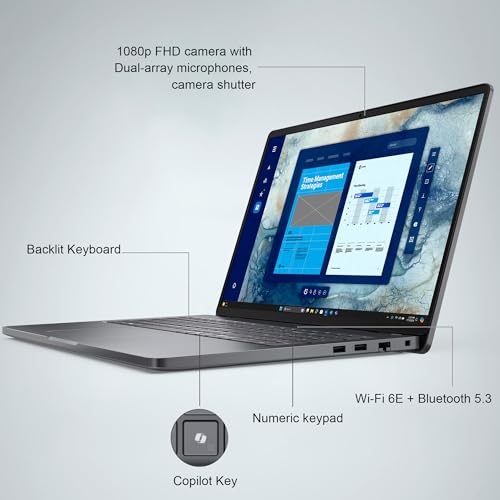
- Connectivity: The laptop includes three USB Type-A ports, an SD card reader, a headphone and microphone connection, Wi-Fi, and Bluetooth for common peripherals and accessories.
- Integrated Webcam and Microphone: The built-in HP webcam and integrated digital microphone make the laptop suitable for basic video calls, online classes, and remote communication.

✅ What I Like
- ✔ The 14-inch form factor is convenient for everyday home, school, and light office use without taking up excessive desk space.
- ✔ Windows 11 gives users access to a broad selection of familiar desktop applications and web browsers.
- ✔ The 64GB SSD should make basic startup and file access feel more responsive than an older mechanical hard drive.
- ✔ Three USB Type-A ports provide useful flexibility for a mouse, keyboard, flash drive, printer, or other accessories.
- ✔ The built-in SD card reader is convenient for users who regularly transfer photos or other files from compatible memory cards.
- ✔ Wi-Fi and Bluetooth support makes it straightforward to connect to a home network and common wireless peripherals.
- ✔ The integrated webcam and digital microphone cover basic video conferencing and online learning needs.
⚠️ What Could Be Better
- ✖ The 4GB of RAM is limited for heavy multitasking, numerous browser tabs, and more demanding applications.
- ✖ The 64GB SSD provides relatively little storage space for large software collections, media libraries, and extensive offline files.
- ✖ The 1366 x 768 display resolution is basic compared with the sharper Full HD screens available on many newer laptops.

My Recommendation
I would consider this HP 14 primarily for buyers who want a straightforward Windows computer for basic tasks and are comfortable working within its hardware limits. It is a better fit for browsing, email, documents, online learning, and light entertainment than for demanding creative or professional software.
Before purchasing, pay particular attention to the renewed condition and the available storage. If you routinely keep many applications open, edit video, play modern PC games, or store large photo and video libraries locally, a laptop with more memory, storage, and processing capability will be a better long-term choice.
| Best For | Why It Fits |
|---|---|
| Students | The Windows 11 environment, webcam, Wi-Fi, and 14-inch screen are suitable for web research, documents, online coursework, and video calls. |
| Home Users | It covers common tasks such as email, web browsing, online shopping, document editing, and casual media use without requiring high-end hardware. |
| Light Office Work | The laptop can handle basic productivity tasks when workloads remain modest and users avoid excessive multitasking. |
| Budget-Conscious Buyers | The renewed format can make a familiar HP Windows laptop more accessible to buyers who prioritize basic functionality over premium specifications. |

Alternative Products You Can Consider
| Product | Best For | Key Difference |
|---|---|---|
| HP 14 HD Laptop | Basic Windows computing | This configuration emphasizes simple everyday use with 4GB RAM and 64GB SSD storage. |
| Acer Aspire 3 | Buyers wanting broader configuration choices | The Aspire 3 family is available in multiple hardware configurations, allowing buyers to target different performance levels. |
| ASUS VivoBook 14 | Compact everyday productivity | The VivoBook 14 family provides different configurations for buyers who want to balance portability and hardware capability. |

Final Verdict: Which Should You Buy?
The HP 14 HD Laptop is a sensible option when the goal is affordable, uncomplicated Windows computing. Its 14-inch display, SSD storage, webcam, useful ports, wireless connectivity, and Windows 11 software environment make it capable of handling many everyday tasks.
The biggest limitation is the entry-level hardware configuration. The 4GB of RAM and 64GB SSD leave little headroom for heavy multitasking or large local file collections, while the HD resolution is less spacious than a Full HD display. Buyers who mainly browse, write documents, attend online classes, and handle email can find it practical, but demanding users should look at a better-equipped alternative.