The Logitech G502 HERO is my best gaming mouse with side buttons for flexible controls, reliable performance, and strong value.
When a game asks you to switch weapons, trigger an ability, and keep aiming at once, reaching for your keyboard can break your focus. Side buttons put useful commands under your thumb, but the right layout depends on the games you play and how many controls you need. I compared ten wired and wireless options, from simple two-button designs to MMO mice with a full thumb grid. Here are the picks that make the most sense for different hands, games, and budgets.
See the differences between my top picks at a glance.
| Mouse | Connection | Side-control style | Best fit | Main strength | Shop |
|---|---|---|---|---|---|
| Logitech G502 HERO | Wired | Several thumb buttons | Mixed game genres | Versatile control layout | View on Amazon |
| Razer Naga V2 HyperSpeed | Wireless | Large side-button grid | MMO and hotkey-heavy games | Many thumb commands | View on Amazon |
| Corsair Scimitar RGB Elite | Wired | 12-button thumb panel | MMO and MOBA | Adjustable side keypad | View on Amazon |
| Redragon M913 | Wireless | 12 side buttons | Budget MMO play | Wireless macro controls | View on Amazon |
| Redragon M908 | Wired | 12 side buttons | Value-focused MMO play | Many remappable controls | View on Amazon |
| Redragon M901K | Wired | 12 side buttons | Macro-rich MMO play | Weight tuning | View on Amazon |
| UtechSmart Venus Pro | Check listing variant | MMO-style side controls | Macro-focused play | High listed DPI ceiling | View on Amazon |
| Redragon M901P-KS | Wireless | 12 side buttons | Wireless MMO play | Rechargeable design | View on Amazon |
| Redragon M921 | Wired | Remappable side controls | Entry-level MMO setup | Programmable layout | View on Amazon |
| Razer DeathAdder Essential | Wired | Two thumb buttons | FPS and everyday play | Simple, familiar layout | View on Amazon |
Logitech G502 HERO Wired Gaming Mouse

The Logitech G502 HERO is my most balanced pick for players who want more commands without a full MMO keypad. Its thumb buttons sit within easy reach, and the mouse offers multiple programmable controls for common actions. That makes it useful for shooters, action games, and daily computer tasks. The familiar shape also helps it feel like a general-purpose mouse rather than a niche MMO tool.
This is a wired model, so you do not need to charge it or manage a wireless receiver. Its HERO sensor has a high listed DPI range, but a large number does not guarantee better aim; comfort and a steady setting matter more. Logitech software lets you set up controls and sensitivity to suit your habits. If you want a single mouse for several game types, this is a strong place to start.
Pros:
- Useful thumb controls for quick commands
- Programmable buttons support different game setups
- Wired connection avoids battery charging
- Adjustable settings can suit more than one game genre
- Versatile shape works for gaming and general use
Cons:
- The cord may bother players who prefer a clear desk
- It does not offer the large side grid of an MMO mouse
- Extra controls may take time to learn
What Amazon Buyers Are Saying
I cannot verify current Amazon review trends or quote buyers here. In general, check recent reviews for comments on fit, button feel, software setup, and long-term use. Those details matter more than a broad star score, especially if you have small hands or prefer a light mouse.
My Recommendation
I recommend the G502 HERO to players who want several handy side controls without giving up a familiar all-round layout. It is a sensible value choice if wired use suits your desk. My overall rating is 4.5 out of 5.
| Category | Rating |
|---|---|
| Button access | 4.5/5 |
| Genre flexibility | 4.5/5 |
| Ease of setup | 4/5 |
| Value for money | 4.5/5 |
| Overall rating | 4.5/5 |
Razer Naga V2 HyperSpeed Wireless MMO Mouse

The Naga V2 HyperSpeed targets players who use many commands in games such as MMOs. Its side-button grid moves hotkeys under your thumb, which can reduce the need to reach for a row of keyboard keys. The wireless design also keeps the desk free from a mouse cable. Razer lists long battery life for this model, though actual time can change with use and settings.
A dense button panel has a learning curve. At first, it can be hard to press the right control without looking, so I suggest setting up only your most-used actions and adding more over time. This layout is most useful when each button has a clear purpose. If you mainly play games that need only two thumb actions, a simpler mouse may feel easier and cost less.
Pros:
- Large side-button layout suits many hotkeys
- Wireless design supports a tidy desk
- Can keep frequent game commands close to the thumb
- Useful for MMO and other command-heavy games
- Button assignments can be tailored through supported software
Cons:
- Button grid can feel crowded at first
- Wireless use means you must keep battery needs in mind
- May be more mouse than casual or FPS players need
What Amazon Buyers Are Saying
I do not have live access to this product’s current Amazon reviews, so I will not present invented buyer quotes or review trends as fact. Before ordering, read recent comments about thumb-button comfort, wireless reliability, and software. Also check the current product page for the exact battery and connection details.
My Recommendation
I would choose the Naga V2 HyperSpeed when wireless use and many side commands are both high priorities. It is a specialist tool, not the best fit for every player. My overall rating is 4.4 out of 5.
| Category | Rating |
|---|---|
| Side-button capacity | 5/5 |
| Wireless convenience | 4.5/5 |
| Ease of learning | 3.5/5 |
| MMO suitability | 5/5 |
| Overall rating | 4.4/5 |
Corsair Scimitar RGB Elite MMO Mouse
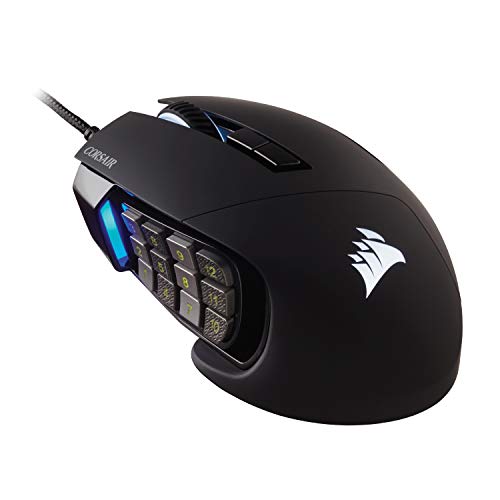
The Corsair Scimitar RGB Elite is built for players who want a full set of thumb commands. Its 12-button side panel gives MMO and MOBA players room for skills, items, and other shortcuts. A key advantage is the movable side keypad, which lets you shift the panel to better match your grip. That adjustment can help if a fixed keypad sits too far forward or back.
This mouse makes the most sense when you will use the extra buttons often. For a new user, I would map only a few controls first, then practice until each press feels natural. The wired connection means no charging breaks, though the cord remains part of the setup. Its focused layout can be less appealing for players who want a slim, simple FPS mouse.
Pros:
- 12-button side panel supports many commands
- Movable keypad helps tailor thumb reach
- Wired connection needs no battery charging
- Designed with MMO and MOBA control needs in mind
- RGB lighting adds a visible style touch
Cons:
- Many side keys need practice and careful mapping
- The larger control layout may not suit every grip
- Wired operation may not suit cable-free setups
What Amazon Buyers Are Saying
I cannot check the current Amazon review page from here, so I cannot claim a specific buyer consensus. Look for recent feedback on how well the keypad adjustment works for your hand size and whether the software setup feels clear. Reviews that describe the reviewer’s grip and game type are especially useful.
My Recommendation
The Scimitar is a strong wired pick for players who will make real use of a 12-button thumb panel. Its adjustable keypad is a practical feature, not just decoration. My overall rating is 4.5 out of 5.
| Category | Rating |
|---|---|
| Thumb-key access | 4.5/5 |
| Keypad flexibility | 4.5/5 |
| Genre fit | 5/5 |
| Everyday simplicity | 3.5/5 |
| Overall rating | 4.5/5 |
Redragon M913 Wireless MMO Gaming Mouse

The Redragon M913 offers an MMO-style side-button layout in a wireless mouse. Its 12 side keys give players a place to assign actions they would otherwise trigger on the keyboard. The listed 16,000 DPI ceiling gives a wide range of sensitivity settings, although most players will prefer a lower setting they can control. Its remappable controls make the mouse more useful across different games.
This is a value-minded option for players who want a wireless MMO mouse but do not need a premium brand name. As with any button grid, setup takes time: label your most-used actions and practice in a low-pressure game mode. Check the current listing for the included connection method and software support, since seller pages and bundles can change. Keep battery upkeep in mind before a long session.
Pros:
- Wireless design reduces cable clutter
- 12 side buttons give room for MMO commands
- Remappable controls support a personal layout
- Listed DPI range allows sensitivity adjustment
- Useful alternative for players seeking many controls on a budget
Cons:
- Dense side keys take time to learn
- Wireless models need charging or battery care
- Software details and included accessories should be checked on the listing
What Amazon Buyers Are Saying
I cannot confirm live buyer comments for this listing. Read recent reviews for firsthand notes about the side-button feel, connection stability, and how easy it is to set up macros. Pay attention to comments from people who use the same operating system and games as you.
My Recommendation
I recommend the M913 to budget-minded MMO players who value wireless freedom and a large number of side commands. Check the current listing closely before buying. My overall rating is 4.1 out of 5.
| Category | Rating |
|---|---|
| Wireless convenience | 4/5 |
| Side-button utility | 4.5/5 |
| Setup confidence | 3.5/5 |
| Value | 4.5/5 |
| Overall rating | 4.1/5 |
Redragon M908 Wired MMO Gaming Mouse

The M908 is a wired MMO mouse with 12 side buttons and remappable controls. It gives players many places to assign spells, inventory actions, or macros. The listed sensor setting reaches 12,400 DPI, but that maximum matters less than the ability to choose a comfortable speed. For someone moving from a basic mouse, the M908 can make a keyboard-heavy game feel easier to manage.
The number of buttons is the main draw, and also the main thing to consider. A large grid can feel busy if you do not need many shortcuts, and it is easy to press the wrong one before muscle memory forms. A wired design avoids battery planning, but it does leave a cable on the desk. I see it as a practical entry point for MMO play when cost matters.
Pros:
- 12 side buttons create room for many game actions
- Programmable controls support custom commands
- Wired operation removes battery concerns
- High listed DPI range offers sensitivity options
- Good fit for players who want many controls at a lower price point
Cons:
- Side-button grid has a learning curve
- The cable can add drag or desk clutter
- Many controls may go unused in simpler games
What Amazon Buyers Are Saying
I cannot see current Amazon reviews for this product, so I will not invent a rating pattern. Check recent buyer notes for comfort, the feel of the side buttons, and the setup process. A review that explains how long the mouse has been used gives more context than a short rating alone.
My Recommendation
The M908 is worth considering if you want a wired MMO mouse with many remappable buttons and do not mind learning the layout. It is less compelling for players who need only a pair of thumb buttons. My overall rating is 4.1 out of 5.
| Category | Rating |
|---|---|
| Number of controls | 4.5/5 |
| Wired reliability | 4.5/5 |
| Learning curve | 3.5/5 |
| Value | 4/5 |
| Overall rating | 4.1/5 |
Redragon M901K Wired MMO Gaming Mouse

The Redragon M901K is a wired MMO mouse with 12 side buttons, programmable controls, and a set of removable weights listed for tuning. Those weights can help players who like a heavier or more balanced feel, though the best setup depends on personal preference. The side grid supports quick access to a long list of actions. Its stated 12,400 DPI maximum gives room to adjust pointer speed.
I would focus on fit and control placement before treating the DPI figure as a major reason to buy. The extra weight option is useful only if you enjoy a mouse that feels more substantial. This model is a better match for MMO and MOBA players than for someone seeking a very simple, light FPS mouse. Set up only the commands you use most, then add more as your thumb learns the layout.
Pros:
- 12 thumb buttons suit games with many mapped commands
- Remapping supports a personal control plan
- Weight tuning lets users adjust the feel
- Wired connection avoids battery upkeep
- Listed DPI range gives sensitivity options
Cons:
- It may feel heavy to players who prefer a light mouse
- 12 side controls need practice
- Wired use is not ideal for a cable-free desk
What Amazon Buyers Are Saying
I cannot verify the live Amazon review history for this exact listing. Before you buy, look for recent comments on weight balance, button reach, and the quality of the software experience. Check that the product page still lists the weight set and other features you expect.
My Recommendation
The M901K is a reasonable pick for MMO players who want a wired keypad mouse and like the option to adjust weight. Skip it if your top goal is a feather-light shape. My overall rating is 4 out of 5.
| Category | Rating |
|---|---|
| Side-button usefulness | 4.5/5 |
| Weight adjustment | 4/5 |
| Ease of learning | 3.5/5 |
| Genre fit | 4.5/5 |
| Overall rating | 4/5 |
UtechSmart Venus Pro MMO Gaming Mouse

The UtechSmart Venus Pro is marketed as an MMO gaming mouse with a high listed DPI ceiling and RGB lighting. Its MMO-style control layout is aimed at players who want more actions close to the thumb. Before ordering, pay special attention to the exact Amazon listing and model details. Product names and variants can differ, so confirm connection type, button count, and included parts on the current page.
That extra check matters because the supplied product title calls this a wired model, while product naming around the Venus Pro line can be confusing. I would not buy based on a name alone. If the listing matches your desired connection and button setup, it may suit budget-conscious players who want many commands. If not, compare a model with clearer specifications before you commit.
Pros:
- Designed around MMO-style control needs
- High listed DPI ceiling gives many sensitivity choices
- RGB lighting adds visual customization
- Potential value for players who need several mapped actions
- Amazon listing lets buyers check current variant details before purchase
Cons:
- Confirm the exact version and connection type before buying
- Model naming can make comparisons less clear
- A high maximum DPI is not a benefit for every player
What Amazon Buyers Are Saying
I cannot access the current Amazon review page to confirm buyer patterns. Read the newest reviews and match them to the exact version in the cart. Focus on reports about the connection, button layout, and whether the product software works with your setup.
My Recommendation
I would consider the Venus Pro only after confirming the exact variant and its included features. Its listed MMO focus may appeal to macro users, but unclear model details call for extra care. My overall rating is 3.8 out of 5.
| Category | Rating |
|---|---|
| MMO control potential | 4/5 |
| Specification clarity | 3/5 |
| Sensitivity options | 4/5 |
| Value potential | 4/5 |
| Overall rating | 3.8/5 |
Redragon M901P-KS Wireless MMO Mouse

The Redragon M901P-KS puts an MMO-style 12-button side panel in a wireless, rechargeable design. The listing also states a 16,000 DPI maximum and up to 70 hours of use. Battery life varies with settings and how the mouse is used, so treat that figure as a listed claim rather than a guaranteed result. Its broad button set is the main reason to consider it.
Wireless play is handy if you dislike a cable crossing your pad, while the side keys keep many commands near your thumb. The trade-off is that you must plan for charging and learn the keypad. I suggest checking the included wireless connection details and charging method on the product page. If you want fewer buttons, a lighter and simpler mouse could be a better match.
Pros:
- Wireless design keeps the mouse cable off the desk
- 12 side buttons offer many shortcut options
- Rechargeable setup avoids buying disposable mouse batteries
- Programmable controls support different game profiles
- Listed battery and DPI figures provide clear points to compare
Cons:
- Battery life can change with use and settings
- The side grid requires practice
- More controls may add little value for simple games
What Amazon Buyers Are Saying
I cannot confirm the current Amazon customer feedback for this listing. Read recent reviews for notes about battery life in real use, wireless connection, and button comfort. Make sure the reviewers discuss the same model and not a different Redragon mouse.
My Recommendation
The M901P-KS is a good candidate for a player who wants wireless MMO controls at a value-focused price. Verify the current listing details and battery expectations before buying. My overall rating is 4.1 out of 5.
| Category | Rating |
|---|---|
| Wireless freedom | 4.5/5 |
| Side-button layout | 4.5/5 |
| Battery convenience | 4/5 |
| Ease of learning | 3.5/5 |
| Overall rating | 4.1/5 |
Redragon M921 Wired RGB MMO Mouse

The Redragon M921 is a wired RGB gaming mouse with remappable controls and a stated 12,400 DPI maximum. Its programmable layout can help move useful commands from the keyboard to the mouse. That can be helpful in games where you often repeat the same actions. The wired connection keeps setup simple and avoids a separate charging routine.
The product title does not make the side-button count clear, so check the current listing images and details before you buy. That is a key point if you are comparing it with a mouse that clearly lists 12 thumb buttons. I would also consider hand size and grip, as controls only help when you can reach them without shifting your palm. Think of this as a flexible wired option, not an automatic MMO specialist.
Pros:
- Remappable controls can support a custom layout
- Wired use does not require battery charging
- RGB lighting offers a visual style option
- Listed DPI range allows sensitivity changes
- May suit players who want programmable controls without wireless features
Cons:
- Confirm the precise side-button count on the listing
- Wired cable may not suit every desk
- Not enough detail in the title alone to compare its layout fully
What Amazon Buyers Are Saying
I cannot see the current Amazon buyer review page for this item. Read recent reviews and verify they refer to the M921 rather than another model. Useful comments should cover button placement, software, and whether the mouse fits the reviewer’s hand.
My Recommendation
The M921 could suit a player who wants a wired, programmable mouse, but I would confirm its exact side controls before choosing it as a dedicated MMO mouse. My overall rating is 3.8 out of 5.
| Category | Rating |
|---|---|
| Programmable controls | 4/5 |
| Wired convenience | 4/5 |
| Listing clarity | 3/5 |
| Potential value | 4/5 |
| Overall rating | 3.8/5 |
Razer DeathAdder Essential Wired Gaming Mouse

The DeathAdder Essential is the simplest mouse in this guide, with two thumb buttons rather than a full side keypad. That modest layout suits players who want a couple of quick commands for actions such as melee, push-to-talk, or a game ability. Its familiar ergonomic shape is a reason many players consider the DeathAdder family. This wired model also avoids battery care.
It is not the best choice for a player who needs a dozen MMO hotkeys under one thumb. But more buttons are not always better: fewer controls can be easier to hit under pressure. If you mostly play shooters or want a basic gaming mouse for everyday use, the Essential keeps the layout straightforward. Check grip comfort and current listing details before ordering.
Pros:
- Two thumb buttons are easy to understand
- Simple layout can suit FPS and action games
- Wired connection needs no charging
- Less crowded than a 12-button MMO mouse
- Can work as a general gaming and everyday mouse
Cons:
- Only a few side commands compared with MMO mice
- Wired use may be a drawback for some desks
- Not designed for mapping a large set of skills
What Amazon Buyers Are Saying
I cannot verify recent Amazon buyer comments for this exact listing. Check current reviews for notes on shape, button feel, and long-term use. Give extra weight to comments from people with a similar hand size and grip style.
My Recommendation
I recommend the DeathAdder Essential to players who want only two useful side buttons and a simple wired setup. It is not a substitute for an MMO keypad mouse, but simplicity is its strength. My overall rating is 4 out of 5.
| Category | Rating |
|---|---|
| Simple side controls | 4/5 |
| FPS suitability | 4.5/5 |
| MMO command capacity | 2.5/5 |
| Ease of use | 4.5/5 |
| Overall rating | 4/5 |
How to Choose the Best Gaming Mouse With Side Buttons
The best gaming mouse with side buttons is the one that puts the right commands within easy reach. Button count, hand fit, connection type, and setup all affect how useful it feels in play. Decide what you need before you pay for features you may not use.
1. Match the Button Layout to Your Games
Two thumb buttons can cover common actions in an FPS, such as melee and voice chat. A 12-button grid makes more sense for an MMO with many skills, items, and macros. MOBA players may want a middle ground, with enough controls for a few key actions but not so many that every press feels alike.
Count the commands you truly use. If you need only three, a mouse with a large keypad may add clutter rather than speed. If you play several genres, consider a flexible layout that lets you remap buttons for each game. Set up one or two new actions at a time and practice before you rely on them in a match.
2. Check Thumb Reach, Grip, and Mouse Shape
A side button is only useful if your thumb can reach it without shifting your grip. Look at the shape and panel placement, then compare them with the way you hold a mouse. A movable keypad, such as the one on the Scimitar, can help adjust the reach. If possible, test the mouse in a store or choose a seller with a clear return policy.
Consider the mouse’s overall feel as well. A model with optional weights may suit someone who likes a heavier shape, while players who make quick, repeated movements may prefer a simpler design. Avoid judging fit by photos alone. Hand size and grip style can change how a mouse feels in real use.
3. Compare Wired, Wireless, and Software Needs
A wired mouse does not need charging, but its cable may catch on the desk or mouse pad. A wireless mouse gives you more freedom of movement, yet it adds battery upkeep. Think about where you play and whether a cable has bothered you before. Check the exact connection method and what accessories come in the box.
Also check how the mouse handles button setup. You may need software to assign commands, save profiles, or adjust sensitivity. Read the current product details for compatibility and setup steps. Treat very high DPI figures as an option, not a promise of better aim. A steady setting that feels right is more useful than a large number.
Final Verdict: Which Should You Buy?
For most players, the Logitech G502 HERO is the best gaming mouse with side buttons because it balances useful thumb controls with an adaptable, familiar layout. Choose the Razer Naga V2 HyperSpeed or Corsair Scimitar if your games need a full MMO keypad.
Match the number of side buttons to your real needs, then check fit and current listing details. The best gaming mouse with side buttons should make commands easier, not make your grip harder.
FAQs Of best gaming mouse with side buttons
How many side buttons do I need for gaming?
Two buttons suit many FPS players. MMO players may benefit from a 12-button panel if they use many skills or shortcuts.
Is the Logitech G502 HERO good for MMO games?
It can work well for players who need several extra controls, but a dedicated MMO mouse offers more thumb buttons for many hotkeys.
Are wireless gaming mice with side buttons reliable?
They can be convenient and responsive, but check the connection details and plan for charging or battery replacement.
Do more mouse buttons make gaming easier?
Only when you use them. Extra buttons can help with frequent actions, but a crowded layout takes practice and may not suit simple games.
Is a high DPI number important when choosing a gaming mouse?
Not by itself. Choose a sensitivity that feels controlled and consistent; most players do not need to use the mouse’s maximum DPI setting.