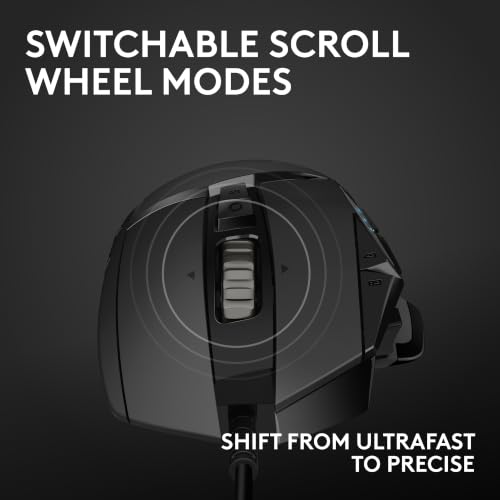
The Logitech Lift is my top pick for most users seeking an ergonomic mouse for trigger finger because its upright shape supports a relaxed grip.
If clicking a mouse leaves your finger sore or stiff, changing your setup may help make computer work more comfortable. A vertical mouse can change how your forearm and wrist sit, while a trackball can reduce the need to move the whole mouse. Neither design cures trigger finger, and a new mouse may not reduce the repeated finger motion that bothers you. I compared these options by shape, grip, useful features, and likely fit. If pain or finger locking continues, ask a health professional for advice.
See the differences between my top picks at a glance.
| Mouse | Shape | Hand fit / notable point | Best for | Link |
|---|---|---|---|---|
| Anker 2.4G Ergonomic | Vertical | Right hand; simple wireless option | Lower-cost entry | View on Amazon |
| Logitech MX Vertical | Vertical | Right hand; premium design | Feature-rich desk use | View on Amazon |
| Logitech Lift | Vertical | Right-hand version; small to medium hands | Comfort-focused daily use | View on Amazon |
| EIGIIS Handheld Trackball | Handheld / trackball | Moves cursor without sliding a mouse | Limited desk space | View on Amazon |
| SANWA Ergonomic Mouse | Ergonomic with wrist rest | Listed for large hands | Roomier grip preference | View on Amazon |
| Uineer Vertical Mouse | Vertical | Bluetooth; listed for three devices | Switching between devices | View on Amazon |
| SABLUTE MAM3 | Ergonomic Bluetooth | Listed for small and medium hands | Compact wireless use | View on Amazon |
How I Chose These Ergonomic Mice
Trigger finger can make repeated finger movement uncomfortable. A mouse cannot treat the condition, but its shape and button feel may affect how you use your hand. I focused on products with a different grip, less need to slide the device, or features that may suit a particular desk setup. I also considered hand size, connection type, and how easy it may be to try a new grip.
There is no single best mouse for every hand. An upright mouse may feel easier on the wrist and forearm, yet still asks you to click with your fingers. A trackball may reduce arm movement, but it can shift more cursor control to the thumb or another finger. That trade-off matters if one specific finger is sore.
Before you buy, check the current listing for exact size, button layout, connection needs, and return terms. Product versions and seller details can change. The Amazon links below lead to the listed products, but you should review the latest specifications before ordering.
Anker 2.4G Ergonomic Mouse

The Anker 2.4G mouse is a basic right-hand vertical mouse. Its raised shape encourages a different hand position from a flat, standard mouse. That change may feel helpful if you dislike turning your forearm palm-down for long stretches. It is a straightforward option for someone who wants to try a vertical grip without starting with a premium model.
The main point is the shape, not a promise to ease trigger finger. You still use the mouse buttons, so the same finger may keep bending and straightening. Take time to see whether the grip feels natural and whether your sore finger can rest between clicks. The simple design may suit a home office, but check the current listing for the exact connection and compatibility details.
Pros:
- Vertical shape gives a clear alternative to a flat mouse.
- Right-hand design may suit common desk setups.
- Wireless use avoids a cable across the work area.
- Simple form can make the switch to a vertical mouse less complex.
- Often a more budget-friendly way to test an upright grip than a premium model.
Cons:
- Right-hand design does not suit left-handed users.
- A vertical shape does not remove the need to click.
- It may take time to adjust to the raised grip.
- It lacks the broader feature set found on some higher-priced mice.
What Amazon Buyers Are Saying
Buyer feedback can change over time, so check recent reviews on the listing before you order. When comparing comments, look for reports about the mouse’s fit, the learning period, tracking on your desk, and wireless reliability. Reviews that describe hand size and daily use are more useful than a short rating with no details. Pay close attention to comments from people who use a vertical mouse for long work sessions.
My Recommendation
I would consider the Anker if you want a simple, right-hand vertical mouse at a modest cost. It is a reasonable first test of this style, but it is not a medical solution for trigger finger. If your pain comes from repeated button use, focus on breaks and settings as well as the shape. Overall, I rate it 3.8 out of 5 for a practical entry-level option.
| Category | Rating |
|---|---|
| Grip and hand position | 4/5 |
| Finger-click comfort | 3/5 |
| Ease of setup | 4/5 |
| Value | 4/5 |
| Overall rating | 3.8/5 |
Logitech MX Vertical

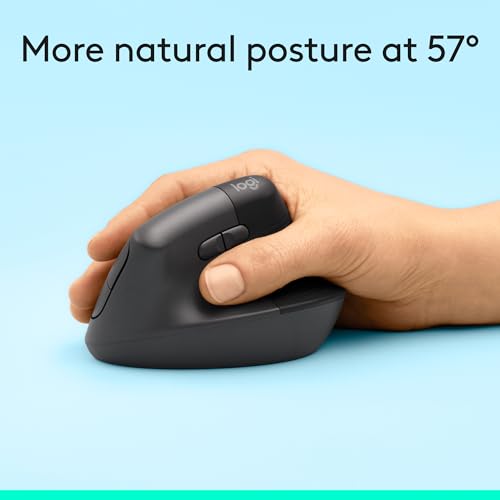
The Logitech MX Vertical is a premium right-hand mouse with a pronounced upright body. It is built for people who want a more angled grip than a flat mouse offers. Logitech lists the mouse as having a 57-degree angle, a detail that helps explain its shape. This is a larger investment, so it makes the most sense if you know you prefer an upright mouse.
Its ergonomic design may help you keep your hand in a more relaxed position, but it cannot prevent finger motion during clicks. That distinction is important for trigger finger. You can also compare its size and button placement with your hand before committing. If your main issue is clicking, lowering pointer speed or using operating-system accessibility settings may matter as much as changing the mouse.
Pros:
- Pronounced vertical angle offers a distinct alternative to a flat mouse.
- Established brand with product support and setup resources.
- Wireless design helps keep the desk clear.
- Designed for right-handed use with an ergonomic contoured form.
- Useful choice for users who want a more feature-rich vertical model.
Cons:
- Costs more than basic vertical mice.
- Large form may not suit small hands or compact work areas.
- Right-hand shape excludes left-handed users.
- It still requires repeated button presses.
What Amazon Buyers Are Saying
Read current customer comments for details on hand fit and the transition from a standard mouse. Buyers tend to weigh comfort against the time needed to adjust to a steep vertical shape, so those are useful points to check in recent reviews. Look for specific notes on long workdays, button reach, and connection setup. A review from someone with a similar hand size and work pattern can be more helpful than a general score.
My Recommendation
I recommend the MX Vertical to right-handed users who want a full-size, premium vertical design and are willing to adapt to it. I would not choose it solely to treat trigger finger, because it does not eliminate clicking. For a sore index finger, test the button action and consider ways to reduce repeated clicks. Overall, I rate it 4.2 out of 5 as a well-known ergonomic option, with hand fit as the key question.
| Category | Rating |
|---|---|
| Grip and hand position | 4.5/5 |
| Finger-click comfort | 3.5/5 |
| Build and features | 4.5/5 |
| Value | 4/5 |
| Overall rating | 4.2/5 |
Logitech Lift Vertical Mouse

The Logitech Lift is a compact vertical mouse made for a more upright hand position. The right-hand graphite version in this roundup is listed for small to medium hands. Logitech gives the Lift a 57-degree angle, much like the MX Vertical, but its smaller body can feel easier to manage for some users. It is a strong choice if the larger vertical models feel bulky.
A well-fitted mouse should let your hand rest without reaching or gripping hard. The Lift’s shape may help with that, yet each person’s comfort is different. Trigger finger often involves irritation around a finger tendon, so the number and force of clicks still matter. Pair the mouse with a lower click workload when possible, and stop using it if it worsens symptoms.
Pros:
- Compact vertical body may suit small and medium hands.
- Upright design can reduce the need for a flat, palm-down grip.
- Right-hand version has a clear, ergonomic shape.
- Suitable for users who find large vertical mice hard to hold.
- Wireless design supports a tidy desk setup.
Cons:
- The fit may feel small to users with large hands.
- Vertical shape needs an adjustment period.
- It does not stop the repeated finger action of clicking.
- Usually costs more than a basic wireless mouse.
What Amazon Buyers Are Saying
Before buying, scan recent reviews for comments about hand size, comfort over a full workday, and how long the adjustment took. Those details help you decide whether this smaller vertical shape is a good match. Customer experiences vary, so do not assume that another person’s comfort will match yours. Check the listing for current return rules in case the size does not work for you.
My Recommendation
The Lift is my top overall pick for many right-handed users who want a vertical mouse and have small or medium hands. Its shape and size make it a practical place to start, though no mouse can promise relief from trigger finger. I would test it alongside changes that reduce long, unbroken clicking. Overall, I rate it 4.5 out of 5 for grip design, fit options, and everyday use.
| Category | Rating |
|---|---|
| Grip and hand position | 4.5/5 |
| Fit for small/medium hands | 4.5/5 |
| Finger-click comfort | 3.5/5 |
| Value | 4/5 |
| Overall rating | 4.5/5 |
EIGIIS Handheld Trackball Mouse

The EIGIIS is a handheld wireless trackball-style mouse. A trackball lets you move the pointer by rolling a ball rather than sliding the whole device over a desk. This can help when desk space is tight or when you want to limit broad arm movement. Its handheld form differs from a traditional mouse, so check product images and the current listing to confirm that the shape suits your intended use.
This design may not be ideal for every person with trigger finger. Trackballs often shift cursor control to a finger or thumb, and that movement could bother the digit you are trying to rest. The key question is not only whether the mouse moves less, but which finger operates the ball and how much effort it takes. If you can, try a similar trackball before replacing your regular mouse.
Pros:
- Cursor movement does not require sliding the full mouse across a desk.
- Handheld format may work where desk space is limited.
- Wireless connection avoids a tether across the work area.
- Offers an alternative to both flat and vertical mouse shapes.
- May reduce broad arm movement for users who find that useful.
Cons:
- Trackball control can place extra movement on a particular finger or thumb.
- Handheld shape may take time to learn.
- It may not suit users who prefer a stable, desk-based mouse.
- Check connection and compatibility details on the current listing.
What Amazon Buyers Are Saying
Look for recent buyer comments that explain how the trackball feels during real use. Useful details include which hand controls it, whether the pointer feels easy to guide, and whether the handheld shape stays comfortable. Reviews that mention the learning period can help set realistic expectations. Since this is a different style from a standard mouse, a few specific comments are more useful than a simple star rating.
My Recommendation
I would choose the EIGIIS if you want a compact handheld pointer and are comfortable learning trackball control. I would not make it my first pick for trigger finger if the ball requires frequent movement from your sore finger. Try to identify the operating finger before you buy. Overall, I rate it 3.6 out of 5 as a specialized option with a meaningful fit trade-off.
| Category | Rating |
|---|---|
| Reduced desk movement | 4/5 |
| Finger effort trade-off | 3/5 |
| Ease of learning | 3/5 |
| Specialized usefulness | 4/5 |
| Overall rating | 3.6/5 |
SANWA Ergonomic Mouse for Large Hands
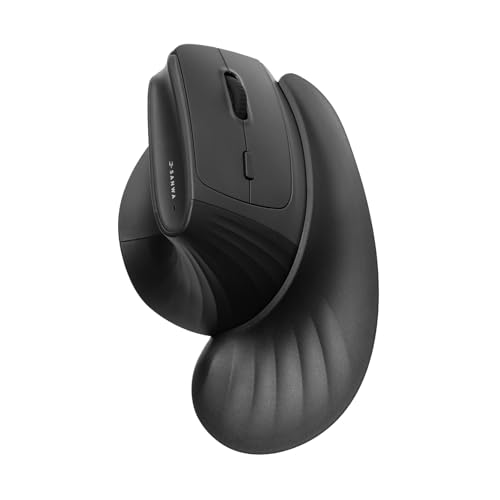
The SANWA model in this roundup is listed as a wireless ergonomic mouse for large hands, with a wrist rest. That makes it worth a look if compact mice force you to curl your fingers or grip too tightly. A roomier shape can make it easier for some people to rest the hand. Check the current product photos and measurements to see how the support sits against your own wrist.
A wrist rest should support the heel of the hand during pauses, not press into the wrist while you move the mouse. Keep the mouse close to your keyboard and avoid reaching forward. The product’s ergonomic label alone does not prove it will fit your hand or ease finger symptoms. For trigger finger, button reach and click force remain important details to assess.
Pros:
- Listed for users who need a larger mouse shape.
- Includes a wrist rest as part of the design.
- Wireless setup can keep the desk less cluttered.
- May offer more room than compact mice for a relaxed hand.
- Provides an alternative to strongly angled vertical designs.
Cons:
- May feel too large for small or medium hands.
- Wrist-rest comfort depends on desk height and hand position.
- Product details and exact dimensions should be checked on the listing.
- It still relies on repeated mouse-button use.
What Amazon Buyers Are Saying
Check recent reviews for specific comments about hand size and wrist-rest placement. Look for notes on desk height, long sessions, and whether the shape lets the hand rest without strain. Buyers may have different expectations for wrist support, so details about their setup matter. Confirm that the current listing matches the size and connection details you need.
My Recommendation
The SANWA is worth considering if you have large hands and want a mouse with a wrist rest. I would compare its measurements with a mouse that already fits you well before ordering. The wrist rest may be useful, but it should not force your hand into one fixed position. Overall, I rate it 3.9 out of 5 as a potentially good fit for a specific hand-size group.
| Category | Rating |
|---|---|
| Fit for large hands | 4/5 |
| Wrist-rest design | 4/5 |
| Finger-click comfort | 3.5/5 |
| Value | 4/5 |
| Overall rating | 3.9/5 |
Uineer Vertical Ergonomic Mouse

The Uineer is a vertical wireless mouse listed with Bluetooth, quiet operation, and support for three devices. It may suit someone who moves between a work computer and other devices. Its upright shape gives it a different grip from a standard mouse, while the quiet feature may be welcome in a shared room. Check the listing for exact device support and switching steps before you buy.
For trigger finger, device switching is a convenience, not a treatment. Quiet clicks do not always mean lighter clicks, so do not assume the buttons require less force. Try to find clear details about button feel and hand size in current product information. If you spend long hours at a screen, make sure the mouse fits your hand and that you can reach its main buttons without stretching.
Pros:
- Vertical shape offers an alternative to a flat mouse grip.
- Bluetooth connection may help reduce receiver clutter.
- Listed support for three devices can suit multi-device desks.
- Quiet operation may be useful in shared work areas.
- Combines several convenience features in one mouse.
Cons:
- Exact compatibility should be checked before purchase.
- Quiet buttons may not mean low-force buttons.
- Switching between devices adds a feature you may not need.
- Vertical fit varies by hand size and grip preference.
What Amazon Buyers Are Saying
Read recent buyer feedback for notes about Bluetooth pairing, device switching, and the feel of the buttons. Comments that describe the operating system and device setup can help you judge compatibility. Look for details on hand fit as well as how quiet the clicks sound in a real room. As with any newer or less familiar model, confirm the seller’s current product details before ordering.
My Recommendation
I recommend the Uineer to users who want a vertical mouse and will use its multi-device support. It can be a convenient desk tool, but check button effort closely if finger motion causes discomfort. A quiet click is not the same as an easy click. Overall, I rate it 4 out of 5 for its mix of shape and listed connection features, subject to fit.
| Category | Rating |
|---|---|
| Vertical grip | 4/5 |
| Multi-device features | 4.5/5 |
| Finger-click comfort | 3.5/5 |
| Ease of fit | 4/5 |
| Overall rating | 4/5 |
SABLUTE MAM3 Ergonomic Bluetooth Mouse

The SABLUTE MAM3 is listed as an ergonomic Bluetooth mouse for small and medium hands. That stated fit range makes it an option for shoppers who find many mice too wide or long. Its Bluetooth connection can suit a compatible laptop or desktop, though you should confirm the devices it supports. A compact shape may also work well on a smaller desk.
Hand fit is especially important when a finger feels sore. If the mouse is too large, you may stretch to reach a button; if it is too small, you may curl your fingers tightly. Neither situation suits every hand. Compare the product dimensions and button layout with your current mouse, and remember that an ergonomic label does not prove that the mouse will ease a medical condition.
Pros:
- Listed for small and medium hands.
- Bluetooth connection may suit compatible wireless devices.
- Compact size can fit a smaller work area.
- Offers an ergonomic alternative to a basic flat mouse.
- May reduce finger reach for users who find full-size mice too large.
Cons:
- May feel too small for users with large hands.
- Bluetooth support must match your computer or device.
- Exact shape and button feel should be checked before purchase.
- It still requires repeated clicks during normal use.
What Amazon Buyers Are Saying
Check current reviews for useful information about size, Bluetooth setup, and daily comfort. Prioritize feedback from buyers who state their hand size or describe the computer they use. Look for any repeated concerns about pairing or reaching the buttons. Reviews are personal accounts, so use them to guide your questions rather than as a guarantee of how the mouse will feel for you.
My Recommendation
The SABLUTE MAM3 may be a good fit if you have small or medium hands and want a compact Bluetooth mouse. I would check its measurements and connection details closely before ordering. If your main concern is trigger finger, pay special attention to how much effort each click takes. Overall, I rate it 3.9 out of 5 as a size-specific option with practical wireless appeal.
| Category | Rating |
|---|---|
| Fit for small/medium hands | 4.5/5 |
| Wireless convenience | 4/5 |
| Finger-click comfort | 3.5/5 |
| Value | 4/5 |
| Overall rating | 3.9/5 |
How to Choose the Best Ergonomic Mouse for Trigger Finger
The best ergonomic mouse for trigger finger is not always the most advanced or most expensive model. Start with the movement that causes discomfort. Is it reaching for the button, pressing it, moving the mouse, or holding your hand in one place? That answer helps narrow down the shape and features worth trying.
1. Match the Mouse to the Finger That Hurts
Think about which finger you use for the main click and how often you click during a normal day. A vertical mouse changes the hand angle, but it still needs button presses. A trackball can reduce mouse travel, yet its ball may ask one finger or thumb to move more. If that digit is the one that hurts, a trackball may not be the right first choice.
Check button placement before buying. Your finger should reach the main buttons without a stretch or a tight curl. If possible, try the mouse in a store or choose a seller with a return policy that fits your needs. Stop using any device that clearly makes symptoms worse.
2. Check Hand Size, Grip, and Wrist Position
A mouse can have a strong ergonomic design and still feel wrong if it does not fit your hand. A small mouse may make large hands bunch up. A large mouse can make small hands reach too far. Compare listed dimensions with a mouse you already like, and check whether the product is made for the left or right hand.
Notice how your wrist sits while the mouse is in use. Keep your forearm in line with your hand and place the mouse close to your body. A wrist rest should support the hand when you pause, not press into the wrist as you move. OSHA workstation guidance favors a neutral wrist position and a setup that lets the arms stay close to the body.
3. Consider Click Feel, Setup, and Long-Term Value
Button feel matters when clicking is the main source of discomfort. A quiet button may still need firm pressure, so do not treat “quiet” as a promise of a lighter click. Look for useful information about button force, reach, and feedback. Also consider settings that reduce effort, such as pointer speed changes, keyboard shortcuts, voice control, or operating-system accessibility tools.
Then compare the features you will actually use. Bluetooth and multi-device support can help if you switch computers, while a basic wireless connection may be enough for one desk. A premium mouse can offer more features, but only if its size and grip suit you. Read recent customer comments for fit and setup details, and check current compatibility, warranty, and return information before purchase.
Final Verdict: Which Should You Buy?
For most right-handed users with small or medium hands, I recommend the Logitech Lift as the best ergonomic mouse for trigger finger to try first. Its vertical shape and compact fit stand out, but comfort varies and it still requires clicks.
If you have large hands, consider the SANWA; for a basic vertical option, look at Anker. Choose a mouse that fits, reduce repeated clicks where you can, and seek medical advice for ongoing pain or finger locking.
FAQs Of best ergonomic mouse for trigger finger
Can an ergonomic mouse cure trigger finger?
No. A mouse cannot cure trigger finger. A different shape may make computer use more comfortable, but ask a health professional about ongoing pain or finger locking.
Is a vertical mouse better for trigger finger?
A vertical mouse changes your grip and forearm position, but it does not remove clicking. It may help some users feel more comfortable, while others may prefer a different shape.
Is a trackball mouse a good choice for trigger finger?
It can reduce the need to slide a mouse, but it may increase movement in the finger or thumb that controls the ball. Check which digit operates it before you buy.
What should I look for in a mouse if clicking hurts?
Check button reach and effort, hand fit, and whether you can reduce repeated clicks with settings or shortcuts. A quiet click does not always require less force.
When should I stop using a new ergonomic mouse?
Stop if it clearly worsens your pain, stiffness, or other symptoms. Contact a health professional if symptoms continue or interfere with daily tasks.