The ProtoArc EM11 NL is my top pick for flexible wireless use, a comfortable vertical shape, and rechargeable convenience.
If your wrist feels tired after a long workday, a standard flat mouse may be part of the problem. An ergonomic mouse can change how your hand rests, but no shape suits everyone. I compared ten budget-friendly options, including vertical mice, a trackball, and a wired model. The right pick depends on your hand size, connection needs, desk space, and preferred grip. Prices can change, so check each listing before you buy.
See the differences between my top picks at a glance.
| Mouse | Style | Connection | Power | Best for | Check price |
|---|---|---|---|---|---|
| ProtoArc EM11 NL | Vertical | Wireless; check listing for modes | Rechargeable | Flexible everyday use | View on Amazon |
| TECKNET Ergonomic Mouse | Vertical | Bluetooth; 3-device listing | Check listing | Switching between devices | View on Amazon |
| Anker 2.4G Vertical | Vertical | 2.4 GHz receiver | Check listing | Simple wireless use | View on Amazon |
| memzuoix Vertical | Vertical, right-hand | 2.4 GHz wireless | Check listing | Large right-hand fit | View on Amazon |
| UGREEN Ergonomic Mouse | Ergonomic | Bluetooth and 2.4 GHz | Check listing | Quiet clicks and options | View on Amazon |
| Uineer Vertical Mouse | Vertical | Bluetooth; 3-device listing | Check listing | Multi-device setup | View on Amazon |
| Uineer 3-Mode Vertical | Vertical | Bluetooth and 2.4 GHz | Check listing | Connection choice | View on Amazon |
| Anker USB Wired Vertical | Vertical | Wired USB | USB powered | No battery or pairing | View on Amazon |
| Lekvey Rechargeable Vertical | Vertical | Wireless; check listing | Rechargeable | Wireless comfort grip | View on Amazon |
| Logitech Ergo M575S | Thumb trackball | Wireless; check listing | Battery powered | Small desks, less arm travel | View on Amazon |
ProtoArc EM11 NL Rechargeable Vertical Mouse

The ProtoArc EM11 NL is a rechargeable vertical mouse for people who want a more upright hand position without giving up wireless use. Its vertical shape asks your hand to rest on its side rather than face down on the desk. That change can feel more natural to some users, though it takes time to learn. The black finish also keeps the look simple for a home or office desk.
Its rechargeable design means you do not need to shop for disposable batteries as often. Before buying, check the current listing for its exact connection modes, device support, and charging details. I would also check the mouse dimensions against your hand, since vertical mice can feel too large or too small when the grip does not fit. It is a strong all-round choice when comfort and wireless convenience matter most.
Pros:
- Vertical shape encourages a less flat hand position
- Rechargeable design reduces the need for disposable batteries
- Wireless use keeps the desk clear of a long mouse cable
- Black color suits many work setups
- Good candidate for daily office tasks and general browsing
Cons:
- A vertical grip may take several days to feel familiar
- Not designed for left-handed use
- Confirm connection modes and hand fit on the listing before purchase
What Amazon Buyers Are Saying
Buyer feedback and listing details can change over time. I do not want to invent review quotes or claim a current rating that I cannot verify. When you check the Amazon page, look for repeated comments about comfort after long sessions, charging, button feel, and how quickly buyers adjusted to the upright grip. Give more weight to reviews from people with a similar hand size and work pattern.
My Recommendation
I recommend the EM11 NL as the first one to consider if you want a rechargeable vertical mouse for general work. It offers a practical mix of a comfort-focused shape and wireless convenience, but confirm the exact connection options before checkout. For this guide, I rate it highly as an adaptable everyday pick.
| Category | Rating |
|---|---|
| Comfort potential | 4.5/5 |
| Daily use | 4.5/5 |
| Feature clarity | 4/5 |
| Budget value | 4.5/5 |
| Overall Rating | 4.4/5 |
TECKNET 3-Device Ergonomic Vertical Mouse

This TECKNET mouse pairs a vertical form with Bluetooth and a listing that describes support for three devices. That can help if you move between a laptop, desktop, and tablet during the day. The product title also states a maximum sensitivity of 4800 DPI, but the exact adjustment steps and controls should be confirmed on the product page. A higher DPI number is not automatically better; it gives you more cursor-speed options.
The multi-device feature is the main reason to consider this model. Check how the mouse changes between devices and whether each computer supports the connection method you plan to use. A vertical mouse can reduce the need to twist your forearm into a flat position, but it will not suit every hand or solve every pain issue. Think of this as a feature-rich budget option, not a medical device.
Pros:
- Vertical profile gives an alternative to a flat mouse
- Bluetooth can avoid using a USB receiver on supported devices
- Three-device support suits people with more than one computer
- 4800 DPI claim offers a wide stated sensitivity range
- Useful for office tasks where device switching is common
Cons:
- Bluetooth setup may differ across computers and operating systems
- The vertical angle can feel odd during the first few days
- Confirm battery type, size, and mode switching in the current listing
What Amazon Buyers Are Saying
I cannot verify live Amazon comments here, so I will not present unconfirmed praise or complaints as fact. On the current listing, check whether buyers mention reliable switching, Bluetooth pairing, and whether the mouse fits small or large hands. Also scan recent critical reviews for reports of connection drops or button issues. Those details matter more than a single overall star score.
My Recommendation
Choose this TECKNET if you need one vertical mouse for several compatible devices. Its stated 3-device support is useful, and the listed sensitivity range gives you room to tune pointer speed. I would verify how it connects to each device before buying. It earns a strong score for feature value, with a little less certainty around fit and setup.
| Category | Rating |
|---|---|
| Comfort potential | 4/5 |
| Device flexibility | 4.5/5 |
| Feature set | 4.5/5 |
| Budget value | 4/5 |
| Overall Rating | 4.2/5 |
Anker 2.4G Wireless Vertical Mouse

Anker’s 2.4G vertical mouse is a straightforward wireless option for right-handed users. It uses a USB receiver, so it can be a simple choice for a computer with an open USB port. The upright body changes the angle of your hand compared with a standard mouse. The design is aimed at people who want a vertical grip without extra device-switching features.
This model makes sense if you prefer a familiar brand and do not need Bluetooth. A receiver-based mouse can be easy to set up, though a small receiver can be misplaced. Check the product page for the exact operating system support, battery needs, and current package contents. As with any vertical mouse, allow time to adjust and make sure the body fits your palm before using it for long sessions.
Pros:
- Vertical shape offers a different resting angle from a flat mouse
- 2.4 GHz receiver connection is simple on compatible computers
- No Bluetooth pairing steps are needed for receiver-based use
- Suitable for basic browsing and office work
- Useful option for shoppers who want a focused, no-frills design
Cons:
- Requires a compatible USB port for its receiver
- Receiver can be easy to lose when traveling
- Right-hand shape will not suit left-handed users
What Amazon Buyers Are Saying
Review patterns may shift as listings and product batches change. I cannot confirm the current buyer comments, so check the latest reviews for details on comfort, receiver range, and long-term button use. Pay attention to comments from people who switched from a flat mouse, since they can describe the learning period. Also check whether the listing still includes the receiver and power items you expect.
My Recommendation
This is a sensible pick if you want a basic wireless vertical mouse and do not need Bluetooth or rechargeable power. Its simple connection can suit a fixed desk setup. I would compare its current price with newer multi-mode models before choosing it. It is best for buyers who value a familiar, focused feature set over extra options.
| Category | Rating |
|---|---|
| Comfort potential | 4/5 |
| Connection ease | 4/5 |
| Feature set | 3.5/5 |
| Budget value | 4/5 |
| Overall Rating | 3.9/5 |
memzuoix Large Right-Hand Vertical Mouse

The memzuoix mouse is described as a large, right-hand vertical model with a 2.4 GHz wireless connection. Its listing states three DPI settings: 800, 1200, and 1600. Those options let you pick a slower or faster pointer feel for everyday tasks. The pink finish gives it a more colorful look than the plain black mice in this group.
Size is the key detail to review here. A large mouse may feel more supportive in a bigger hand, but it can make reaching buttons harder if your hand is small. The listed DPI steps cover common everyday use, though they may not offer the fine control some users want for detailed work. Check the photos, measurements, and return terms before buying, especially if you have not used a vertical mouse before.
Pros:
- Large right-hand shape may suit users who find compact mice cramped
- Vertical design changes the angle of the hand
- Three listed DPI settings offer basic pointer-speed choice
- 2.4 GHz wireless use avoids a cable across the desk
- Pink finish adds a clear color option
Cons:
- Large size may be awkward for small hands
- Right-hand design is not suited to left-handed use
- Confirm power and receiver details on the current listing
What Amazon Buyers Are Saying
I cannot confirm current review trends for this product. Read recent Amazon feedback for repeated notes about actual size, comfort over a full workday, and how well the DPI choices suit daily tasks. Look for buyer photos or measurements if hand fit is a concern. Reviews about shipping or color alone will tell you less about whether the mouse works well for your needs.
My Recommendation
I would shortlist the memzuoix if you have a larger right hand and like the color. Its listed DPI steps cover common use, and its wireless link keeps the desk tidy. The lack of clear detail in the title about power and receiver handling makes me cautious. Check those points and the dimensions before placing an order.
| Category | Rating |
|---|---|
| Comfort potential | 4/5 |
| Hand-fit clarity | 3.5/5 |
| Everyday control | 4/5 |
| Budget value | 3.5/5 |
| Overall Rating | 3.8/5 |
UGREEN Bluetooth and 2.4G Ergonomic Mouse

This UGREEN ergonomic mouse offers Bluetooth and 2.4 GHz wireless options, according to its product title. That gives you a choice between pairing without a receiver and using a receiver-based link, if the current package includes one. The listing also calls out quiet clicks. That feature may be useful in a shared office, library, or quiet room.
Quiet buttons can reduce the sound of each click, but they do not make a mouse fully silent. The exact shape and hand support matter just as much as the connection modes, so inspect the product photos and dimensions. Check which Bluetooth versions and operating systems it supports before you buy. This model stands out for shoppers who want a quieter mouse and more than one way to connect.
Pros:
- Bluetooth and 2.4 GHz offer connection flexibility
- Quiet-click design may be better for shared spaces
- Wireless use keeps the work area less cluttered
- Useful for office tasks and everyday browsing
- UGREEN branding may appeal to shoppers already using its accessories
Cons:
- Quiet clicks may feel different from standard mouse buttons
- Check whether a USB receiver comes in the box
- Confirm the shape suits your hand before committing
What Amazon Buyers Are Saying
Because I cannot check live Amazon reviews, I will not assign this mouse a buyer consensus. On the listing, scan recent comments about click noise, wireless pairing, and comfort during longer use. Buyers may use the word “quiet” in different ways, so consider any sound comparison in context. Look for reports that mention your computer type and connection method.
My Recommendation
The UGREEN is worth a look if quiet clicks and dual connection options matter to you. It may be a better fit for a shared workspace than a basic wired mouse. Confirm the receiver, compatibility, and exact hand shape from the current listing. I rate it as a useful flexible pick, though less specialized than a dedicated vertical model.
| Category | Rating |
|---|---|
| Comfort potential | 4/5 |
| Connection choice | 4.5/5 |
| Quiet use | 4.5/5 |
| Budget value | 4/5 |
| Overall Rating | 4.2/5 |
Uineer 3-Device Bluetooth Vertical Mouse

The Uineer vertical mouse is listed as a wireless Bluetooth model with support for three devices. That feature can help people who use more than one computer and want to keep a single mouse on the desk. Its upright shape offers a different grip from a traditional flat mouse. The product title does not state all of its technical details, so check the full listing before you buy.
Multi-device support works best when the switching control is easy to reach and each device can use the stated connection. Confirm those details for your laptop, desktop, or tablet. The mouse may need a short adjustment period if you have only used flat designs. For this model, I would give fit and connection checks priority over extra features that the listing does not clearly confirm.
Pros:
- Vertical form offers an alternative hand position
- Three-device support can simplify a multi-computer desk
- Bluetooth can free a USB port on compatible devices
- Wireless design avoids a cable pulling across the desk
- One mouse may serve more than one compatible device
Cons:
- Verify the exact device-switching method before purchase
- Bluetooth compatibility depends on the computer or tablet
- Hand size and grip may affect comfort more than the feature list
What Amazon Buyers Are Saying
I cannot verify live buyer reviews for this model. Check the current page for repeated feedback about Bluetooth pairing, device switching, and comfort after several days. If buyers mention a specific computer or tablet, compare it with your own setup. Recent reviews are more useful than older comments when a listing may have changed over time.
My Recommendation
Consider this Uineer if your desk includes several Bluetooth devices and you want a vertical grip. Its stated three-device support is the main selling point. Before ordering, make sure the connection modes match every device you plan to use. I would choose it for flexibility, not for unverified details about battery life or advanced controls.
| Category | Rating |
|---|---|
| Comfort potential | 4/5 |
| Device flexibility | 4.5/5 |
| Setup confidence | 3.5/5 |
| Budget value | 4/5 |
| Overall Rating | 4/5 |
Uineer 3-Mode Vertical Wireless Mouse

This Uineer model is described as a three-mode vertical mouse with Bluetooth 5.0, Bluetooth 4.0, and 2.4 GHz. That set of options may help it work with a mix of newer and older devices, as long as the computer supports the selected mode. The upright design aims to offer a different resting angle for your hand. Check the listing to see how it changes modes and whether a receiver is included.
Having several connection methods is only useful if you can switch between them without hassle. Review the product page for the device limit, supported systems, and power details. Its vertical shape may feel unfamiliar at first, so plan to use it for short sessions while you adjust. This mouse could suit a mixed-device setup, but the current price and verified package details should guide your final choice.
Pros:
- Three listed connection modes add flexibility
- Vertical design differs from a flat, palm-down mouse
- May suit setups with both Bluetooth and USB connections
- Wireless use supports a tidy desktop
- Useful option for people who want connection choices
Cons:
- More modes can make setup less simple for some users
- Check the receiver and battery details in the live listing
- Vertical mice still require a personal fit check
What Amazon Buyers Are Saying
I cannot state current Amazon review trends without checking the live page. Read recent buyer comments about mode changes, pairing stability, and whether the mouse works with the operating systems you use. Look for reviews that explain how often the buyer switches devices. Those details can show whether the extra modes help in real daily use.
My Recommendation
This Uineer is a reasonable choice if you want Bluetooth and 2.4 GHz options in a vertical mouse. It may be more versatile than a receiver-only model, but only if you need the extra modes. Confirm its device support and included parts before ordering. I rate it well for connection flexibility, with fit and setup as the key unknowns.
| Category | Rating |
|---|---|
| Comfort potential | 4/5 |
| Connection choice | 4.5/5 |
| Ease of use | 3.5/5 |
| Budget value | 4/5 |
| Overall Rating | 4/5 |
Anker USB Wired Vertical Mouse
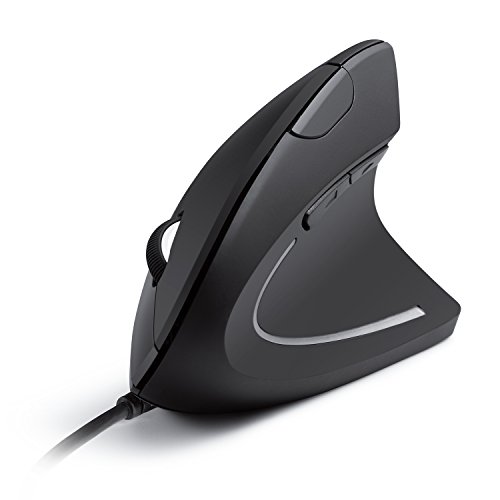
Anker’s USB wired vertical mouse keeps the setup simple: connect the cable to a compatible computer and use it without wireless pairing. Its upright shape offers a more angled grip than a standard mouse. A wired model also avoids charging or replacing a battery. That can be a plus for a fixed desk where cable reach is not a problem.
The main trade-off is the cord. It can limit movement and add clutter, especially on a small desk or when you use a laptop away from a docking station. Check the cable length and the computer’s USB port type in the current listing. If you want to avoid pairing issues and battery checks, though, a wired vertical mouse can be a dependable, straightforward option.
Pros:
- Wired USB connection needs no Bluetooth pairing
- No separate battery charging or replacement is needed
- Vertical body offers an alternative grip angle
- Useful for a fixed desktop workstation
- Simple setup suits users who prefer plug-and-play gear
Cons:
- Cable can limit movement and add desk clutter
- Not as convenient for travel as a wireless mouse
- Check whether your device has a compatible USB port
What Amazon Buyers Are Saying
I cannot verify current customer feedback for this listing. When you read the latest reviews, look for comments on cable length, cursor control, and comfort during longer work sessions. Also check if buyers mention using it with a laptop or desktop like yours. Recent critical reviews can flag issues that a short product description may not cover.
My Recommendation
Pick this Anker if you want the simplicity of a wired connection and do not mind a cable. It can make sense for a permanent desk where you value easy setup over portability. Check the cable and USB details first. For a laptop that moves around, I would choose one of the wireless options instead.
| Category | Rating |
|---|---|
| Comfort potential | 4/5 |
| Connection ease | 4.5/5 |
| Desk flexibility | 3/5 |
| Budget value | 4/5 |
| Overall Rating | 3.9/5 |
Lekvey Rechargeable Vertical Wireless Mouse

The Lekvey is a rechargeable wireless vertical mouse with a comfort-grip design, based on its product title. It is aimed at people who want to try a more upright hand position without a wired connection. Rechargeable power can be convenient if you prefer not to keep spare batteries nearby. The vertical form is its central feature, so hand fit should lead your decision.
Before buying, confirm which wireless mode it uses, how charging works, and what computers it supports. These details can vary by listing, so read the current product information rather than relying on a short title. Give yourself time to adapt if this is your first vertical mouse. For the best experience, keep your wrist relaxed and move the mouse with your whole hand rather than gripping it tightly.
Pros:
- Vertical shape offers an alternative to a flat mouse
- Rechargeable power can reduce disposable battery use
- Wireless design avoids a cable across the desk
- Comfort-grip styling suits shoppers seeking a more shaped body
- Useful for general work and everyday computer tasks
Cons:
- Check the exact wireless connection method before buying
- Vertical grip may need an adjustment period
- Confirm charging and compatibility details from the live listing
What Amazon Buyers Are Saying
Buyer comments change, and I cannot confirm the latest review pattern for this model. Check recent reviews for notes on battery charging, hand comfort, and cursor response. Search for feedback from people who use a vertical mouse for a full workday, not only for a quick setup test. Also see whether buyers found the controls easy to reach.
My Recommendation
The Lekvey is worth considering if you want a rechargeable vertical mouse from an established budget category. I like the mix of a wireless design and a comfort-focused shape, but I would not order until I confirmed its connection mode and fit. Compare its current price with the ProtoArc and Anker options before deciding.
| Category | Rating |
|---|---|
| Comfort potential | 4/5 |
| Power convenience | 4/5 |
| Connection clarity | 3.5/5 |
| Budget value | 4/5 |
| Overall Rating | 3.9/5 |
Logitech Ergo M575S Wireless Trackball

The Logitech Ergo M575S takes a different approach from the vertical mice in this guide. It uses a thumb-operated trackball, so the pointer moves when you roll the ball rather than slide the whole mouse across the desk. That can help when desk space is tight or when you want less arm movement. The product title identifies it as a wireless Bluetooth trackball.
A trackball has a learning curve. You control the pointer with your thumb, which can feel unusual if you have always used a standard mouse. The stationary base can be handy on a small desk, but the ball and its area need occasional cleaning. Check the full listing for all connection options, power details, and computer support. This is the best fit for someone curious about a trackball, not for someone set on a vertical grip.
Pros:
- Trackball control needs little space to move the device
- Stationary base can suit a compact desk
- Thumb control may reduce repeated arm travel
- Wireless use avoids a cable on the work surface
- Different design gives an alternative to vertical mice
Cons:
- Thumb-operated pointer control takes practice
- The ball area needs cleaning to keep movement smooth
- Trackball use may not suit people who prefer moving a mouse
What Amazon Buyers Are Saying
I cannot verify current Amazon review patterns, so check the live page before you rely on buyer feedback. Focus on comments about the learning period, thumb comfort, trackball cleaning, and connection setup. A review from someone switching from a regular mouse may help set expectations. Look for recent feedback that mentions your operating system and desk setup.
My Recommendation
The M575S is my pick for a small desk or for anyone who wants to move the pointer without sliding a mouse around. It is not a vertical mouse, but it is a credible ergonomic-style alternative. Buy it only if you are willing to learn thumb control. If you want an upright hand position, the ProtoArc is a better match.
| Category | Rating |
|---|---|
| Small-desk use | 4.5/5 |
| Comfort potential | 4/5 |
| Learning ease | 3.5/5 |
| Budget value | 4/5 |
| Overall Rating | 4/5 |
How to Choose the Best Ergonomic Mouse Under $50
The best ergonomic mouse under $50 should fit your hand and work habits first. A long feature list cannot make up for a shape that feels awkward. I compare grip, connection, and daily comfort before I look at extras. Workplace guidance from groups such as OSHA and NIOSH also supports a relaxed wrist, a mouse close to the keyboard, and regular changes in posture. A mouse may help your setup, but it cannot promise to prevent or treat pain.
1. Match the shape to your grip and hand
A vertical mouse places your hand at a more angled position than a flat mouse. This suits some people, while others prefer a traditional shape or a trackball. Check the product dimensions and whether it is made for the right or left hand. If possible, try the grip before a long work session. Your fingers should reach the main buttons without stretching, and your wrist should feel relaxed.
Hand size matters. A large mouse can fill a bigger palm, but it may make the controls hard to reach for a smaller hand. A compact body can feel neat but cramped if your fingers hang over the edge. Look for clear measurements and recent buyer photos. If your wrist or hand pain is ongoing, ask a health professional for advice rather than treating a mouse as a cure.
2. Pick the connection and power that fit your setup
Bluetooth works well when you want to save a USB port, but your computer must support it. A 2.4 GHz receiver can be easy to set up on many computers, though it takes a port and can be lost. Wired USB mice avoid pairing and battery checks, but the cable can limit movement. Multi-device models may help if you switch between computers, but only if their switching controls suit your routine.
Check power details before you buy. Some mice use replaceable batteries, while others recharge. Rechargeable power can be convenient, but check how charging works and whether you can use the mouse while it charges. Do not assume that a product title lists every feature. Read the current Amazon details for operating system support, included parts, and connection limits.
3. Judge control, build, and value in real use
DPI describes how quickly the pointer moves for a given hand movement. It does not tell you whether the mouse is comfortable or accurate for you. Look for settings that match your screen size and tasks. Quiet clicks may help in a shared room, while extra device modes may help a multi-computer desk. Choose useful features, not the biggest number on the box.
For value, compare the current price with the warranty, power type, and features you will use. Read recent critical reviews as well as positive ones. Check comments about connection drops, button feel, and long-term comfort. Amazon prices and product details can change, so confirm them at checkout. For the best ergonomic mouse under $50, a good fit and reliable daily use matter more than a long spec sheet.
Final Verdict: Which Should You Buy?
The ProtoArc EM11 NL is my top pick for its vertical shape, rechargeable design, and practical wireless focus. Choose the Logitech M575S if you want a trackball for a small desk, or the TECKNET if multi-device support matters more.
The best ergonomic mouse under $50 is the one that fits your hand, desk, and connection needs. Check the live price and product details before you order.
FAQs Of best ergonomic mouse under $50
What is the best ergonomic mouse under $50 for most people?
The ProtoArc EM11 NL is my top all-round pick in this guide. Its vertical design and rechargeable power suit many everyday setups, but hand fit is personal.
Are vertical mice better for wrist comfort?
Some people find a vertical grip more comfortable because it changes hand position. Results vary, and no mouse can promise to prevent or treat pain.
Is a trackball mouse good for a small desk?
Yes. A trackball stays in one place, so you do not need much room to move the mouse. It takes practice to control the pointer with your thumb.
Should I choose Bluetooth or a 2.4 GHz receiver?
Choose Bluetooth if your device supports it and you want to save a USB port. Choose a receiver if you prefer a direct wireless link and have a compatible port.
How long does it take to get used to an ergonomic mouse?
It varies by person and mouse shape. Start with shorter sessions, then increase use as the grip feels more natural.