For most CS2 players, the Razer Viper V3 Pro is my top pick for its lightweight, esports-focused design.
A mouse can feel fine in casual games but awkward when a CS2 round comes down to one clean flick. Too much weight, a poor fit, or buttons you never use can get in the way. I compared these ten mice by their listed features, shape and likely fit for Counter-Strike 2. My top choice suits players who want a simple, light mouse, while the other picks offer wireless freedom, extra controls or a lower-cost option.
See the differences between my top picks at a glance.
| Mouse | Connection | Standout feature | Best fit | Link |
|---|---|---|---|---|
| Razer Viper V3 Pro CS2 Edition | Wireless | 8 kHz esports model | Competitive play | View on Amazon |
| Zowie U2 Wireless (Renewed) | Wireless | 60 g; driverless use | Simple esports setup | View on Amazon |
| Razer Viper V3 HyperSpeed | Wireless | 82 g | Wireless value | View on Amazon |
| SteelSeries Dragon Lore (Renewed) | 2.4 GHz / Bluetooth | 18K sensor; listed 200-hour battery | CS collectors | View on Amazon |
| SteelSeries Dragon Lore | Wireless | CS2-themed design | Themed setup | View on Amazon |
| Logitech G502 Lightspeed | Wireless | Many programmable controls | Versatile gaming | View on Amazon |
| Redragon M612 | Wired | 8,000 DPI; remap keys | Budget wired play | View on Amazon |
| Redragon M602 | Wired | 9 buttons; 7,200 DPI | Extra shortcut keys | View on Amazon |
| Razer Naga V2 HyperSpeed | Wireless | MMO-style controls | Many bind options | View on Amazon |
| Redragon M908 | Wired | 12,400 DPI; MMO buttons | Low-cost key binds | View on Amazon |
Razer Viper V3 Pro 8KHz CS2 Edition

The Viper V3 Pro CS2 Edition is the clearest pick here for players who want a purpose-built competitive mouse. The listing names an 8 kHz wireless esports model, which signals a focus on fast input reporting. Its clean design also suits players who want a mouse made for aim, not a wall of extra buttons. I would put it near the top of a shortlist for serious CS2 play.
Keep in mind that a high polling rate is not a magic aim upgrade. Your hand comfort, steady sensitivity and practice matter more than a spec number. The 8 kHz feature can also ask more of your PC than a lower polling rate, so it makes sense to use a setting your system handles well. Check the current listing for what comes in the box and which features are included in this specific CS2 edition.
Pros:
- Made with competitive esports play in mind
- Wireless setup avoids cable drag
- 8 kHz model offers a high reporting rate
- Simple design keeps focus on core aim controls
- CS2 edition matches a Counter-Strike-themed setup
Cons:
- High-end esports features may cost more than needed
- Wireless charging or battery details should be checked on the listing
- High polling rates may use more system resources
What Amazon Buyers Are Saying
I can’t verify a current set of Amazon review patterns for this listing, so I won’t claim buyers report specific results. Check recent verified-purchase reviews for comments on comfort, battery use, wireless stability and the exact edition in the box. This listing is distinct from other Viper V3 Pro versions, so confirm the title and seller details before ordering.
My Recommendation
I recommend this mouse to players who want a modern wireless esports model and plan to use its advanced polling feature. It is my overall top pick for CS2 among these choices, though the premium features are not essential for every player. Check the price before buying and compare it with the standard Viper V3 Pro.
| Category | Rating |
|---|---|
| CS2 aim focus | 5/5 |
| Useful features | 4.5/5 |
| Ease of setup | 4/5 |
| Value | 4/5 |
| Overall | 4.5/5 |
BenQ Zowie U2 Wireless (Renewed)

The Zowie U2 listing puts its esports purpose up front. It gives a 60 g weight, a 3,200 DPI sensor setting, five buttons and up to 70 hours of battery life. The product is also described as driverless, which can appeal to players who want to change settings without installing extra software. That straightforward approach fits a CS2 setup where fewer distractions can be a plus.
This Amazon offer is marked renewed, so condition matters as much as the mouse itself. Read the renewed-item terms and confirm the return window before you buy. The listed DPI ceiling is lower than that of many gaming mice, but a large DPI number does not mean better aim; many CS2 players prefer a modest setting. Its 60 g weight may suit players who like a light mouse, but shape fit still comes first.
Pros:
- Listed at a light 60 g
- Wireless design keeps the desk clear
- Driverless setup can reduce software steps
- Five-button layout stays simple
- Listed battery life reaches up to 70 hours
Cons:
- This offer is renewed, not a standard new retail unit
- 3,200 DPI maximum may not suit users who want a higher setting
- Shape comfort depends on hand size and grip
What Amazon Buyers Are Saying
I can’t confirm current buyer feedback for this renewed offer. Review the newest comments for details about cosmetic wear, battery condition and whether the package includes the parts you need. For any renewed mouse, read the seller’s condition notes and return rules rather than assuming it will look or feel new.
My Recommendation
The U2 is a strong option if you want a light wireless mouse with a simple setup and accept the risks that come with renewed stock. I would compare its price with a new mouse before placing an order. Its esports-first layout makes it a good CS2 fit, but only if the shape feels right in your hand.
| Category | Rating |
|---|---|
| CS2 aim focus | 4.5/5 |
| Wireless use | 4/5 |
| Setup simplicity | 4.5/5 |
| Renewed value | 3.5/5 |
| Overall | 4/5 |
Razer Viper V3 HyperSpeed

The Viper V3 HyperSpeed gives players a wireless option without jumping straight to the Pro model. Its listing states an 82 g weight, which is useful information for anyone who wants a middle ground between light control and a more substantial feel. The Viper name and gaming focus make it a natural mouse to consider for CS2. It also keeps the desk free of a cable that could catch on the edge of a pad.
Before buying, check the product page for battery requirements and included accessories. Weight can affect how quickly the mouse starts and stops, but there is no single best weight for every player. If you use low sensitivity and move your arm a lot, a lighter mouse may feel easier to control over long sessions. If you prefer a steady, solid feel, the 82 g body may be more comfortable than an ultralight option.
Pros:
- Wireless play with no cable across the pad
- 82 g weight is clearly stated in the listing
- Viper line targets gaming use
- More accessible choice than a top-tier esports model may be
- Works as a general gaming mouse beyond CS2
Cons:
- Wireless models need battery planning
- Heavier than some competitive-focused mice
- Check whether the needed wireless receiver is included
What Amazon Buyers Are Saying
I can’t verify current Amazon review trends for this exact listing. Read recent buyer reviews for notes on hand fit, battery setup and wireless connection. Focus on comments from people with a similar grip and hand size, since mouse comfort varies more than a spec sheet can show.
My Recommendation
I like the Viper V3 HyperSpeed as a practical wireless pick for CS2 players who do not need the Pro edition. It is worth considering if the shape suits your hand and the current price sits below the more advanced model. I would not pay extra for wireless alone if a simple wired mouse already works well for you.
| Category | Rating |
|---|---|
| CS2 suitability | 4/5 |
| Wireless freedom | 4.5/5 |
| Weight balance | 4/5 |
| Value | 4/5 |
| Overall | 4/5 |
SteelSeries Dragon Lore Mouse (Renewed)
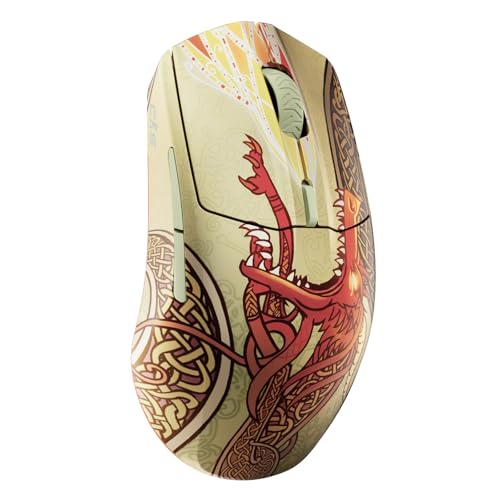
This Dragon Lore edition pairs a Counter-Strike theme with wireless use. The listing names 2.4 GHz and Bluetooth connections, an 18K DPI TrueMove Air sensor, up to 200 hours of battery life and 80-million-click durability. Those are listed product claims, not a promise that every buyer will get the same battery run time in every setup. The themed design may be its biggest draw for a player who wants a CS2 desk with a matching mouse.
Because this particular listing says renewed, check the item condition and seller terms with care. The sensor’s maximum DPI is far above what many CS2 players need, so do not choose it just for that number. Look at the size, shape and button layout in the product images before you decide. For competitive play, comfort and steady control matter more than a themed finish or a large DPI figure.
Pros:
- Distinctive Counter-Strike Dragon Lore design
- Lists both 2.4 GHz and Bluetooth connections
- 18K DPI sensor rating is stated in the offer
- Up to 200-hour battery life is listed
- 80-million-click durability claim is included in the listing
Cons:
- Renewed condition means you should check seller terms
- High DPI does not guarantee better aim
- Theme may cost more than a plain mouse with similar core use
What Amazon Buyers Are Saying
I can’t confirm an up-to-date review pattern for this offer, and I won’t invent one. Look for recent buyer notes on renewed condition, battery life and the actual product finish. Make sure the item shown and the item title match, as a themed product can have more than one listing or condition.
My Recommendation
Choose this Dragon Lore mouse if the design matters to you and you are comfortable buying renewed. For pure CS2 value, I would compare it with a standard lightweight gaming mouse first. Its feature list looks broad, but the design and condition should guide the final decision as much as its technical claims.
| Category | Rating |
|---|---|
| CS2 theme appeal | 5/5 |
| Listed features | 4/5 |
| Renewed confidence | 3/5 |
| Value for aim play | 3.5/5 |
| Overall | 3.5/5 |
SteelSeries Dragon Lore Wireless Mouse
This second Dragon Lore offer is listed as a wireless Counter-Strike mouse, but its title does not include the same detailed sensor, battery and click figures as the renewed listing above. I would treat those offers as separate listings and check the current product page before comparing specifications. The main appeal is clear: it brings a CS theme to a wireless gaming setup. That can be a fun choice for fans who want their gear to reflect the game they play.
For a CS2 mouse, a striking look should come after hand fit and control. Check the current details for weight, connection type, battery information and included receiver. If the page does not clearly state a feature, do not assume it matches another edition. A standard mouse with a comfortable shape may be a better buy if your main goal is aim practice and not a matching setup.
Pros:
- Counter-Strike-themed design
- Wireless setup keeps the mouse cable-free
- Fits a themed CS2 gaming desk
- May appeal to players who collect game-related gear
- Can serve for general PC gaming as well as CS2
Cons:
- The listing title gives fewer technical details
- Check condition, weight and battery information before purchase
- A themed model may offer less value for players who only want aim performance
What Amazon Buyers Are Saying
I can’t confirm current Amazon buyer feedback for this exact offer. Check the latest reviews for details about the actual mouse model, finish and included parts. Compare those comments with the product page, especially if the listing uses a shared image or has multiple versions.
My Recommendation
I see this as a theme-first option, not my first recommendation for a competitive CS2 setup. It may be worth buying if the design is the feature you want most and the listing clearly answers your questions. If competitive value matters more, compare its price and stated specs against the Viper or Zowie picks.
| Category | Rating |
|---|---|
| Theme appeal | 5/5 |
| Spec clarity | 2.5/5 |
| CS2 aim value | 3/5 |
| Purchase confidence | 3/5 |
| Overall | 3/5 |
Logitech G502 Lightspeed

The G502 Lightspeed is a feature-rich wireless mouse with more controls than most CS2 players need. That can still be useful if you play several games or want quick access to common actions. Its shape and button layout suit players who like a mouse that does more than aim and click. Logitech’s listing identifies it as a wireless gaming mouse, so check the included receiver and charging details on the current offer.
For Counter-Strike, extra buttons can help with binds, but too many can also distract if you do not use them. The G502 is not the simplest pick for a player who wants a very light, plain design. Think about how you grip a mouse and how much room you need to move it across your pad. If you value versatility over a stripped-down esports feel, it can make more sense than a basic FPS mouse.
Pros:
- Wireless freedom for a clean desk
- Many controls for useful game binds
- Versatile for different game types
- Recognizable gaming design and software ecosystem
- Can serve as a general-purpose PC gaming mouse
Cons:
- More buttons than many CS2 players need
- May feel bulky beside lightweight FPS mice
- Check charging and receiver details for the exact offer
What Amazon Buyers Are Saying
I can’t verify current review patterns for this Amazon listing. Check recent comments for opinions on the shape, button placement, battery use and long-term feel. Look closely at reviews from players who use the mouse for FPS games, since a buyer’s needs for MMO or general gaming can be quite different.
My Recommendation
I recommend the G502 Lightspeed to players who want one wireless mouse for CS2 and many other games. It is less focused than a light esports model, so I would not make it my first pick for a pure aim setup. It offers better appeal when its many controls will see real use.
| Category | Rating |
|---|---|
| Versatility | 4.5/5 |
| CS2 aim simplicity | 3.5/5 |
| Wireless use | 4/5 |
| Value | 4/5 |
| Overall | 4/5 |
Redragon M612 Wired Gaming Mouse

The Redragon M612 is a wired RGB mouse with an 8,000 DPI rating and remappable keys, according to its listing. That makes it a low-cost way to try gaming controls without buying a high-end wireless model. A wired connection also means you do not need to charge it or replace a battery. For CS2, the important question is whether its shape and cable feel comfortable during long, low-sensitivity movements.
The DPI number gives you room to set different pointer speeds, but it does not measure sensor quality on its own. You can start with one steady sensitivity and leave the extra settings alone. If you use the remapping options, keep important actions easy to reach and avoid binds that could cause mistakes in a round. RGB lighting is a style feature; it will not improve aim, but you can turn it down if you prefer a simple desk.
Pros:
- Wired connection avoids battery upkeep
- 8,000 DPI rating offers adjustable sensitivity choices
- Remappable keys allow custom controls
- RGB gives the setup a gaming look
- Can be a budget-friendly way to enter PC gaming
Cons:
- A cable can drag without a good desk setup
- Extra controls may not help a simple CS2 layout
- DPI alone does not show tracking quality or comfort
What Amazon Buyers Are Saying
I can’t verify the latest Amazon review patterns for this model. Read recent reviews for notes on cable feel, button response, software and fit. Check whether reviewers mention CS2 or other FPS games; general office use may not reveal how the mouse feels during fast aim moves.
My Recommendation
The M612 is worth considering if you want a wired mouse with basic gaming features and a modest budget. I would choose it over a wireless model if price and simple power matter most. Before buying, compare its size with a mouse you already find comfortable, since shape can matter more than RGB or a high DPI label.
| Category | Rating |
|---|---|
| Budget CS2 use | 4/5 |
| Control options | 4/5 |
| Wired convenience | 4/5 |
| Esports focus | 3/5 |
| Overall | 3.5/5 |
Redragon M602 Wired Gaming Mouse

The M602 listing describes an ergonomic wired RGB mouse with up to 7,200 DPI and nine programmable buttons. It may suit a player who wants more shortcut keys than a basic two-button design. Those controls can help with menu actions or other games, but they are not a must for CS2. A steady wired connection keeps the setup simple and avoids wireless battery concerns.
Its larger button count makes it worth checking the product images and size notes before you buy. A mouse that feels too wide or too tall can make small aim corrections harder, even if its feature list looks strong. The adjustable DPI gives you choices, but a stable setting is usually easier to learn than frequent changes. Treat the RGB and software as extra features, not proof of better performance.
Pros:
- Nine programmable buttons provide extra binds
- Wired connection needs no battery charging
- Up to 7,200 DPI is listed
- Ergonomic design may suit players who prefer a shaped mouse
- RGB lighting adds visual customization
Cons:
- Many buttons can feel unnecessary in CS2
- Shape may not suit a small hand or fingertip grip
- Wired cable can affect movement if it catches
What Amazon Buyers Are Saying
I can’t confirm current customer review patterns for this listing. Read fresh reviews for details on the ergonomic shape, software and button feel. A good review for one hand size may not apply to yours, so use the measurements and images to judge fit as well.
My Recommendation
I would choose the M602 if you want a low-cost wired mouse with extra buttons for several games. For a clean CS2-only setup, it is less focused than a lighter mouse with fewer controls. It can still be a practical starter choice if its shape fits your hand and you do not mind the cable.
| Category | Rating |
|---|---|
| Button options | 4/5 |
| CS2 simplicity | 3/5 |
| Budget appeal | 4/5 |
| Wired reliability | 4/5 |
| Overall | 3.5/5 |
Razer Naga V2 HyperSpeed

The Naga V2 HyperSpeed is an MMO gaming mouse, and that shapes how I would judge it for CS2. Its listing highlights wireless use and up to 400 hours of battery life, while the Naga line is built around extra thumb controls. That layout can be useful if you play games with many actions to bind. In Counter-Strike, most players may not need that many inputs close to the thumb.
Think about the balance between control and movement before choosing this model. A side-button layout can make a mouse feel wider or more complex than a simple FPS design. If you also play MMOs, those buttons may add real value across your game library. If CS2 is your only game, a smaller, lighter mouse with a plain side may feel easier to move and grip.
Pros:
- Wireless design keeps the desk uncluttered
- Up to 400-hour battery life is listed
- Extra thumb controls suit games with many commands
- Useful choice for players who switch between genres
- Offers more ways to assign game actions
Cons:
- MMO-style controls can be excessive for CS2
- Check the exact button layout and size before purchase
- Wireless battery claims vary with settings and use
What Amazon Buyers Are Saying
I can’t verify current reviews for this specific Amazon offer. Check recent feedback for comments on side-button comfort, wireless use and battery life. Prioritize reviews from buyers who use the mouse for shooters as well as MMOs, since their needs may better match yours.
My Recommendation
The Naga V2 HyperSpeed is not my top choice as a dedicated CS2 mouse. I recommend it for players who want one device for MMOs and shooters, and who will use the added thumb buttons. If you only play Counter-Strike, spend your money on a simpler shape that supports easy, steady aim.
| Category | Rating |
|---|---|
| Multi-game use | 4.5/5 |
| Wireless convenience | 4/5 |
| CS2-focused layout | 2.5/5 |
| Battery claim | 4/5 |
| Overall | 3.5/5 |
Redragon M908 Wired MMO Mouse

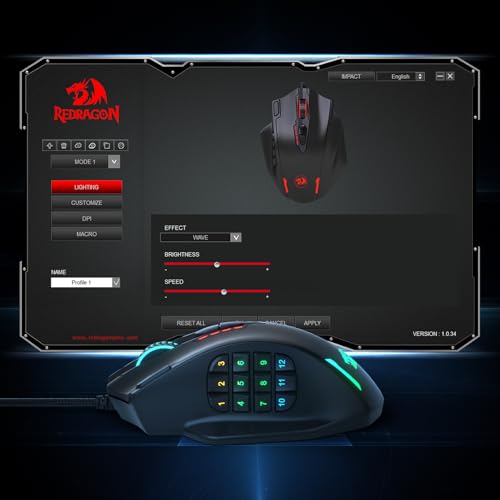
The Redragon M908 is a wired MMO mouse with 12,400 DPI and remapping keys in its listing. That setup is aimed at players who want many commands under one hand. For CS2, those controls can be more than you need, but they may help if you share the mouse with other games. The cable also means no battery to charge, though cable control matters during wide arm movements.
Do not let the DPI headline decide the purchase. A high maximum setting is not a direct measure of accurate tracking or how well the shape fits your grip. The M908 makes more sense if you have a use for the extra keys and want an inexpensive wired option. If you want a lean FPS design, compare its dimensions and button placement with a simpler mouse before ordering.
Pros:
- 12,400 DPI rating is listed
- Many remapping keys can serve MMO and shortcut needs
- Wired connection avoids battery charging
- Can cover several game genres with one mouse
- RGB styling is available for a gaming desk
Cons:
- Its MMO layout is not made specifically for CS2
- Extra keys may get in the way of a simple grip
- Check the size and cable setup before buying
What Amazon Buyers Are Saying
I can’t confirm the current Amazon review mix for this listing. Read recent reviews for comments on the thumb-button layout, software and day-to-day comfort. Check whether buyers mention shooter use, since comfort in a slower MMO does not always match fast aim movement.
My Recommendation
The M908 is a practical pick if you want many programmable inputs at a low cost and also play games that use them. I would not choose it as my first CS2-only mouse. For that job, a lighter and simpler design is usually easier to manage, while the M908’s strongest value comes from its extra controls.
| Category | Rating |
|---|---|
| Extra controls | 4.5/5 |
| CS2 aim simplicity | 2.5/5 |
| Wired use | 4/5 |
| Multi-game value | 4/5 |
| Overall | 3.5/5 |
How to Choose the Best Gaming Mouse for CS2
Picking the best gaming mouse for CS2 is less about chasing the biggest number and more about choosing a mouse you can control every round. Start with fit and movement. Then check the connection, buttons and value. A clear choice can help you keep your setup steady while you build aim through practice.
1. Match the weight and shape to your grip
Weight changes how a mouse starts and stops. A lighter mouse may feel easy to lift and move, while a heavier model can feel more planted. Neither choice is right for everyone. If you can, hold a mouse before you buy it or compare its size with a mouse you already like. Check whether your palm, fingers or fingertips guide most of your movement. A good fit helps more than a high DPI number.
2. Pick the connection and controls you will use
A wired mouse avoids charging and can cost less, but its cable may catch on the desk or mouse pad. A wireless mouse removes that cable, though you need to watch its battery and keep track of the receiver. For CS2, a few easy-to-reach buttons may be enough. MMO mice offer more binds, but extra controls can add bulk and may not help your aim. Choose the simplest layout that fits how you play.
3. Read the listing and compare real value
Check the exact model name, included parts, return terms and product condition. This is vital for renewed offers and themed editions, as their details may differ from a standard model. Treat DPI and polling rate as features, not proof that a mouse will make you better. Check price against the things you will use: shape, weight, connection and build details. The best gaming mouse for CS2 is the one you can use with comfort and consistency.
Final Verdict: Which Should You Buy?
The Razer Viper V3 Pro CS2 Edition is my top pick for players who want a wireless esports mouse with an 8 kHz focus. The Zowie U2 is a strong light option if renewed stock suits you, while the Viper V3 HyperSpeed offers a simpler wireless choice.
The best gaming mouse for CS2 should fit your hand, suit your setup and feel steady in play. Compare the current listing and choose the mouse you can control with confidence.
FAQs Of best gaming mouse for CS2
What is the best gaming mouse for CS2?
My top pick from this list is the Razer Viper V3 Pro CS2 Edition. It has a competitive focus and an 8 kHz model listing, though comfort and fit should guide your final choice.
Is a lightweight mouse better for CS2?
A light mouse can feel easier to move, but it is not best for every player. Choose a weight and shape that let you stop and aim with control.
Is wireless good for CS2?
Yes. Wireless can remove cable drag and keep the desk clear. Check battery needs, receiver details and current product terms before you buy.
What DPI should I use for CS2?
There is no single best DPI for every player. Pick a setting that feels controlled, then keep it steady while you practice.
Are MMO mice good for CS2?
They can work, especially if you use the extra buttons in other games. For CS2 alone, a simpler mouse may feel easier to grip and move.