The Logitech G502 HERO is my best gaming mouse with programmable buttons for flexible play, precise control, and strong everyday value.
A mouse with programmable buttons can save time when your favorite game asks you to repeat the same actions. It can also make common tasks easier, from switching weapons to launching a command. But button count is only one part of the choice. Shape, software, connection type, and button placement all matter. I compared MMO models with large side grids, general-purpose gaming mice, and wireless picks to help you find a mouse that fits your hand and play style.
See the differences between my top picks at a glance.
| Mouse | Connection | Programmable-button style | Best for | Link |
|---|---|---|---|---|
| Logitech G502 HERO | Wired | Several thumb and top buttons | All-around play | View on Amazon |
| Corsair Scimitar RGB Elite | Wired | 12-button side grid | MMO and MOBA | View on Amazon |
| Razer Naga V2 HyperSpeed | Wireless | Thumb grid plus top controls | Wireless MMO play | View on Amazon |
| Redragon M908 | Wired | 12 side buttons and extra controls | Low-cost MMO setup | View on Amazon |
| Razer Basilisk V3 | Wired | Thumb, top, and scroll controls | Mixed gaming and work | View on Amazon |
| Redragon M901K | Wired | 12 side buttons and remapping | Tunable MMO setup | View on Amazon |
| Redragon M913 | Wireless | Side macro keys | Wireless MMO value | View on Amazon |
| UtechSmart Venus Pro | Wired | 12 side buttons and macro keys | Feature-packed MMO play | View on Amazon |
| Logitech G305 LIGHTSPEED | Wireless | Six programmable buttons | Simple wireless control | View on Amazon |
| Wired 12800 DPI Gaming Mouse | Wired | Programmable controls | Basic budget setup | View on Amazon |
Best Gaming Mouse With Programmable Buttons: Reviews
A programmable mouse is only useful when its buttons feel easy to reach and its software lets you set actions without a struggle. I looked at the number and layout of controls, wired or wireless use, and how well each model suits different games. Some picks suit MMO players who need many commands under one thumb. Others offer a smaller set of useful shortcuts for shooters, daily work, or mixed use. Product details and software can change, so check the current listing before you buy.
Redragon M908 Wired MMO RGB Gaming Mouse

The Redragon M908 is a wired MMO mouse built around a large set of controls. Its 12 side buttons put many commands within thumb reach. The product listing gives a 12,400 DPI maximum, though most players will use a much lower setting for steady aim. This layout can help when a game has a long skill bar or many items to manage.
It makes the most sense for players who want many buttons without paying for a premium wireless model. The extra controls can also suit editing shortcuts or other repeated PC tasks. Before buying, check that the side grid fits your thumb and grip. A high button count is useful only when you can find the right key without looking.
Pros:
- 12 side buttons give MMO players many direct commands.
- Wired connection avoids the need to charge a battery.
- Button remapping supports custom game controls.
- High listed DPI range lets users set their own sensitivity.
- RGB lighting adds a customizable look to a gaming desk.
Cons:
- The side grid may feel crowded for players with smaller hands.
- A wired cable can catch or drag without good desk routing.
- Many buttons take time to learn and set up well.
What Amazon Buyers Are Saying
Buyer feedback on gaming mice can vary by listing and by how each person uses the mouse. When reading current reviews for the M908, look for comments on side-button feel, software setup, and long-session comfort. Pay special attention to reports from MMO players, since they use the side grid more than casual users do. Also check recent reviews for any notes about reliability or changes in the included software.
My Recommendation
I recommend the M908 to players who want a large side-button layout at a value-focused level. It offers a lot of control, but its shape and button grid may not suit every hand. Confirm the fit and software details before ordering. Overall rating: 4.1/5.
| Category | Rating |
|---|---|
| Button access | 4.5/5 |
| Setup flexibility | 4/5 |
| Everyday comfort | 3.8/5 |
| Value | 4.3/5 |
| Overall Rating | 4.1/5 |
Logitech G502 HERO Wired Gaming Mouse

The Logitech G502 HERO is a strong all-round pick for players who want extra controls but do not need a full MMO keypad. Its buttons sit around the thumb and top of the mouse, so common commands stay close at hand. The HERO sensor supports a wide range of sensitivity settings. This wired model also avoids battery charging and wireless pairing.
Its shape has a pronounced right-hand design, which many palm and claw grip users may find easy to settle into. The scroll wheel offers a free-spin mode as well as stepped scrolling, which can be handy outside games. Programmable controls suit weapon changes, push-to-talk, and app shortcuts. The mouse is not the lightest choice, so players who favor quick, low-effort movement should keep that in mind.
Pros:
- Useful mix of side and top buttons without an oversized MMO grid.
- Wired connection provides consistent use without battery concerns.
- Adjustable sensitivity supports both broad movement and careful aim.
- Scroll wheel can switch between stepped and free-spin modes.
- Flexible button setup works for gaming and desktop tasks.
Cons:
- The sculpted shape is designed for right-handed use.
- Its weight may feel high to players who prefer lightweight mice.
- Button placement takes a short adjustment period.
What Amazon Buyers Are Saying
When checking current buyer reviews, focus on repeated comments about comfort, scroll-wheel use, and the feel of the thumb buttons. A mouse can suit one grip and feel awkward in another, so look for feedback from people with a similar hand size and play style. Also check how buyers describe the configuration software and long-term use. These points matter more than a single high or low rating.
My Recommendation
The G502 HERO is my leading choice for most players who want programmable controls in a familiar, all-purpose layout. It balances extra commands with day-to-day ease better than a dedicated MMO mouse. If you want wireless play or a light shell, choose another model. Overall rating: 4.6/5.
| Category | Rating |
|---|---|
| Button usefulness | 4.6/5 |
| Sensor flexibility | 4.7/5 |
| Grip comfort | 4.4/5 |
| Value | 4.6/5 |
| Overall Rating | 4.6/5 |
Corsair Scimitar RGB Elite MMO Mouse
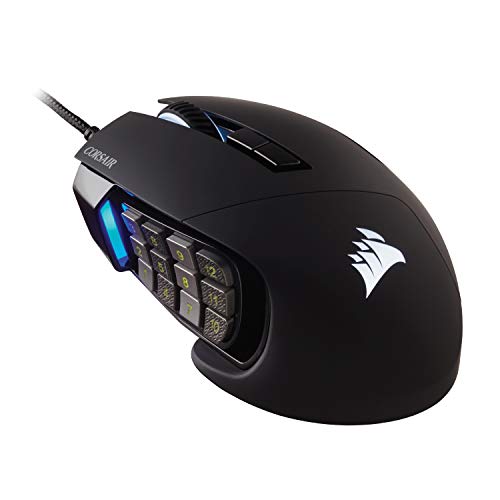
The Corsair Scimitar RGB Elite is made for MMO and MOBA players who need many commands close to the thumb. It has a 12-button side panel, and its position can be adjusted to better match a user’s hand. That sliding panel is a key feature: it can help users bring the keys closer or move them away to find a comfortable reach. The mouse connects by cable.
The side buttons can be mapped for skills, items, or other actions through Corsair’s configuration software. Its layout takes practice, but a player who uses many commands can build a steady thumb pattern over time. The broad body and button panel suit users who like a substantial mouse. It is less compelling for someone who needs only a few shortcuts.
Pros:
- 12 side buttons provide direct access to many in-game commands.
- Adjustable side panel helps tune thumb reach.
- Button layout suits MMO and MOBA action bars.
- Wired operation means no battery charging.
- RGB lighting can be matched to a gaming setup.
Cons:
- The many side buttons require practice and careful mapping.
- The larger shape may not suit small hands or fingertip grip.
- Software configuration adds a setup step.
What Amazon Buyers Are Saying
For this model, use recent reviews to judge whether the sliding panel feels secure and whether the side keys are easy to tell apart. Those details can matter more than the total number of buttons. Buyers’ experiences can depend on grip and hand size, so compare feedback from people who play similar games. Check current comments on the software too, since setup tools can change over time.
My Recommendation
I would choose the Scimitar RGB Elite for an MMO player who wants many thumb commands and values an adjustable side grid. Its special layout offers more tailoring than a fixed keypad. It is a poor fit for someone who wants a simple, light mouse. Overall rating: 4.4/5.
| Category | Rating |
|---|---|
| Side-button access | 4.7/5 |
| Adjustability | 4.6/5 |
| Ease of learning | 3.8/5 |
| MMO value | 4.4/5 |
| Overall Rating | 4.4/5 |
Redragon M901K Programmable MMO Mouse

The Redragon M901K is a wired MMO mouse with a 12-button side panel and a listed maximum of 12,400 DPI. The product listing also highlights 19 programmable buttons and a set of removable weights. These features give users room to adjust both controls and feel. The design targets PC players who want one mouse to handle long command lists.
Weight tuning can help you find a glide that feels more controlled, though it cannot change the mouse’s overall shape. The side grid is useful for hotkeys and macros, but it needs careful setup to avoid accidental presses. This model may appeal to players who want more options than a basic gaming mouse offers. Check the seller’s current details for supported software and included parts.
Pros:
- 12 side keys offer a clear place for game shortcuts.
- Listing states 19 programmable buttons for custom control.
- Removable weights let users adjust the feel.
- Wired connection avoids charging interruptions.
- Listed DPI range provides several sensitivity choices.
Cons:
- The many controls may overwhelm casual players.
- Weight pieces can be easy to misplace.
- Software details should be checked for the exact listing and system.
What Amazon Buyers Are Saying
Look through recent buyer comments for practical notes on weight changes, button spacing, and setup. Those are the areas most likely to affect daily use. Reviews may reflect different versions or personal preferences, so check the date and product details before relying on them. For MMO use, feedback about accidental side-button presses is especially useful.
My Recommendation
The M901K is worth considering if you want a wired MMO mouse with many controls and adjustable weight. It offers flexibility, but the button grid and software need a little patience. I would compare its current price with the M908 before choosing between the two. Overall rating: 4.2/5.
| Category | Rating |
|---|---|
| Button range | 4.6/5 |
| Weight tuning | 4.2/5 |
| Ease of setup | 3.8/5 |
| Feature value | 4.3/5 |
| Overall Rating | 4.2/5 |
Razer Naga V2 HyperSpeed Wireless MMO Mouse

The Razer Naga V2 HyperSpeed brings a familiar MMO-style thumb grid to a wireless design. Its side buttons can hold game commands, while the top controls handle common mouse functions. Razer lists battery life of up to 400 hours under specific use conditions, so actual time can vary with settings and connection mode. The lack of a cable gives more freedom on a crowded desk.
This model suits players who want MMO controls without being tied to a USB cable. Wireless play can also make it easier to move the mouse between a gaming station and another setup. As with any mouse with many side keys, take time to map actions and learn their positions. Check current package and connection details before purchase, as listings can change.
Pros:
- Wireless design keeps the desk clear of a mouse cable.
- Thumb-button grid gives MMO players many nearby commands.
- Long listed battery life can reduce frequent battery changes.
- Custom controls support different game profiles.
- Useful for players who want MMO features without a wired link.
Cons:
- Battery life depends on how and where the mouse is used.
- Wireless mice need battery planning and may add setup steps.
- The large side grid can feel excessive for non-MMO games.
What Amazon Buyers Are Saying
When you read recent reviews, look for detail on wireless setup, battery experience, and thumb-grid comfort. Battery reports can differ because users choose different modes and settings. Also check comments about software and button mapping, especially if you plan to use several profiles. A few detailed reviews from MMO players can be more helpful than broad ratings alone.
My Recommendation
The Naga V2 HyperSpeed is my wireless pick for players who need many programmable controls. Its key appeal is the combination of a thumb grid and freedom from a cable. Choose a simpler model if you use only a few shortcuts or do not want to manage a battery. Overall rating: 4.5/5.
| Category | Rating |
|---|---|
| Wireless freedom | 4.7/5 |
| MMO button access | 4.6/5 |
| Battery convenience | 4.3/5 |
| Versatility | 4.4/5 |
| Overall Rating | 4.5/5 |
UtechSmart Venus Pro MMO Gaming Mouse

The UtechSmart Venus Pro is an MMO-style mouse with a 12-button thumb panel and a listed maximum of 16,400 DPI. Its main draw is the large number of controls for players who want actions close at hand. The wired design makes setup simple: plug it into a compatible computer and configure the buttons. RGB lighting adds a visual touch but does not affect play.
Its many keys can support skill bars, macros, and repeated desktop commands. Players who are new to MMO mice should expect a learning period, since each thumb position needs to become familiar. The mouse works best when its software lets you save a setup that fits your games. Check current software support and system compatibility before purchase.
Pros:
- 12 side buttons keep many actions within thumb reach.
- High listed DPI gives a wide range of sensitivity settings.
- Wired use avoids battery charging and wireless pairing.
- RGB lighting offers visual customization.
- Large control set can suit MMO play and shortcut-heavy tasks.
Cons:
- The side grid may take time to learn.
- Large mouse shapes can be a poor match for smaller hands.
- Check current software support before relying on saved profiles.
What Amazon Buyers Are Saying
Read the latest buyer notes for clear examples of how the side buttons feel in play and how easy the setup process is. Look for feedback about comfort over long sessions, not just first impressions. Review dates matter, since product listings and software can change. If a buyer mentions a hand size or grip close to yours, that comment may be especially useful.
My Recommendation
I recommend the Venus Pro to MMO players who value a large side-button grid and a wired connection. Its headline sensitivity figure matters less than its button placement and comfortable fit. Make sure the shape suits your hand before choosing it over a more compact mouse. Overall rating: 4.1/5.
| Category | Rating |
|---|---|
| Side-button range | 4.5/5 |
| Sensitivity options | 4.3/5 |
| Comfort potential | 3.9/5 |
| Value | 4/5 |
| Overall Rating | 4.1/5 |
Razer Basilisk V3 Customizable Gaming Mouse

The Razer Basilisk V3 is a general-purpose gaming mouse with a right-hand ergonomic shape and several programmable controls. It does not use a large MMO thumb grid, which keeps the side area less crowded. Its scroll wheel can switch between controlled steps and faster scrolling. That mix makes it useful for games and everyday computer work.
It can suit players who want to map a few key actions without changing how they hold the mouse. The thumb rest and shaped body may feel comfortable for users who prefer a more supportive grip. The Basilisk V3 is wired, so there is no battery to manage, though the cable may matter to players who want a clean, unrestricted desk. Use the software to assign shortcuts and lighting settings.
Pros:
- Comfort-focused right-hand shape supports a natural grip.
- Several programmable controls cover common game actions.
- Scroll wheel offers stepped and free-spin use.
- Wired connection removes battery upkeep.
- Works well as a gaming and general desktop mouse.
Cons:
- Right-hand shape will not suit left-handed users.
- It has fewer side controls than an MMO keypad mouse.
- Some players may prefer a lighter or wireless design.
What Amazon Buyers Are Saying
Recent buyer reviews can help you judge the fit of the right-hand shape, the scroll-wheel modes, and how well the software meets your needs. Look for comments from people with a similar grip style. For a wired mouse, check whether buyers mention cable drag in their setup. Reviews that explain both what works and what does not are more useful than broad praise.
My Recommendation
The Basilisk V3 is a smart choice if you want a few programmable buttons in a comfortable everyday shape. It is less suited to MMO players who need many thumb keys. For mixed work and gaming, its controls and scroll wheel make it a flexible option. Overall rating: 4.5/5.
| Category | Rating |
|---|---|
| Everyday button use | 4.5/5 |
| Grip comfort | 4.6/5 |
| Scroll control | 4.6/5 |
| MMO suitability | 3.7/5 |
| Overall Rating | 4.5/5 |
Redragon M913 Wireless MMO Gaming Mouse

The Redragon M913 is a wireless MMO gaming mouse with a listed maximum of 16,000 DPI and programmable side keys. It aims to pair a large command set with a cable-free desk. That can be handy for players who move their mouse across a wide pad or switch between gaming and casual use. RGB lighting lets you change the look of the device.
Before buying, check the exact version and connection options on the product page. Wireless modes and battery features can differ across models and listings. The side buttons can handle skills, items, or macros, but users should test the layout before building a complex setup. If you play competitive games, choose the connection mode that best matches your system and comfort needs.
Pros:
- Wireless design removes the mouse cable from the play area.
- Side controls support MMO commands and custom actions.
- Listed sensitivity range offers room to tune cursor speed.
- RGB lighting adds a personal touch.
- Suitable for players who want more than basic mouse buttons.
Cons:
- Wireless use requires attention to battery and connection details.
- A large set of buttons takes time to learn.
- Check the precise model listing for current specifications.
What Amazon Buyers Are Saying
Check current reviews for comments on wireless stability, battery use, button mapping, and comfort. These areas can vary with each setup, so look for specific details rather than short claims. Verify that the review describes the same version you plan to buy. This is especially important when listings combine more than one model or option.
My Recommendation
The M913 is worth a look if you want an MMO-style wireless mouse at a more accessible price than some premium options. Verify the exact connection and software features before you order. I would favor it when cable-free use matters more than a simple setup. Overall rating: 4.0/5.
| Category | Rating |
|---|---|
| Wireless convenience | 4.2/5 |
| Button usefulness | 4.3/5 |
| Setup clarity | 3.7/5 |
| Value | 4/5 |
| Overall Rating | 4.0/5 |
Logitech G305 LIGHTSPEED Wireless Mouse

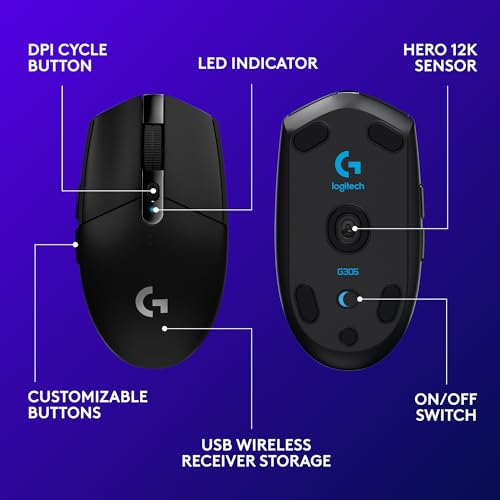
The Logitech G305 LIGHTSPEED is a compact wireless mouse with six programmable buttons. It is a simpler choice than an MMO mouse, but six controls can cover common needs such as changing weapons or assigning a quick action. Logitech lists its HERO sensor and LIGHTSPEED wireless technology for this model. It uses a replaceable AA battery, so buyers should plan for battery replacement rather than cable charging.
The G305 makes sense for players who want wireless freedom and a modest set of custom buttons. Its shape is compact and symmetrical, which can fit a range of grips, though personal fit still matters. The small size may feel less supportive to users with large hands. If you do not need a dozen thumb buttons, this model keeps the layout easy to understand.
Pros:
- Wireless design keeps the desk clear and easy to manage.
- Six programmable buttons cover common shortcuts.
- Compact shape is easy to carry between setups.
- AA battery can be replaced rather than recharging the mouse.
- Less complex than a dedicated MMO mouse.
Cons:
- Six buttons may not be enough for MMO command bars.
- Users must keep a spare AA battery or replace it as needed.
- Compact shape may not suit every hand size or grip.
What Amazon Buyers Are Saying
When reading recent reviews, focus on size, battery use, and wireless setup. Buyers with smaller hands may find the compact body easier to manage, while larger-hand users may prefer a bigger shell. Check comments about the AA battery and the buttons you plan to remap. As always, confirm that reviews match the current listing.
My Recommendation
The G305 is a good pick for wireless gaming with a few custom controls, not a full MMO command grid. Its compact size and replaceable battery will suit some setups better than others. If you want a straightforward programmable gaming mouse, it is a practical option. Overall rating: 4.3/5.
| Category | Rating |
|---|---|
| Wireless use | 4.5/5 |
| Button simplicity | 4.4/5 |
| Hand-fit range | 3.9/5 |
| Daily value | 4.3/5 |
| Overall Rating | 4.3/5 |
Wired 12800 DPI Programmable Gaming Mouse

This listing presents a wired gaming mouse with programmable buttons, RGB lighting, and a stated 12,800 DPI maximum. It may appeal to buyers who want basic customization at a budget price. A wired design removes battery upkeep and keeps the mouse ready whenever the computer is on. The listing title does not give enough detail to compare its button layout with established MMO models.
Before buying, inspect the current product page for the exact number of programmable controls, software support, and shape. DPI is only a sensitivity range; it does not tell you whether a mouse feels accurate or comfortable. This mouse may work for simple game shortcuts if the controls are easy to reach. Check the return terms and recent buyer feedback before choosing an unfamiliar listing.
Pros:
- Programmable controls offer more flexibility than a basic office mouse.
- Wired use avoids charging and pairing.
- RGB lighting gives the setup a gaming look.
- Listed DPI maximum provides several sensitivity options.
- May suit buyers who want a low-cost first gaming mouse.
Cons:
- The listing title does not confirm the exact button count.
- Software and profile support should be checked before purchase.
- Brand and model details may be less familiar than leading alternatives.
What Amazon Buyers Are Saying
Read the newest reviews closely because product details can be limited in the listing title. Look for specific reports about software installation, button remapping, and build quality. A clear review should say which computer and system the buyer used. Avoid relying only on claims about high DPI or lighting, since those do not prove that the mouse fits your needs.
My Recommendation
This mouse may suit a tight budget, but I would verify its button count, software, and support before ordering. If you want known button layouts and clearer product history, the G502 HERO or G305 is an easier choice. Overall rating: 3.6/5.
| Category | Rating |
|---|---|
| Listed customization | 3.8/5 |
| Wired convenience | 4.2/5 |
| Specification clarity | 3.1/5 |
| Value confidence | 3.4/5 |
| Overall Rating | 3.6/5 |
How to Choose the Best Gaming Mouse With Programmable Buttons
The best gaming mouse with programmable buttons is the one that fits your hand and gives you useful controls where you can reach them. A high button count can look appealing, but it is not always an advantage. Think about the games you play, how many commands you use, and whether you want a wired or wireless setup.
1. Match the Button Layout to Your Games
For MMO games, a 12-button thumb grid can move skills and items closer to your hand. For shooters, a few easy-to-reach controls may be enough for voice chat, melee, or a sensitivity change. General-purpose mice such as the G502 HERO or Basilisk V3 offer extra commands without a full keypad. Count the actions you use often before you pay for more buttons.
Also think about how you will learn the layout. Buttons that feel different under your thumb are easier to use without looking. If every key feels the same, you may press the wrong command under pressure. A practical layout matters more than a large number printed on the product page.
2. Check Shape, Grip, and Hand Fit
A mouse can have excellent software and still feel wrong in your hand. Check whether it is designed for right-handed or ambidextrous use. Large MMO mice can suit palm grips, while smaller models may feel easier to move for some claw or fingertip users. If possible, compare the mouse dimensions with a model you already find comfortable.
Consider button reach as well as the main body. A side grid should sit where your thumb can move from key to key without strain. Adjustable panels, like the one on the Corsair Scimitar, give more control over reach. If you cannot test the mouse in person, use product images and dimensions, then check the return policy.
3. Compare Software, Connection, and Long-Term Value
Button programming often depends on the maker’s software. Check whether it supports your computer, can save profiles, and lets you assign the actions you need. If you switch games often, profiles can make setup easier. Do not assume every button accepts every type of command; review the software details for the model you want.
Wired mice avoid battery charging and wireless pairing. Wireless models keep the desk clear, but you should check battery type, battery life claims, and connection modes. Treat DPI as a sensitivity option, not a score for overall quality. Finally, compare warranty details and current price. A slightly simpler mouse can be a better value if it fits your hand and covers your real needs.
Final Verdict: Which Should You Buy?
For most players, I recommend the Logitech G502 HERO. It offers useful programmable buttons in a flexible layout that works for many games and daily tasks. MMO players who want a thumb grid should choose the Corsair Scimitar RGB Elite or wireless Razer Naga V2 HyperSpeed.
The best gaming mouse with programmable buttons should fit your hand, offer easy-to-learn controls, and suit your connection needs. Compare button layout and current software details before you buy.
FAQs Of best gaming mouse with programmable buttons
What is the best gaming mouse with programmable buttons for most players?
The Logitech G502 HERO is a strong all-around choice. It has several programmable controls without the large side grid found on MMO mice.
Are MMO gaming mice with 12 side buttons hard to use?
They can take time to learn. Start with a few key actions, then add more as each button position becomes familiar.
Is a wired or wireless programmable gaming mouse better?
A wired mouse avoids battery upkeep. A wireless mouse gives you a cleaner desk and more freedom to move. Choose based on your setup and habits.
Does a higher DPI mean a better gaming mouse?
No. DPI sets cursor sensitivity. Comfort, tracking, button placement, and software support matter more for most players.
Can I use programmable mouse buttons for work as well as gaming?
Yes. You can often assign shortcuts for common tasks, such as copying, pasting, or opening an app, if the mouse software supports them.