For most players, the Razer Basilisk V3 is the best gaming mouse with RGB for comfort, control, and useful customization.
A mouse can look great on a desk and still feel wrong in a match. Maybe the shape tires your hand, the buttons sit out of reach, or the lights distract more than they help. I compared these picks by their design, controls, lighting, and fit for different game styles. See the differences between my top picks at a glance.
| Product | Connection | Best for | Standout feature | RGB or lighting | Check price |
|---|---|---|---|---|---|
| Razer Basilisk V3 | Wired | All-around play | Ergonomic shape and scroll wheel | Razer Chroma RGB | View on Amazon |
| Redragon M612 | Wired | Budget gaming | Remappable controls | RGB backlighting | View on Amazon |
| Corsair Scimitar RGB Elite | Wired | MMO and MOBA | Adjustable side button panel | RGB lighting zones | View on Amazon |
| Logitech G502 HERO | Wired | Versatile control | Programmable buttons and wheel | LIGHTSYNC RGB | View on Amazon |
| BENGOO Wired RGB Mouse | Wired | Simple low-cost setup | Basic ergonomic form | RGB backlight | View on Amazon |
| Corsair NIGHTSWORD RGB | Wired | Weight tuning | Adjustable weight system | Four-zone RGB | View on Amazon |
| Redragon M810 PRO | Wireless | Cord-free play | Wireless design and remapping | RGB lighting | View on Amazon |
| Corsair M65 RGB Ultra | Wired | FPS aiming | Sniper button and weight tuning | RGB lighting | View on Amazon |
| Redragon M908 | Wired | MMO shortcuts | Side-button grid | RGB lighting | View on Amazon |
| RGB LED Mouse Pad | USB powered | Desk lighting | Large lit surface | LED edge lighting | View on Amazon |
Razer Basilisk V3 Customizable RGB Wired Gaming Mouse

The Basilisk V3 is a strong pick if you want one mouse for work and play. Its right-handed shape gives your thumb a clear resting place and keeps its extra controls close. The scroll wheel can move in notched steps or spin freely, which is handy for long pages and quick in-game menus. Its Chroma lighting adds color without being the main reason to buy it.
Razer’s software lets you set button actions and lighting effects. You can save a setup for different games and change the mouse response to suit your style. The wired connection also means you do not need to charge it or keep a wireless receiver nearby. I would choose it for a player who values comfort and flexible controls more than a very light shell.
Pros:
- Comfortable right-handed shape for many palm and claw grips
- Useful scroll wheel modes for both games and daily tasks
- Many controls can be assigned to game actions
- Chroma RGB offers broad lighting choices
- Wired connection avoids battery upkeep
Cons:
- Not designed for left-handed use
- Wired cable may bother players who prefer a clean, cord-free desk
- Its shape and features may feel large for small hands
What Amazon Buyers Are Saying
Buyer feedback for this type of feature-rich mouse often focuses on comfort, button access, and the flexible scroll wheel. Some shoppers may need time to learn the software and find a grip that suits the shape. Check recent reviews for fit notes, software comments, and any concerns about long-term use, since feedback can change over time.
My Recommendation
I recommend the Basilisk V3 as the best gaming mouse with RGB for most right-handed players who want a comfortable, wired all-rounder. Its controls and scroll wheel make it useful outside gaming too. It is less suitable if you want a light, simple mouse or need a left-handed shape.
| Category | Rating |
|---|---|
| Comfort and shape | 4.5/5 |
| Game controls | 4.5/5 |
| RGB options | 4.5/5 |
| Everyday value | 4.5/5 |
| Overall rating | 4.5/5 |
Redragon M612 Wired RGB Optical Gaming Mouse

The Redragon M612 gives budget-minded players a way to add extra controls and RGB to a basic setup. It is a wired mouse with a familiar contoured shape and programmable buttons. The listed sensor settings reach up to 8,000 DPI, though high DPI alone does not make a mouse more accurate. A lower setting may feel easier to control for careful aiming.
The M612 suits players who want to assign common actions to mouse buttons instead of reaching for the keyboard. Its lighting adds a gaming look, while the cable keeps charging out of the picture. It may take some setup to get the buttons and sensitivity just right. I would compare its size and button layout with your hand before choosing it.
Pros:
- Often a lower-cost way to get programmable controls
- Wired use keeps the mouse ready without charging
- Adjustable sensitivity gives room to find a comfortable setting
- RGB backlighting adds color to a gaming desk
- Extra buttons can help with common game actions
Cons:
- Not as refined as higher-priced gaming mice
- Extra controls may take time to learn
- Wired design can add desk clutter
What Amazon Buyers Are Saying
When reading buyer feedback, look for comments about button feel, grip comfort, and software setup. These are the details that matter most with an affordable mouse that offers extra controls. Individual experiences may differ, so check recent reviews for repeated concerns rather than relying on one unusual report.
My Recommendation
The M612 is worth considering if you want an inexpensive RGB mouse with useful buttons and do not mind a cable. I would not choose it solely because of its maximum DPI figure. Overall, it is a practical entry-level option: 4/5.
| Category | Rating |
|---|---|
| Comfort and shape | 4/5 |
| Game controls | 4/5 |
| RGB options | 4/5 |
| Budget value | 4/5 |
| Overall rating | 4/5 |
Corsair Scimitar RGB Elite MMO Mouse
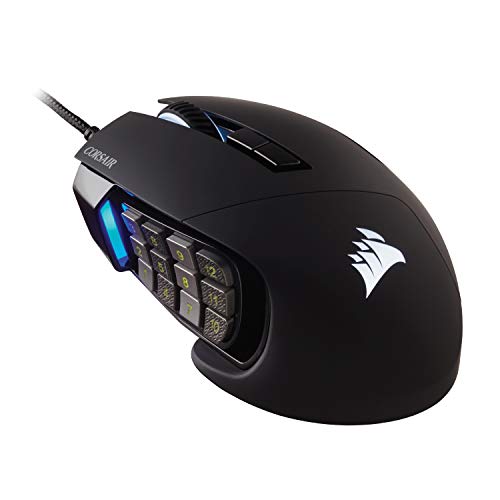
The Scimitar RGB Elite is built for players who use many commands in an MMO or MOBA. Its defining feature is a side panel with a grid of buttons that you can move to suit your thumb. That adjustment can make the layout easier to reach, though the many buttons need practice. RGB lighting gives the mouse a bold look and can be set to suit your desk.
This is a specialized wired mouse, not a simple choice for every player. The side controls can hold skills, macros, or other actions, so you can keep more commands close at hand. The larger control layout may feel busy in fast shooters or casual games. I would select it when its button grid solves a real problem in the games you play.
Pros:
- Side-button panel can be adjusted to fit your thumb reach
- Large number of controls suits games with many commands
- RGB lighting supports a coordinated desk setup
- Wired design needs no battery charging
- Useful for assigning skills and shortcuts
Cons:
- Button grid takes practice to use without mistakes
- Its specialized shape may feel bulky for some hands
- Less appealing if you only need a few mouse buttons
What Amazon Buyers Are Saying
For this style of mouse, buyers often focus on whether the side buttons are easy to reach and distinguish during play. Look for feedback about adjustment, hand size, and comfort over longer sessions. The large button count is a benefit for some players and a learning curve for others.
My Recommendation
I recommend the Scimitar RGB Elite to MMO and MOBA players who will use its side panel. It is not the best fit for a player who wants a light, minimal mouse. For the right game library, its layout can be a real advantage: 4.3/5.
| Category | Rating |
|---|---|
| Button access | 4.5/5 |
| MMO suitability | 4.8/5 |
| RGB options | 4/5 |
| Ease of learning | 3.7/5 |
| Overall rating | 4.3/5 |
Logitech G502 HERO Wired Gaming Mouse

The G502 HERO is a long-running choice for players who want a lot of control in a wired mouse. Its button set and scroll wheel give you ways to set shortcuts for games or daily tasks. The HERO sensor supports adjustable sensitivity, so you can tune pointer movement to your display and aim style. LIGHTSYNC RGB adds lighting that can coordinate with compatible Logitech gear.
The G502 shape includes a thumb rest, which many right-handed users may find supportive. It is not an ultra-light design, so players who make rapid, wide movements may prefer a lighter mouse. The wired link is dependable, but the cable remains part of your desk setup. I see it as a flexible pick for people who want buttons, a feature-rich wheel, and familiar software options.
Pros:
- Many buttons support shortcuts and game commands
- Scroll wheel offers both notched and free-spinning use
- Adjustable sensor settings suit different play styles
- LIGHTSYNC RGB can match a compatible setup
- Thumb rest supports a relaxed right-handed grip
Cons:
- Heavier feel may not suit every FPS player
- Shape favors right-handed users
- Wired cable can catch or drag without good routing
What Amazon Buyers Are Saying
Feedback on this popular design tends to weigh its button count and wheel against its size and weight. Buyers often consider whether the thumb rest fits their hand and whether the software is easy to use. Check current reviews for the latest comments on the specific listing and included model.
My Recommendation
The G502 HERO remains a sensible choice if you want a versatile wired mouse with useful controls and RGB. It is a better fit for players who like a substantial mouse than for those seeking a feather-light shell. Overall: 4.4/5.
| Category | Rating |
|---|---|
| Control options | 4.6/5 |
| Sensor tuning | 4.5/5 |
| RGB options | 4/5 |
| Comfort and fit | 4.2/5 |
| Overall rating | 4.4/5 |
BENGOO Wired RGB Ergonomic Gaming Mouse

The BENGOO wired mouse is aimed at shoppers who want basic gaming style without a premium price. Its ergonomic form and RGB backlight can dress up a starter PC setup. A wired connection keeps it simple: plug it in and use it. This listing is best judged as an entry-level mouse rather than a specialist tool for competitive play.
It may work well for casual games, school tasks, and everyday browsing. Before buying, check the listing details for the exact button and sensitivity options, as product versions and bundles can change. Do not assume that bright lighting means better tracking or faster play. I would pick it when low cost and basic function matter more than advanced software or fine tuning.
Pros:
- RGB lighting gives a colorful look to a budget setup
- Wired connection means there is no battery to recharge
- Ergonomic form may feel familiar to many users
- Simple option for casual gaming and daily computer use
- Can be a low-cost way to try a gaming-style mouse
Cons:
- Fewer advanced features than higher-end gaming mice
- Exact functions should be checked on the current listing
- May not suit players who need fine software tuning
What Amazon Buyers Are Saying
For an entry-level mouse, useful review details include how the mouse feels after long use, how the lighting works, and whether the controls match the listing. Check recent buyer comments for your exact model, since marketplace listings can change. I would give more weight to repeated comments than to one-off praise or complaints.
My Recommendation
The BENGOO is worth a look if you need an inexpensive wired mouse for casual play and basic use. I would spend more for frequent competitive gaming or for richer control software. Overall rating: 3.6/5.
| Category | Rating |
|---|---|
| Basic comfort | 3.7/5 |
| Gaming controls | 3.4/5 |
| RGB style | 3.8/5 |
| Entry-level value | 3.8/5 |
| Overall rating | 3.6/5 |
Corsair NIGHTSWORD RGB Adjustable Weight Mouse
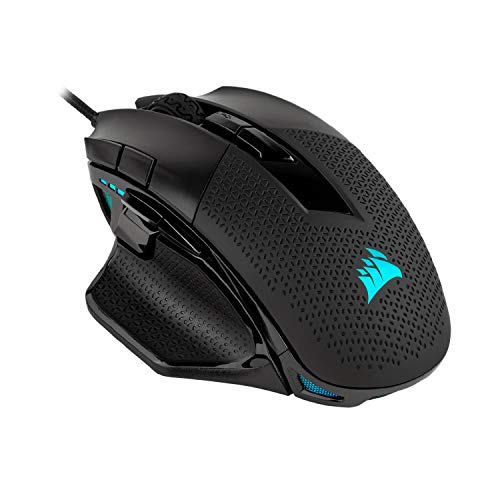
The NIGHTSWORD RGB stands out because you can change its weight to match your preference. It is a wired mouse designed for players who like a solid, shaped body and a steady feel. Its lighting can add color to a desktop, while Corsair’s software provides ways to tune settings. Weight adjustment matters most if you notice how a mouse balances during long sessions.
This mouse is not the best match for players who want the lightest possible design. It may suit a palm grip and users who like the hand to rest on a larger body, but fit is personal. I would test the weight options in small steps instead of making a large change at once. Choose it for its adjustable feel, not just for its RGB effects.
Pros:
- Adjustable weight lets you tune the feel
- Contoured shape offers a planted grip for many right-handed users
- RGB lighting adds a polished desk look
- Software supports setting changes and customization
- Wired use avoids battery management
Cons:
- Weight system may be unnecessary for many players
- Not an ideal pick for users who prefer very light mice
- Right-handed shape limits who may find it comfortable
What Amazon Buyers Are Saying
When comparing feedback, focus on comments about the mouse’s size, weight range, and grip. The adjustable system is useful only if you like a heavier or carefully balanced mouse. Look for recent reports about setup and long-session comfort before you decide.
My Recommendation
I recommend the NIGHTSWORD to right-handed players who want to adjust mouse weight and prefer a substantial feel. If you want a simple or very light mouse, another option here will suit you better. Overall: 4.1/5.
| Category | Rating |
|---|---|
| Weight tuning | 4.5/5 |
| Grip and fit | 4.1/5 |
| RGB options | 4.2/5 |
| Ease of use | 3.8/5 |
| Overall rating | 4.1/5 |
Redragon M810 PRO Wireless RGB Gaming Mouse

The M810 PRO is the wireless option in this group for players who want less cable clutter. The listing describes a 10,000-DPI sensor and remappable buttons, giving you room to change sensitivity and controls. RGB lighting adds a bright look, while the wireless design helps keep the desk clear. Check the listing for the included charging or connection details before ordering.
A wireless mouse can make broad movements feel less restricted, but you should plan for charging and receiver placement. The M810 PRO is worth considering if those trade-offs suit your setup and you want extra buttons. Its maximum sensitivity is only one part of performance; sensor feel and your chosen setting matter more in play. I would set a comfortable DPI first, then adjust only if a game needs it.
Pros:
- Wireless design reduces cable clutter
- Remappable buttons offer flexible control
- Adjustable sensitivity supports different game styles
- RGB lighting gives the mouse a gaming look
- Useful option for a cleaner desktop setup
Cons:
- Requires charging or power upkeep
- Wireless receiver placement may matter on a busy desk
- More buttons can take time to set up well
What Amazon Buyers Are Saying
For wireless gaming mice, look for buyer notes on connection stability, battery routine, and comfort. With a button-rich model, check whether users find the controls easy to reach. Recent feedback matters because it can reflect the current product bundle or listing version.
My Recommendation
The M810 PRO is a practical pick if you want an RGB wireless gaming mouse with extra controls and an affordable feature set. It is not ideal if you never want to think about charging. Overall rating: 4/5.
| Category | Rating |
|---|---|
| Wireless convenience | 4.2/5 |
| Game controls | 4/5 |
| RGB options | 4/5 |
| Value | 4/5 |
| Overall rating | 4/5 |
Corsair M65 RGB Ultra Adjustable Weight Mouse

The M65 RGB Ultra is aimed at FPS players who want a firm grip and quick access to a precision control. Its dedicated sniper button can lower sensitivity while pressed, which may help with careful shots. The mouse also has adjustable weights, so you can tune how it moves across the pad. RGB lighting completes the gaming look without changing how it performs.
This model has a more specialized feel than an everyday office mouse. The side button and weight system are useful if you plan to use them, but they add features that some players will not need. Its wired connection keeps it ready for play but leaves a cable to manage. I would put shape and button reach ahead of the sensor figures when deciding if it fits you.
Pros:
- Sniper button can support temporary precision aiming
- Adjustable weights allow a more personal feel
- FPS-oriented layout keeps key controls close
- RGB lighting adds customizable color
- Wired connection avoids battery charging
Cons:
- Wired design may not suit a minimal desk
- Weight options may be unnecessary for a simple setup
- Specialized shape may not fit every hand or grip
What Amazon Buyers Are Saying
Feedback worth checking for the M65 includes the feel of its sniper button, grip comfort, and how easy it is to adjust the weights. Some players value a firm, controlled mouse, while others prefer a lighter design. Read recent reviews from users with a similar hand size and game type.
My Recommendation
I recommend the M65 RGB Ultra for FPS players who want a sniper control and adjustable weight. It is less compelling if you need a light, no-fuss mouse for mixed everyday use. Overall: 4.2/5.
| Category | Rating |
|---|---|
| FPS controls | 4.5/5 |
| Weight tuning | 4.2/5 |
| RGB options | 4/5 |
| Everyday ease | 3.9/5 |
| Overall rating | 4.2/5 |
Redragon M908 Wired MMO RGB Gaming Mouse

The Redragon M908 is a wired MMO mouse with a side-button grid for players who use many in-game commands. Its listed sensor sensitivity reaches up to 12,400 DPI, and its controls can be remapped. The side buttons can hold skills or shortcuts, which can reduce trips to the keyboard. RGB lighting gives it a bold look for a gaming setup.
That many side buttons can be helpful, but you need to learn where each one sits. The M908 will likely suit MMO players better than someone who plays only fast shooters. As with any high-DPI mouse, you do not need to use the maximum setting; choose one that gives you steady control. I would buy it for the button layout, not the largest number on the box.
Pros:
- Side-button grid offers many shortcut options
- Remappable controls suit command-heavy games
- Wired connection is ready without charging
- RGB lighting adds a clear gaming style
- Adjustable sensitivity lets you find a preferred setting
Cons:
- Side buttons can be hard to learn at first
- Large control layout may feel excessive for simple games
- Wired cable can restrict desk movement
What Amazon Buyers Are Saying
When you read buyer feedback, pay close attention to the spacing and feel of the side buttons. Also look for comments on hand size, software setup, and whether the mouse feels comfortable during longer sessions. A button grid can be a major advantage for one player and a distraction for another.
My Recommendation
The M908 is a good-value option for MMO players who want many thumb-accessible commands. I would skip it for a clean, simple FPS setup. Overall rating: 4.1/5.
| Category | Rating |
|---|---|
| MMO button access | 4.5/5 |
| Customization | 4.2/5 |
| RGB options | 4/5 |
| Ease of learning | 3.7/5 |
| Overall rating | 4.1/5 |
RGB LED Mouse Pad for a Lit Gaming Desk

This listing is a mouse pad, not a gaming mouse, so it cannot replace any of the picks above. It can still help finish an RGB desk with a large surface and lit edges. A broad pad gives you more room for low-sensitivity mouse movement and can help keep the mouse on a consistent surface. Check the product dimensions and power details before ordering.
The pad may appeal if your current desk surface feels rough or if you want matching lighting around your mouse area. RGB is a visual extra, while the surface and size affect daily use. Make sure it fits your desk and keyboard, and consider how its USB cable will route. I see it as an accessory for a gaming mouse rather than a contender for the best gaming mouse with RGB.
Pros:
- Large pad style can provide room for broad mouse movements
- Lit edges add color to a gaming desk
- Can pair with wired or wireless mice
- Offers a dedicated surface in place of bare desk use
- Useful add-on for a coordinated RGB setup
Cons:
- It is an accessory, not a mouse
- Needs desk space and a place to route its power cable
- Check dimensions carefully to avoid a poor fit
What Amazon Buyers Are Saying
For an RGB mouse pad, recent buyer comments should help you judge surface feel, size, lighting controls, and cable placement. Confirm that the listing matches the dimensions you need. Feedback on a desk accessory may not tell you whether it suits your mouse sensor, so check the mouse maker’s surface guidance if available.
My Recommendation
This is a useful extra if you want more mouse room and edge lighting, but it is not a mouse and should not be compared directly with the nine gaming mice. Check your desk size before buying. Overall accessory rating: 3.8/5.
| Category | Rating |
|---|---|
| Desk coverage | 4/5 |
| RGB look | 4/5 |
| Mouse surface use | 3.8/5 |
| Setup ease | 3.5/5 |
| Overall accessory rating | 3.8/5 |
How to Choose the Best Gaming Mouse with RGB
The best gaming mouse with RGB should fit your hand and play style first. Lighting can make your desk feel personal, but it does not improve aim by itself. I suggest checking shape, controls, connection, and software before you compare effects or color options.
1. Match the Shape and Weight to Your Grip
Think about how you hold a mouse. A palm grip needs room for more of your hand to rest on the body. A claw or fingertip grip may feel better with a smaller or more compact shape. Right-handed designs like the Basilisk V3, G502 HERO, and M65 RGB Ultra may feel awkward to left-handed players. If possible, compare the mouse’s shape with one you already find comfortable.
Weight also changes how a mouse feels. A heavier design can feel steady, while a lighter one may be easier to move in quick sweeps. Adjustable-weight models let you test different feels, but extra weight options are not useful to everyone. Consider your hand size and desk space, then choose the shape you can hold without strain.
2. Choose Buttons and Sensitivity for Your Games
For an MMO, MOBA, or game with many commands, a side-button grid can save time. The Scimitar RGB Elite and Redragon M908 are designed around that kind of use. For an FPS, fewer controls may be easier to manage, while a sniper button like the one on the M65 RGB Ultra can help with a temporary aim setting. For mixed use, the Basilisk V3 and G502 HERO offer a flexible set of buttons and a useful scroll wheel.
DPI is a measure of how far the pointer moves for a given hand movement. A high maximum figure is not a promise of better aim. Many players lower sensitivity for more control, then tune it to their screen and game. Look for easy adjustment and a sensor that feels steady, not only a large number in the product name.
3. Compare Connection, RGB Controls, and Value
A wired mouse does not need charging, but its cable can tug or clutter a small desk. A wireless model, such as the Redragon M810 PRO, offers more freedom but needs power and a receiver. Choose the type that fits how you play and how you arrange your desk. Also check which software supports button changes and lighting effects, especially if you want to sync more than one device.
RGB should be a bonus, not the only reason to buy. Ask whether you can dim or turn off the lights, whether you like the mouse shape, and whether the controls solve a real need. Compare the current price with the features you will use. A simple mouse that fits well can be a better buy than a costly model full of controls you never touch.
Final Verdict: Which Should You Buy?
For most right-handed players, I recommend the Razer Basilisk V3. It balances a comfortable shape, useful controls, a flexible scroll wheel, and customizable RGB without limiting itself to one game type.
The best gaming mouse with RGB is the one that fits your hand and play style. Compare button layout, weight, and connection before you buy, then use lighting as the finishing touch.
FAQs Of best gaming mouse with RGB
What is the best gaming mouse with RGB for most players?
The Razer Basilisk V3 is my top all-around pick. It combines a comfortable right-handed shape, useful controls, and customizable RGB lighting.
Does RGB lighting improve gaming performance?
No. RGB lighting changes the look of your setup, but it does not improve tracking or aim. Shape, sensor feel, and control settings matter more.
Is a wired or wireless RGB gaming mouse better?
A wired mouse avoids charging and keeps a steady cable connection. A wireless mouse reduces cable clutter but needs power and careful receiver placement.
How many buttons should a gaming mouse have?
Choose enough buttons for the games you play. MMO players may value a side-button grid, while many FPS players prefer a simpler layout.
Is a high-DPI gaming mouse always more accurate?
No. A high maximum DPI does not guarantee better aim. Use a sensitivity that feels steady and suits your screen and game.