The Logitech G502 HERO is my top pick for Linux gaming because it combines precise wired tracking with useful onboard controls.
A mouse can work well on Linux and still make setup feel harder than it should. You may want reliable aim, extra buttons, or wireless freedom without depending on a Windows-only app just to move the pointer. I focused on those everyday needs when comparing these options. Most USB mice handle basic pointer input through standard support built into Linux, but special button mapping, lighting, and profile changes can depend on software. My picks cover wired and wireless gaming mice, plus one Linux-themed desk mat that is an accessory—not a mouse.
See the differences between my top picks at a glance.
| Pick | Connection | Best for | Linux note | Link |
|---|---|---|---|---|
| Logitech G502 HERO | Wired | All-around gaming | Basic use works; advanced setup may need tools | View on Amazon |
| Logitech G305 Lightspeed Black | Wireless | Wireless value | Basic pointer use; onboard features vary | View on Amazon |
| Acer Wired Gaming Mouse | Wired | Budget RGB | Simple USB use is the safest bet | View on Amazon |
| Razer Basilisk V3 | Wired | Extra controls and scroll options | Advanced settings may rely on Razer software | View on Amazon |
| Redragon M612 | Wired | Programmable-button value | Check Linux support for remapping | View on Amazon |
| Seven-Button Wired PC Mouse | Wired | Basic gaming features | Listing states Linux support; verify extras | View on Amazon |
| BENGOO Wired RGB Mouse | Wired | Low-cost basic play | Expect basic input; check software needs | View on Amazon |
| Redragon M913 Wireless MMO | Wireless | MMO-style side controls | Basic use likely; test extra buttons | View on Amazon |
| Pixiecube Linux Command Desk Mat | Not applicable | Desk space and Linux reference | Accessory, not a mouse | View on Amazon |
| Logitech G305 Lightspeed White | Wireless | Wireless value, white finish | Basic pointer use; onboard features vary | View on Amazon |
Logitech G502 HERO Wired Gaming Mouse

The G502 HERO is a strong pick if you want a familiar, full-featured wired mouse for Linux gaming. Its HERO sensor supports adjustable sensitivity, and the mouse has a set of extra buttons that can help with game actions and desktop tasks. The wired link also means you do not need to charge it or pair a receiver. Its larger shape suits players who like a mouse with a solid feel.
Linux should handle the basic mouse functions through its standard USB input support. You can use the main buttons and movement without Logitech’s Windows software in many setups. Yet button remapping, saved profiles, and some settings may need Linux tools or setup work. I like it most for people who want a feature-rich mouse and do not mind checking which extras their distribution can manage.
Pros:
- Wired connection avoids battery charging and wireless pairing.
- Extra buttons give more control in games and daily work.
- Adjustable sensitivity makes it easier to tune cursor speed.
- Solid, familiar shape works well for many palm-style grips.
- Broad retail availability makes it easy to compare current prices.
Cons:
- Its larger body may not suit small hands or a fingertip grip.
- Advanced button and profile setup may not be simple on Linux.
- The cable can drag or catch on a crowded desk.
What Amazon Buyers Are Saying
I cannot verify live Amazon review themes here, so I will not claim a current buyer consensus. Before buying, check recent reviews for comments about cable wear, scroll-wheel feel, and long-term button use. Those details can help you judge whether the shape and controls fit your needs. Also check that the listing matches the wired HERO model.
My Recommendation
I recommend the G502 HERO as the best all-around gaming mouse for Linux in this group. It offers a useful mix of wired reliability and extra controls, though Linux users should treat software features as optional until they confirm support. I rate it highly for people who want a capable mouse, not the lightest design.
| Category | Rating |
|---|---|
| Linux basic use | 4.5/5 |
| Control options | 4.5/5 |
| Ease of setup | 4/5 |
| Value | 4/5 |
| Overall rating | 4.3/5 |
Logitech G305 Lightspeed Wireless Gaming Mouse

The G305 is a compact wireless gaming mouse for a desk where you want fewer cables. Logitech’s LIGHTSPEED receiver connects over USB, while the HERO sensor offers adjustable sensitivity for different games. It uses a replaceable AA battery, so there is no built-in battery to recharge. Its simple shape and modest feature set make it easier to live with than a large MMO mouse.
Linux can usually recognize the receiver as a standard mouse, so basic movement and clicks should not require Logitech software. Extra button behavior and settings may depend on the game, the mouse firmware, and Linux input tools. The receiver also takes up a USB port, which matters on a small laptop. If wireless freedom matters more than RGB lighting, this is a practical choice for the best gaming mouse for Linux shortlist.
Pros:
- Wireless design keeps the mouse cable off your desk.
- AA power means you can swap a battery instead of waiting to recharge.
- LIGHTSPEED receiver offers a direct wireless connection.
- Compact build is easy to carry with a laptop.
- Simple design avoids relying on complex lighting software.
Cons:
- You need to keep spare AA batteries or replace one when it runs low.
- Its compact size may feel cramped in a large hand.
- Advanced settings may not be available through a Linux app.
What Amazon Buyers Are Saying
I cannot confirm current Amazon review patterns, and buyer experiences can change over time. When you check the listing, look for recent notes on battery life, hand comfort, and receiver performance. Also check whether buyers mention the exact color and model you plan to order. These are more useful checks than assuming every wireless setup works the same way.
My Recommendation
The G305 is my wireless value pick for Linux users who want a simple mouse with no cable. Basic input should be straightforward, but do not buy it expecting every advanced setting to work through a native Linux app. It earns a strong score for convenience and everyday play.
| Category | Rating |
|---|---|
| Linux basic use | 4.5/5 |
| Wireless convenience | 4.5/5 |
| Ease of setup | 4/5 |
| Value | 4.5/5 |
| Overall rating | 4.4/5 |
Acer Wired Gaming Mouse, 12,800 DPI
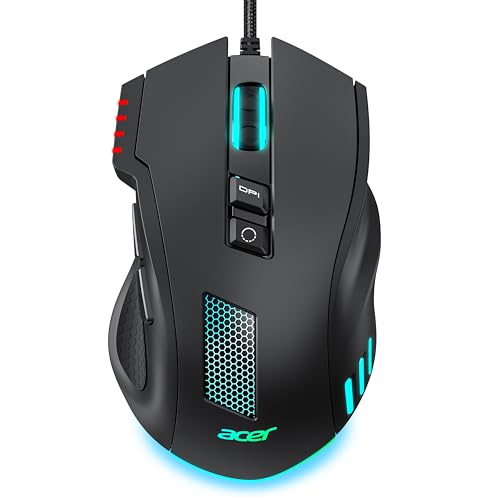
This Acer-branded wired mouse is aimed at players who want adjustable sensitivity and RGB lighting at a budget level. Its listing advertises up to 12,800 DPI, but a high DPI figure alone does not prove that a mouse will feel accurate. Your grip, game settings, and mouse pad matter just as much. The wired connection keeps setup simple and removes the need for a battery.
On Linux, the core mouse functions should be the easiest part to use. Lighting control and any saved DPI steps may depend on whether the model stores settings on the mouse or expects a companion app. The listing does not give enough detail to promise Linux support for every extra feature. I would treat it as a basic plug-in option first and confirm the return policy if those extras matter.
Pros:
- Wired connection needs no battery or pairing.
- Advertised adjustable DPI gives you sensitivity options.
- RGB lighting adds color to a gaming setup.
- Acer branding may appeal to buyers building around the brand.
- Can suit people seeking a low-cost, straightforward mouse.
Cons:
- Linux support for lighting and special settings is not clear.
- The advertised DPI ceiling does not guarantee better aim.
- There is limited detail here on shape, weight, or onboard memory.
What Amazon Buyers Are Saying
I do not have verified, up-to-date Amazon review data for this listing. Check recent buyer comments for comfort, durability, and whether the advertised lighting and DPI controls work as expected. Pay close attention to comments from Linux users if you plan to configure extra features. I would not treat marketing claims as proof of Linux software support.
My Recommendation
This is a reasonable budget candidate if you want a wired mouse with lighting and adjustable sensitivity. I would choose it only after checking the listing details and recent return feedback, especially if you need button remapping on Linux. For dependable advanced controls, the better-documented Logitech and Razer models are safer picks.
| Category | Rating |
|---|---|
| Linux basic use | 4/5 |
| Feature clarity | 3/5 |
| Wired ease | 4.5/5 |
| Value | 3.5/5 |
| Overall rating | 3.8/5 |
Razer Basilisk V3 Wired Gaming Mouse

The Basilisk V3 is a wired gaming mouse with a right-hand ergonomic shape, extra controls, and customizable RGB lighting. One feature that stands out is its scroll wheel, which can switch between a more controlled feel and free scrolling. That can help when you move between games and long pages. The mouse offers many options, though you may not need all of them.
Basic pointer use should work on Linux through USB input support. The main concern is the software layer: Razer’s full configuration suite is designed for other operating systems, so lighting and button changes may take extra work. Linux projects and community tools can support some devices, but support varies by model and version. Before buying, check whether the exact Basilisk V3 features you want are supported by your distribution.
Pros:
- Wired design avoids charging and wireless receiver issues.
- Ergonomic right-hand shape gives the thumb a support area.
- Extra buttons can add useful game and desktop controls.
- Scroll wheel offers more than one scrolling feel.
- RGB lighting gives the desk a customizable look.
Cons:
- Full setup may depend on software that does not run natively on Linux.
- Its many options can be more than a simple setup needs.
- The shape is made for right-handed use.
What Amazon Buyers Are Saying
I cannot confirm the current mix of Amazon reviews for this product. Read recent comments for feedback on the scroll wheel, shape, and long-term use of the buttons. If Linux support is your main concern, search reviews for the exact model and check current community compatibility notes. Do not assume the lighting app will offer the same features on every system.
My Recommendation
The Basilisk V3 is a good fit if you want a comfortable wired mouse with many physical controls. It is less ideal if you expect simple Linux access to every RGB and profile option. I would buy it for its shape and hardware first, and view software extras as a bonus.
| Category | Rating |
|---|---|
| Linux basic use | 4.5/5 |
| Physical features | 4.5/5 |
| Linux extra setup | 3/5 |
| Value | 4/5 |
| Overall rating | 4/5 |
Redragon M612 Wired RGB Gaming Mouse

The Redragon M612 is a wired optical mouse with RGB lighting and remappable buttons. Its product title lists sensitivity up to 8,000 DPI, which gives you room to adjust pointer speed. Extra buttons can help in games that support custom key binds. The cable also means the mouse stays ready without batteries.
For Linux users, the key question is not whether it can move the pointer; it is whether its extra buttons can be set the way you want. The mouse should work for basic input, but maker software may be needed for full remapping or lighting control. Some features might be stored in the device, while others may need an app. Check the product documentation and Linux tool support before relying on a custom profile.
Pros:
- Wired link keeps daily setup simple.
- Remappable buttons offer more control when supported.
- RGB lighting adds a gaming look.
- Advertised sensitivity range can suit different play styles.
- Good option for buyers who want extra controls without wireless setup.
Cons:
- Linux remapping support may be limited or require extra steps.
- RGB features may not be adjustable from Linux.
- Extra buttons only help if games or tools can use them.
What Amazon Buyers Are Saying
I do not have verified current Amazon review data to quote or summarize as a confirmed trend. Check the latest buyer notes for button feel, comfort, and software setup. If you see claims about remapping, confirm whether they refer to Linux or another operating system. This is especially important if you plan to use custom commands in games.
My Recommendation
The M612 offers a lot on paper for its category, especially if you want a wired mouse with extra buttons. It can be a good buy for basic use, but Linux users should confirm remapping support before counting on every control. I rate it as a promising value choice with a software caveat.
| Category | Rating |
|---|---|
| Linux basic use | 4/5 |
| Button options | 4/5 |
| Linux setup clarity | 3/5 |
| Value | 4/5 |
| Overall rating | 3.8/5 |
Seven-Button Wired PC Gaming Mouse

This listing describes a wired mouse with a high-precision sensor, RGB backlight, adjustable DPI, and seven programmable buttons. It also names Linux among its supported systems, which is a helpful sign for basic compatibility. Still, a listing’s compatibility claim does not confirm that every button and light setting works on every Linux distribution. I would view it as a low-cost feature set rather than a proven specialist device.
The wired design should keep basic setup simple: connect it and test movement and clicks. Then check each side button and the DPI switch in your games or desktop. If the mouse needs a brand app to change button assignments, those settings may not be easy to set in Linux. This is a sensible pick for users who want to try extra controls without spending much.
Pros:
- The listing names Linux as a supported system.
- Seven buttons can provide shortcuts for supported games.
- Wired use avoids battery care and pairing.
- Adjustable DPI offers a way to change pointer speed.
- RGB backlighting adds visual flair.
Cons:
- The listing does not prove that full button programming works on Linux.
- Brand and software details are limited in the supplied product name.
- Long-term durability is hard to judge without verified review data.
What Amazon Buyers Are Saying
I cannot verify current Amazon buyer comments for this product, so I will not present guesses as review facts. Read recent reviews for reports about the cable, button response, and Linux setup. Look for a clear product maker and a support page before you depend on programmable buttons. Keep your order details in case the mouse does not match the listing.
My Recommendation
This mouse may suit a tight budget if you need basic wired input and want to test extra buttons. Its Linux claim is useful, but I would still confirm how much of the programmable feature set works on your system. I give it a cautious rating because the supplied product details are brief.
| Category | Rating |
|---|---|
| Linux basic use | 4/5 |
| Stated compatibility | 4/5 |
| Feature certainty | 3/5 |
| Value | 3.5/5 |
| Overall rating | 3.6/5 |
BENGOO Wired RGB Gaming Mouse

The BENGOO wired mouse is a basic option for someone who wants gaming style without a wireless setup. Its product listing calls out RGB backlighting and an ergonomic PC mouse design. A wired USB mouse is often easy to use for basic pointer tasks on Linux. The important limit is that the listing title does not provide enough detail to rate advanced software features with confidence.
I would choose this model for simple play, browsing, and everyday use rather than complex macros. Once connected, test the main buttons and scroll wheel in your own setup. If you need side-button mapping or custom lighting, confirm that the feature works without Windows software. Its value depends on the price and on whether its shape feels right in your hand.
Pros:
- Wired connection keeps the setup direct.
- RGB backlighting suits a colorful gaming desk.
- Ergonomic design may feel more natural than a flat travel mouse.
- Basic USB mouse input is generally a good fit for Linux.
- Can work for both everyday tasks and casual games.
Cons:
- Detailed Linux software support is not clear from the supplied listing.
- Advanced buttons and lighting may not be configurable.
- Limited product detail makes it harder to compare with known models.
What Amazon Buyers Are Saying
I cannot confirm current buyer feedback for this listing. Check recent Amazon reviews for comfort, button response, and how the RGB lighting behaves. Treat comments about Windows setup separately from Linux reports. A low price can be appealing, but recent feedback and a clear return policy matter too.
My Recommendation
The BENGOO is worth a look if you want a simple wired mouse and do not need deep customization. I would not make it my first choice for a Linux gaming setup that relies on macros or custom profiles. It is a basic-budget option, not a feature leader.
| Category | Rating |
|---|---|
| Linux basic use | 4/5 |
| Feature detail | 3/5 |
| Ease of use | 4/5 |
| Value | 3.5/5 |
| Overall rating | 3.6/5 |
Redragon M913 Wireless MMO Gaming Mouse

The Redragon M913 is designed for MMO play, where a thumb grid can give you quick access to many actions. The product listing advertises wireless use, RGB, remapping, and sensitivity up to 16,000 DPI. That mix can be useful if your game makes regular use of many key binds. Its broader feature set also makes setup more complex than a simple two-button mouse.
Linux should handle basic pointer input, but the side grid is the main reason to buy this model. You should confirm that the buttons can send useful inputs without relying on a Windows-only utility. Some games let you bind mouse buttons directly, which may be enough for your needs. If you want saved profiles or lighting control, check current Linux support before you place an order.
Pros:
- Side controls suit games with many actions and shortcuts.
- Wireless design keeps a cable off the desk.
- RGB lighting gives the mouse a gaming look.
- Advertised sensitivity range offers adjustment options.
- Can be useful for MMO players who want many physical inputs.
Cons:
- Extra buttons may need software to set up well.
- Linux support for profiles and lighting is not assured.
- A large control layout may feel busy for simple games.
What Amazon Buyers Are Saying
I do not have verified current Amazon feedback for this product. Check the latest reviews for comfort, wireless performance, button layout, and battery use. Look for comments on the exact M913 model, not a similar Redragon mouse. Linux buyers should focus on whether the side buttons work as expected without the maker’s software.
My Recommendation
The M913 can be a good fit for Linux MMO players who value a thumb grid and are willing to test each control. It is not my first pick for someone who wants the simplest plug-and-play experience. Buy it for its physical layout, and confirm advanced support before you count on macros or profiles.
| Category | Rating |
|---|---|
| Linux basic use | 4/5 |
| MMO controls | 4.5/5 |
| Wireless ease | 4/5 |
| Linux configuration | 3/5 |
| Overall rating | 3.9/5 |
Pixiecube Linux Command Cheat-Sheet Desk Mat

This Pixiecube product is a Linux-themed extended mouse pad, not a gaming mouse. Its design is described as a large desk mat with command references for several Linux systems and Unix tools. It may help keep a keyboard and mouse on one shared surface. The printed guide could also serve as a quick reminder while you learn or work.
A desk mat does not need drivers, so its Linux compatibility is simple: it is a surface for your mouse and keyboard. The main buying questions are size, print readability, and how well the base stays in place. The provided listing name does not give dimensions, so confirm the current size before ordering. I include it because it can pair with a mouse, but it cannot replace one.
Pros:
- Linux command theme suits Linux users and learners.
- Extended mat can give a mouse more room to move.
- Printed commands may work as a handy visual reference.
- No driver or software setup is needed.
- Can help define a shared keyboard and mouse area.
Cons:
- It is a desk accessory, not a gaming mouse.
- Exact dimensions and surface feel should be checked on the listing.
- Printed commands may not match every user’s preferred distribution or workflow.
What Amazon Buyers Are Saying
I cannot verify current Amazon reviews for this desk mat. Check recent buyer photos and comments for print clarity, edge finish, and whether the mat fits the desk. Also confirm the command text and product size in the current listing. Those points matter more than mouse sensor features, which this accessory does not have.
My Recommendation
This is a useful optional accessory for someone who wants a Linux reference mat and more desk coverage. It is not part of my mouse ranking and should not be compared with a pointer device. I would buy it only after checking its dimensions and printed layout.
| Category | Rating |
|---|---|
| Linux theme | 4.5/5 |
| Mouse compatibility | Not applicable |
| Useful desk space | 4/5 |
| Value | 3.5/5 |
| Overall accessory rating | 4/5 |
Logitech G305 Lightspeed Wireless Gaming Mouse, White

This white G305 offers the same core style of wireless use as the black version, with a lighter finish for a different desk look. It uses a USB receiver and an AA battery, so setup does not involve a charging cable. The compact shape can work well for a travel kit or a smaller desk. The main difference between these two listings is the color.
For Linux, the same practical points apply: basic pointer input should be easier than advanced configuration. Connect the receiver, test the buttons, and see whether your games can use the extra controls as-is. If you need to change profiles or sensitivity behavior, confirm Linux tool support for the exact device. Choose this version when you prefer the white finish and the price is right.
Pros:
- Wireless setup keeps the mouse cable-free.
- White finish fits light-colored desk setups.
- Replaceable AA battery is easy to swap.
- Compact shape is convenient for moving between work areas.
- Basic Linux input does not depend on a full gaming app.
Cons:
- Requires an AA battery.
- Compact size may not suit every grip or hand size.
- Advanced settings may need Linux-compatible tools.
What Amazon Buyers Are Saying
I cannot verify current Amazon review patterns for this color listing. Read recent reviews for battery use, fit, and the receiver’s performance, then make sure they apply to the white version. Buyer experience may differ by use and setup. Check the product details before ordering so you get the color you want.
My Recommendation
This white G305 is a sound option if you like the wireless design and want a light-colored mouse. Functionally, I would choose it over the black model only for color or price, not for a different Linux feature set. It remains a good practical pick for basic wireless gaming.
| Category | Rating |
|---|---|
| Linux basic use | 4.5/5 |
| Wireless convenience | 4.5/5 |
| Color choice | 4/5 |
| Value | 4.5/5 |
| Overall rating | 4.4/5 |
How to Choose Best Gaming Mouse for Linux
Choosing the best gaming mouse for Linux means looking beyond sensor numbers and lighting effects. Start with what works without special software, then decide which extras you truly need. A mouse can be useful even if its RGB effects cannot be changed from Linux. Focus on comfort, connection, and the features your games can use.
1. Check Basic Linux Support First
Most standard USB mice can handle pointer movement and common clicks on Linux. That does not mean every special feature will work. A mouse may need a maker’s app for DPI changes, macro setup, saved profiles, or lighting effects. Search for the exact model name and your Linux distribution before you buy. Look for reports that describe the feature you need, not just a general claim that the mouse “works.”
Tools such as Piper and libratbag support some gaming mice, while Logitech devices may have support through tools such as Solaar. Support depends on the exact model and feature. These tools do not unlock every function on every mouse. If the mouse stores settings onboard, you may be able to set it up elsewhere and then use those saved settings on Linux. Confirm that behavior before relying on it.
2. Match the Shape and Controls to Your Games
A mouse should feel comfortable before you worry about its DPI ceiling. Check the listed size and shape, then think about how you hold it. A large mouse with a thumb rest may suit a palm grip, while a compact shape can be easier to carry. If possible, test a similar shape in person. Hand comfort matters during long sessions and can affect how steady your aim feels.
Extra buttons help only when you can reach them and your game can use them. A few side buttons may be enough for action games, while an MMO player may want a thumb grid. You should also consider wired versus wireless. Wired mice need no batteries and can be easy to set up. Wireless mice reduce cable drag but need a receiver and a battery plan.
3. Compare Real Value, Not Just the Spec Sheet
A high DPI number does not make a mouse automatically better. Most players can use a range of sensitivity settings, and comfort and control matter more than a large number on the box. Compare the build, warranty, shape, connection, and Linux setup needs. A lower-cost mouse can be a good buy if you only need basic input. A more expensive model makes sense when its physical controls fit your games.
Think about how you will change settings after purchase. If the maker app does not run on Linux, you may need a supported community tool or access to another computer. If that sounds like a hassle, choose a mouse with useful defaults and fewer software-dependent features. For many people, that is the simplest path to a reliable Linux gaming setup.
Final Verdict: Which Should You Buy?
The Logitech G502 HERO is my top pick for most Linux gamers. Its wired connection, adjustable sensitivity, and extra buttons make it a capable all-around mouse, though advanced setup can take extra work. Choose the G305 if you want wireless value, or the Basilisk V3 for its ergonomic shape and scroll options.
The best gaming mouse for Linux is the one that feels right and works with the features you use. Check Linux support for extra controls before you buy, and favor comfort over a long list of specs.
FAQs Of best gaming mouse for Linux
Do gaming mice work with Linux without drivers?
Most USB gaming mice support basic pointer movement and clicks without a separate driver. Extra buttons, lighting, and profiles may need tools or may not be configurable.
Can I change gaming mouse DPI on Linux?
Some mice let you switch DPI with a button or save settings onboard. Other models need software. Check support for your exact mouse before you buy.
Is a wired or wireless mouse better for Linux gaming?
Both can work well. Wired models avoid batteries and receiver setup, while wireless models reduce cable drag. Choose based on your desk and play style.
Will RGB lighting work on a gaming mouse in Linux?
The mouse may light up by default, but changing its colors can require software. Linux tools support some models, not all. Check the exact model first.
Which gaming mouse is best for Linux beginners?
The Logitech G502 HERO is a strong all-around choice in this group. If you prefer wireless use, consider the Logitech G305 and confirm which advanced settings you need.