The Razer Basilisk V3 is my best gaming mouse for fast clicking, thanks to its wired link, easy grip, and flexible controls.
A slow or awkward mouse can make rapid clicks feel harder than they should. That matters in games with repeated inputs, quick item use, or frequent button presses. The right mouse can help you click with less strain and keep your hand in control, but no mouse can replace good technique or make every switch click faster. I compared wired and wireless options, button layouts, and practical use so you can find a good fit for your hand, game, and budget.
See the differences between my top picks at a glance.
| Mouse | Connection | Clicking fit | Useful feature | Best for | Shop |
|---|---|---|---|---|---|
| Razer Basilisk V3 | Wired | Strong all-around | Programmable buttons | Flexible play | View on Amazon |
| Logitech G305 Lightspeed | Wireless | Good, no cable drag | Compact shape | Wireless value | View on Amazon |
| Logitech G502 HERO | Wired | Good, heavier build | Programmable controls | Button-rich play | View on Amazon |
| INPHIC A9 V2 | Wireless | Quiet-click focus | Silent-click design | Quiet settings | View on Amazon |
| Redragon M612 | Wired | Good for button setup | Remappable keys | Budget customization | View on Amazon |
| Logitech G PRO X2 SUPERSTRIKE | Wireless | Click-focused option | Check current listing details | Competitive play | View on Amazon |
| Redragon M602 | Wired | Good for extra inputs | Nine-button layout | Budget gaming | View on Amazon |
| INPHIC Upgraded Silent Wireless | Wireless | Quiet-click focus | Rechargeable design | Quiet daily use | View on Amazon |
| Razer Orochi V2 | Wireless | Good, compact control | Small travel-friendly shape | Small hands, travel | View on Amazon |
| Razer Pro Click V2 Vertical | Wireless | Not click-speed focused | Vertical ergonomic shape | Wrist comfort | View on Amazon |
Razer Basilisk V3

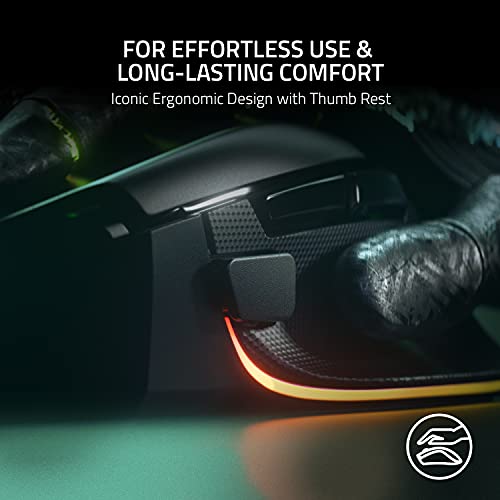
The Razer Basilisk V3 is a wired gaming mouse with an ergonomic right-hand shape and a set of programmable controls. Its cable means you do not need to manage a battery or wait for a wireless connection to wake. The shape gives your thumb a place to rest, which can help during long sessions. Its design suits players who want more than a plain two-button mouse.
For fast clicking, I value its steady wired connection and the chance to set useful actions on its extra buttons. Keep the main click for the action you need to repeat, and map less frequent commands elsewhere. This can reduce hand travel in games with many controls. It is not a magic tool for faster fingers, but it is a flexible pick for many players.
Pros:
- Wired connection needs no charging.
- Ergonomic right-hand shape supports a relaxed hold.
- Extra controls can suit games with many actions.
- Can fit several play styles through button setup.
- Useful for gaming and daily computer work.
Cons:
- Wired use may feel restrictive on a crowded desk.
- The shape may not fit left-handed users.
- Extra buttons can take time to learn.
What Amazon Buyers Are Saying
Buyer comments and ratings can change over time, and I cannot verify live reviews here. Before buying, check recent reviews for comments about hand fit, cable feel, button response, and software setup. Those details matter more than a broad claim that a mouse is “fast.” Also look for reports from people who play the same kinds of games you do.
My Recommendation
I recommend the Basilisk V3 as the best gaming mouse for fast clicking for players who want a wired, configurable, ergonomic option. Its extra controls add value, while the cable keeps setup simple. Choose another model if you need a small mouse, a wireless design, or a symmetrical shape.
| Category | Rating |
|---|---|
| Clicking control | 4.5/5 |
| Comfort and grip | 4.5/5 |
| Setup flexibility | 4.5/5 |
| Value | 4/5 |
| Overall rating | 4.5/5 |
Logitech G305 Lightspeed

The G305 Lightspeed is a wireless gaming mouse with a compact body. It is a good match for players who want to clear a cable from the desk without moving to a large mouse. Its familiar, simple layout keeps the main buttons easy to reach. The product uses a removable battery, so remember that its weight and upkeep differ from rechargeable mice.
A wireless mouse can make quick hand movements feel less tangled, especially if a cable tends to catch on the desk edge. The G305 can also work well for smaller hands or a fingertip grip, though fit depends on your hand. It has extra buttons for commands you do not need to click repeatedly. I would compare its size and battery setup with your current mouse before ordering.
Pros:
- Wireless design removes cable drag.
- Compact shape is easy to pack.
- Simple button layout is quick to learn.
- Extra side controls add useful shortcuts.
- Good option for players who prefer a smaller mouse.
Cons:
- Uses a removable battery rather than built-in charging.
- Compact size may feel small in larger hands.
- Wireless models need battery planning.
What Amazon Buyers Are Saying
Check recent Amazon reviews for feedback on the shape, battery life, and wireless use. Those are the practical points that can vary most between users and setups. I would not treat a few comments as proof of a specific click-speed advantage. Look for repeated, detailed notes rather than single extreme ratings.
My Recommendation
The G305 is a sensible wireless choice if you want a compact mouse and do not mind changing its battery. It is less suited to people who want a large palm rest or a rechargeable design. For click-heavy play, its freedom from cable drag is its main benefit, not a claim that it will increase your click rate.
| Category | Rating |
|---|---|
| Clicking control | 4/5 |
| Comfort and grip | 4/5 |
| Wireless convenience | 4.5/5 |
| Value | 4.5/5 |
| Overall rating | 4/5 |
Logitech G502 HERO

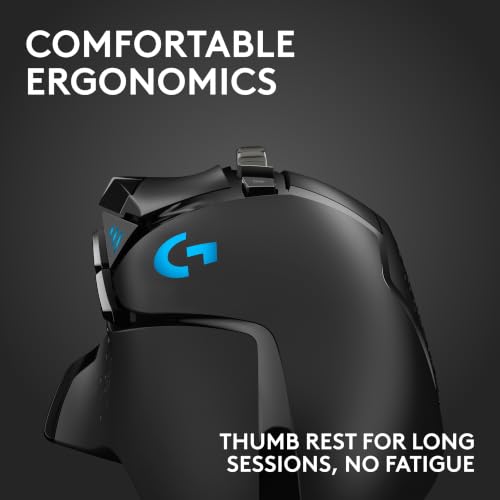
The Logitech G502 HERO is a wired mouse with a sculpted shape and several programmable buttons. Its many controls suit players who want quick access to commands without reaching for the keyboard. The design is made for a right hand, so left-handed buyers should look elsewhere. Its larger build may feel secure to some users and bulky to others.
For repeated clicking, the most useful feature is the chance to assign secondary actions to buttons within thumb reach. This can reduce extra hand motion in games with many commands. The cord avoids battery concerns but still needs enough room to move freely. If you prefer a light, minimal mouse, this is not the one I would pick.
Pros:
- Several programmable buttons support custom layouts.
- Wired design avoids charging downtime.
- Sculpted right-hand shape offers a defined grip.
- Useful for games with many mapped actions.
- Can double as a general-purpose desktop mouse.
Cons:
- Bulkier than compact gaming mice.
- Wired cable can snag without good desk routing.
- Button-rich layout may feel busy at first.
What Amazon Buyers Are Saying
Review the latest buyer feedback for notes on weight, hand comfort, and the usefulness of the extra buttons. These are personal factors, so a positive review from a large-handed player may not predict your fit. Check whether buyers mention software setup and long-term use. Avoid assuming that a high button count alone makes a mouse faster.
My Recommendation
I would choose the G502 HERO for a player who wants many controls and prefers a solid, wired mouse. It is a practical option for games with several abilities or macros, subject to each game’s rules. It is not my first pick for lightweight, rapid aim movements or small hands.
| Category | Rating |
|---|---|
| Clicking control | 4/5 |
| Comfort and grip | 4/5 |
| Button flexibility | 5/5 |
| Value | 4/5 |
| Overall rating | 4/5 |
INPHIC A9 V2 Wireless Mouse

The INPHIC A9 V2 is listed as a wireless gaming mouse with silent clicks and a stated 12,800 DPI maximum. Its quiet switch feel may suit a shared room or late-night play. A high DPI number describes cursor sensitivity, not how fast a switch registers a click. Check the current listing for the exact connection, charging, and software details before you buy.
This model makes more sense for someone who values low click noise than for a player chasing the lightest or most direct-feeling click. Silent switches can feel different from standard gaming mouse buttons. Try to confirm that the click feel suits your game and that the shape fits your hand. If fast repeated clicks are the top priority, compare it with a conventional wired gaming mouse first.
Pros:
- Silent-click design can reduce noise.
- Wireless form helps keep the desk clear.
- Listed DPI range offers sensitivity options.
- Could suit shared work and gaming spaces.
- Suitable for buyers who want a quiet mouse feel.
Cons:
- Silent clicks may not feel as crisp as standard switches.
- DPI does not measure click speed.
- Confirm current listing details before purchase.
What Amazon Buyers Are Saying
I cannot verify current Amazon reviews for this listing, so I will not invent a buyer consensus. Read recent comments for details about click sound, connection stability, and battery use. Give extra weight to reviews that explain the buyer’s computer and use case. If the quiet click is a key reason to buy, seek comments about that feature in particular.
My Recommendation
The A9 V2 is worth considering when quiet clicking matters as much as gaming. I would not make it my first recommendation for rapid competitive clicking without checking current reviews and specifications. Its strongest appeal is a quieter wireless setup, not the advertised DPI figure.
| Category | Rating |
|---|---|
| Clicking control | 3.5/5 |
| Quiet use | 4.5/5 |
| Feature clarity | 3.5/5 |
| Value | 3.5/5 |
| Overall rating | 3.5/5 |
Redragon M612 Wired Gaming Mouse

The Redragon M612 is a wired RGB gaming mouse with remappable buttons and a listed maximum of 8,000 DPI. Its extra controls let you place selected game commands closer to your thumb. That can make a complex control layout easier to manage. The mouse is a budget-minded option for players who want more than a basic two-button design.
A cable provides a steady connection and removes charging from your routine. The M612 may be useful for games where you switch between repeated clicks and other commands. Before you buy, check its shape against your hand and grip style. Do not use DPI as a measure of click response; it changes pointer movement sensitivity.
Pros:
- Wired connection does not need a battery.
- Remappable buttons allow a custom layout.
- Listed DPI range gives sensitivity choices.
- RGB lighting adds a gaming look.
- Extra controls offer value for multi-action games.
Cons:
- Wired use may limit movement if the cable catches.
- More buttons can take time to set up well.
- High DPI alone does not improve clicking speed.
What Amazon Buyers Are Saying
Check current buyer reviews for repeated comments about comfort, button mapping, and software. A single report may reflect a personal setup rather than a common issue. Pay special attention to whether buyers find the extra buttons easy to reach. That matters more than the lighting if you plan to use the mouse for fast game inputs.
My Recommendation
The M612 is a useful budget choice for players who want a wired mouse with extra controls. It can help keep commands close to hand, though it does not promise faster clicks by itself. I would compare its size and button placement with the Basilisk V3 if both fit your budget.
| Category | Rating |
|---|---|
| Clicking control | 4/5 |
| Button flexibility | 4.5/5 |
| Ease of setup | 3.5/5 |
| Value | 4.5/5 |
| Overall rating | 4/5 |
Logitech G PRO X2 SUPERSTRIKE

The G PRO X2 SUPERSTRIKE listing presents a wireless gaming mouse aimed at players who want a performance-focused design. Product names and features can vary by region or listing, so read the current Amazon page before you order. Confirm its supported controls, connection options, and what comes in the box. I avoid assuming a feature from the name alone.
If its current listing confirms click-response settings that match your needs, it may suit someone who wants fine control over button feel. That kind of feature can matter in fast games, but comfort and practice still matter more. Compare the return policy and recent owner feedback, since a specialized mouse can be a poor fit if its shape feels wrong. This is a pick to research closely, not an automatic choice for every player.
Pros:
- Wireless design keeps the desk free of a mouse cable.
- Performance-focused product positioning suits gaming setups.
- Potentially appealing to competitive players seeking advanced control.
- Black-and-white finish offers a distinct look.
- Worth considering if the current listing matches your preferred features.
Cons:
- Check exact specifications because listing details can change.
- Wireless charging or battery needs may add upkeep.
- A specialized design may not suit every hand or budget.
What Amazon Buyers Are Saying
I cannot confirm a reliable set of current Amazon buyer comments for this listing. Read the latest reviews before purchase, with focus on click feel, fit, wireless performance, and setup. Look for several detailed reports that agree, rather than relying on a star score alone. Confirm that reviewers discuss the same version shown on the product page.
My Recommendation
This mouse may be a strong option for players who want an advanced wireless gaming product, but verify the current specifications first. I would buy it only after confirming that its click features, shape, and price fit my needs. For a simpler, known wired choice, the Basilisk V3 remains easier to recommend.
| Category | Rating |
|---|---|
| Clicking control | 4/5 |
| Feature certainty | 3/5 |
| Wireless convenience | 4/5 |
| Value | 3.5/5 |
| Overall rating | 3.5/5 |
Redragon M602 Gaming Mouse

The Redragon M602 is a wired gaming mouse with an ergonomic design, RGB lighting, and nine programmable buttons, according to its listing. It also lists adjustable DPI up to 7,200. The button count can help players move commands off the keyboard. This makes it a flexible budget pick for games that use many inputs.
For rapid clicking, a comfortable grip and stable placement matter more than a long list of features. The M602 gives you a wired setup, so you avoid battery checks but need to manage the cable. Its shape and button reach are personal, so check dimensions and recent photos before buying. The extra buttons suit varied commands better than repeated clicks alone.
Pros:
- Nine programmable buttons offer many mapping choices.
- Wired connection avoids battery changes.
- Ergonomic design may suit longer sessions.
- Adjustable DPI lets you tune pointer speed.
- RGB lighting adds a customizable appearance.
Cons:
- Large number of controls can feel crowded.
- Cable management is still needed.
- Its shape may not work for every grip or hand size.
What Amazon Buyers Are Saying
Check current buyer reviews for common notes about the shape, button placement, and software. For a mouse with many controls, reports about whether the side buttons are easy to reach can be useful. I cannot verify live review themes here, so I will not present unconfirmed claims as buyer consensus. Look for recent reviews that include specific details.
My Recommendation
The M602 is a reasonable low-cost choice for players who want several mapped inputs and a wired connection. It may be less appealing if you prefer a simple, light shape. For fast-click games, it offers practical control options but no guaranteed increase in click speed.
| Category | Rating |
|---|---|
| Clicking control | 3.5/5 |
| Button flexibility | 4.5/5 |
| Comfort potential | 4/5 |
| Value | 4/5 |
| Overall rating | 4/5 |
INPHIC Upgraded Silent Wireless Mouse

This INPHIC mouse is listed as a rechargeable wireless model with silent clicks and a maximum of 12,800 DPI. Its quiet design may suit an office, library, or shared room. The listing calls it a gaming mouse, but the high DPI figure does not tell you how crisp or responsive the buttons feel. Confirm current battery and connection details on the product page.
The main reason to consider it is quiet, cable-free use. Silent switches can feel softer than standard switches, which some players like and others do not. If you click repeatedly for a long time, test the feel as soon as you can and use the return window if it does not suit you. I would compare it with a gaming-first wired mouse before deciding.
Pros:
- Rechargeable design avoids disposable batteries.
- Wireless setup keeps the desk tidy.
- Silent clicks may suit shared rooms.
- Listed DPI options allow pointer adjustment.
- Can serve for everyday computer use as well as casual gaming.
Cons:
- Quiet switches may feel less crisp for rapid clicking.
- Battery life depends on use and settings.
- DPI figures do not confirm button response.
What Amazon Buyers Are Saying
I cannot confirm current Amazon review patterns for this product. Check recent feedback for how quiet the buttons sound, whether the mouse feels comfortable, and how charging works in daily use. Reviews that describe gaming sessions are more helpful than general office-use comments. Be careful with review claims that focus only on DPI.
My Recommendation
I recommend this INPHIC model for quiet work and casual play, not as a clear leader for competitive rapid clicking. It offers convenience if you need a rechargeable wireless mouse. Choose a conventional gaming mouse if button feel and consistent click feedback matter most.
| Category | Rating |
|---|---|
| Clicking control | 3.5/5 |
| Quiet use | 4.5/5 |
| Wireless convenience | 4/5 |
| Value | 3.5/5 |
| Overall rating | 3.5/5 |
Razer Orochi V2 Wireless Mouse

The Razer Orochi V2 is a compact wireless gaming mouse. Its small size makes it easier to carry than a larger desktop model, and it can suit a fingertip or claw grip. The product listing states support for a long battery life, but actual time will depend on use and settings. Check the current listing for the included battery and connection details.
Without a cord, the Orochi V2 can move freely during quick swipes. Its compact shape is the key question: small hands may find it easy to control, while larger hands may want more palm support. A mouse that feels secure can help you keep a steady click rhythm. Try not to choose it only because it is wireless; fit comes first.
Pros:
- Compact shape is easy to carry.
- Wireless design avoids cable drag.
- Can suit smaller hands and fingertip grips.
- Useful for both travel and desktop gaming.
- Listed long battery life may reduce frequent battery changes.
Cons:
- Small body may feel cramped for larger hands.
- Battery needs vary with use.
- Compact shape offers less palm support than a large mouse.
What Amazon Buyers Are Saying
Read current buyer reviews for notes about hand size, grip, and battery use. Comments about comfort are most useful when the reviewer shares their hand size or grip style. I cannot verify current review trends, so check recent comments directly. Also confirm the version and battery information on the page before placing an order.
My Recommendation
The Orochi V2 is a good candidate if you want a small wireless mouse for gaming and travel. Its fit may help some players click with control, but it is not a universal choice. If you have large hands or rest your palm on the mouse, consider the Basilisk V3 instead.
| Category | Rating |
|---|---|
| Clicking control | 4/5 |
| Wireless freedom | 4.5/5 |
| Compact comfort | 4/5 |
| Value | 4/5 |
| Overall rating | 4/5 |
Razer Pro Click V2 Vertical Mouse

The Razer Pro Click V2 Vertical is a wireless mouse with a vertical ergonomic shape and six buttons. It aims to place the hand in a different position from a flat gaming mouse. That may appeal to people who value comfort during long workdays. Its shape is not built first for competitive rapid clicking, so it is a special-purpose pick in this group.
A vertical mouse takes time to learn because your hand moves and points in a new way. The grip may feel more natural to some users, but it can make quick aim corrections harder at first. Consider it if wrist comfort is your top concern and gaming is less intense. For fast clicks in action games, I would start with a familiar horizontal gaming shape.
Pros:
- Vertical form can offer a different hand posture.
- Wireless design keeps the desk clear.
- Six buttons provide basic shortcut options.
- May suit mixed work and casual gaming.
- Good alternative for buyers who dislike flat mouse shapes.
Cons:
- Not designed primarily for fast competitive clicking.
- New grip may take time to learn.
- May feel less natural for fast aiming movements.
What Amazon Buyers Are Saying
Check recent Amazon reviews for comments on comfort, learning time, and button reach. Vertical mice are personal, so one buyer’s comfort may not match yours. Look for detailed reports from people who use the mouse for both work and gaming. I cannot confirm live review patterns for this listing.
My Recommendation
I would choose the Pro Click V2 Vertical for comfort-focused work, not as the best gaming mouse for fast clicking. It may be useful for casual gaming after you adapt to the shape. Competitive players should choose a conventional gaming mouse with a grip that feels familiar.
| Category | Rating |
|---|---|
| Clicking control | 3/5 |
| Ergonomic focus | 4.5/5 |
| Gaming fit | 3/5 |
| Value | 3.5/5 |
| Overall rating | 3.5/5 |
How to Choose the Best Gaming Mouse for Fast Clicking
The best gaming mouse for fast clicking should feel easy to control for your hand and game. A large DPI number does not mean the buttons register faster. Focus on grip, button feel, connection, and the controls you will use. If possible, test the shape in person or buy from a seller with a clear return policy.
1. Check the main button feel and switch type
When you click, the button should feel clear and easy to reset. A firm or heavy button can tire your finger during long sessions. A very light button may cause accidental clicks if you rest your finger on it. Try several clicks in a row and notice how your finger feels, not just how loud the mouse sounds. Silent-click mice can be useful in shared rooms, but the softer sound may come with a different feel.
2. Match the shape to your grip and game
Grip matters because a mouse that slips or strains your hand can break your rhythm. Palm grip users often want more support, while claw and fingertip users may prefer a smaller shape. Check whether the mouse is made for a right hand, and compare its size with your current model. For action games, a shape that lets you lift and reset the mouse easily may help more than extra buttons. For games with many commands, side buttons can keep actions close to your thumb.
3. Choose wired or wireless based on your setup
A wired gaming mouse avoids charging and gives you a direct cable connection. Its cord can drag, though, so keep it clear of the mouse pad edge. Wireless mice remove that cable and can feel free during wide movements, but they need a battery or charging plan. Do not assume that wired always means faster or wireless always means better. Pick the style that fits your desk and habits, then check current reviews for connection and battery feedback.
Final Verdict: Which Should You Buy?
The Razer Basilisk V3 is my top pick because it combines a wired connection, an ergonomic shape, and useful programmable buttons. The Logitech G305 is a better fit if you want a compact wireless mouse.
The best gaming mouse for fast clicking is the one that fits your hand and lets you click with control. Compare the button feel, shape, and current listing details before you buy.
FAQs Of best gaming mouse for fast clicking
Does a gaming mouse make you click faster?
A mouse cannot make your fingers move faster. A comfortable shape and clear button feel may help you click with better control and less strain.
Is wired or wireless better for fast clicking?
Either can work well. Wired models avoid charging, while wireless models remove cable drag. Choose the one that feels steadier on your desk.
Does higher DPI improve clicking speed?
No. DPI affects cursor sensitivity, not how fast a button click registers. Set DPI to a level that feels easy to control.
Are silent gaming mice good for rapid clicking?
They can work, but silent switches may feel softer than standard switches. Check the click feel before choosing one for competitive play.
How do I choose a gaming mouse for small hands?
Compare the mouse size with one you already like. A compact model such as the Logitech G305 or Razer Orochi V2 may be worth testing.