For most players, the Logitech G502 X is the best wired gaming mouse for control, comfort, and dependable performance.
A mouse that slips, misses a click, or pulls against its cable can spoil a close match. The right wired gaming mouse can give you steady tracking, useful controls, and a shape that feels good through long sessions. I compared these ten options by their design, stated features, and likely fit for different players. My top pick is a strong all-rounder, but lighter mice, budget models, and MMO mice may suit you better.
See the differences between my top picks at a glance.
| Mouse | Design | Standout feature | Best fit | Link |
|---|---|---|---|---|
| Logitech G502 X | Right-handed, sculpted | Custom controls and scroll wheel | All-around gaming | View on Amazon |
| Logitech G502 Hero | Right-handed, sculpted | Adjustable weights | Feature-rich control | View on Amazon |
| Razer Basilisk V3 | Right-handed, ergonomic | Custom scroll options | Mixed games and daily use | View on Amazon |
| Razer Basilisk V3 35K | Right-handed, ergonomic | 35K sensor model | Fine sensor adjustment | View on Amazon |
| Razer DeathAdder V3 | Right-handed, light | Up to 8K polling rate | Fast competitive play | View on Amazon |
| Logitech G203 | Compact, ambidextrous shape | Simple six-button layout | Budget and smaller hands | View on Amazon |
| Razer DeathAdder Essential | Right-handed, ergonomic | Classic five-button layout | Simple gaming setup | View on Amazon |
| Redragon M612 | Right-handed, contoured | Up to 8,000 DPI | Low-cost extra controls | View on Amazon |
| Redragon M908 | Right-handed MMO style | Many remappable buttons | MMO and hotkey-heavy games | View on Amazon |
| Corsair Scimitar RGB Elite | Right-handed MMO style | Adjustable side button panel | MMO and MOBA play | View on Amazon |
Logitech G502 X Wired Gaming Mouse
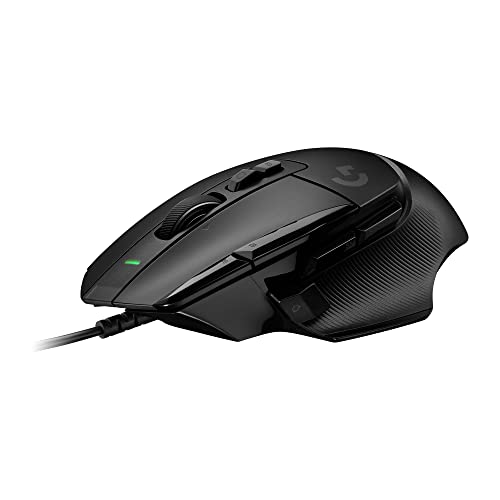
The Logitech G502 X is my strongest all-around pick for players who want a wired mouse with plenty of control. Its familiar right-handed shape has a thumb rest and several buttons within reach. The scroll wheel can switch between distinct steps and a faster free-spin mode. That mix makes it useful for games, work, and browsing.
Logitech lists a HERO 25K sensor for this model, with adjustable sensitivity in its software. You can assign supported commands to the mouse buttons and tune the pointer to your play style. The cable means you do not need to charge it or keep a battery ready. Its shape and features do make it a larger, more involved choice than a simple esports mouse.
Pros:
- Comfortable thumb rest supports a relaxed grip.
- Multiple buttons can reduce keyboard trips for common actions.
- Scroll wheel offers both stepped and free-spin use.
- Wired connection avoids battery charging and pairing.
- Sensor sensitivity can be adjusted for different games.
Cons:
- Its size and shape may not suit small hands.
- Extra buttons take time to learn and configure.
- It is not as light or simple as a basic FPS mouse.
What Amazon Buyers Are Saying
Amazon reviews can change over time, so check recent comments for the exact version and seller. For this mouse, focus on feedback about its hand fit, button feel, scroll modes, and software setup. Those are the features most likely to affect daily use. Also look for notes about cable movement and long-term button behavior rather than relying on a star score alone.
My Recommendation
I recommend the G502 X to players who want one wired mouse for several game types and everyday tasks. It has a useful balance of customization and familiar controls, without the large side grid found on MMO models. If you want the best wired gaming mouse for broad use, this is my first choice, provided the shape fits your hand.
Logitech G502 Hero Wired Gaming Mouse

The G502 Hero is a feature-rich wired mouse with a shape that favors right-handed use. Its Hero sensor supports a wide sensitivity range, and the mouse includes programmable controls for games and apps. A set of removable weights lets you change how heavy it feels. This can help if you prefer a more solid mouse over an ultralight design.
The thumb rest and side buttons work well for players who want quick access to extra actions. The wheel can also move through pages quickly when you use its free-spin mode. Logitech software provides options for button mapping and sensitivity settings. The many features are useful, though the mouse may feel busy if you only need two main buttons and a wheel.
Pros:
- Removable weights let you adjust the feel.
- Programmable buttons offer options for game commands.
- Thumb rest gives the hand a clear place to sit.
- Scroll wheel can switch between controlled and fast scrolling.
- Wired use means no charging or battery swaps.
Cons:
- The shape is made for right-handed use.
- It feels heavier than many lightweight FPS mice.
- Weight pieces and software settings may be more than some players need.
What Amazon Buyers Are Saying
Read current Amazon reviews for comments on the weight system, scroll wheel, and fit. These points matter more than broad praise because they depend on hand size and personal preference. Check whether reviewers discuss the Hero version shown on the product page, since listings and bundles can vary. I would also scan recent reviews for reports about button wear or software issues.
My Recommendation
The G502 Hero remains a sensible choice if you like a substantial mouse and want several controls at hand. It is less appealing if your priority is a very light shell or a plain design. Compare its current price with the newer G502 X before buying, since the better deal can change. I rate it highly for customization and daily flexibility.
Razer Basilisk V3 Wired Gaming Mouse

The Razer Basilisk V3 is a wired, right-handed mouse built around comfort and control. It has a pronounced thumb rest and a set of buttons that can be assigned to useful actions. Its scroll wheel has more than one operating mode, so you can choose a controlled feel or move through long pages quickly. This makes it a natural fit for both games and desktop use.
Razer’s software gives you ways to set sensitivity, lighting, and button behavior. The shape feels supportive for a palm grip, but it may not suit a player who wants a small, flat mouse. Its extra controls can help in games that use several commands, yet they do not replace a dedicated MMO keypad. Consider it when you want an ergonomic all-purpose mouse with a wired connection.
Pros:
- Thumb rest supports a relaxed right-handed grip.
- Scroll modes suit both precise and fast movement.
- Buttons can be set for personal game commands.
- RGB lighting allows a more personal desk setup.
- Wired operation keeps it ready without charging.
Cons:
- Its shape does not work for left-handed users.
- Large features may feel excessive for a simple FPS setup.
- Software configuration takes time if you want custom profiles.
What Amazon Buyers Are Saying
When checking Amazon feedback, look for recent notes on how the thumb rest fits different hands and how easy the wheel modes are to use. Buyers may value different things, so compare comments from people who play games like yours. Confirm the listing details and included version before ordering. Reviews about software setup can also help you decide whether its customization suits your routine.
My Recommendation
I recommend the Basilisk V3 if you want an ergonomic wired mouse with versatile scrolling and customizable controls. It is a better fit for general play and daily use than for someone chasing the lightest possible FPS mouse. Check the hand fit first, especially if you use a fingertip grip. It offers a strong feature set when its shape matches your needs.
Razer Basilisk V3 35K Wired Gaming Mouse

This Basilisk V3 version pairs the ergonomic shape with a sensor rated up to 35,000 DPI. DPI describes how far the pointer moves for a given hand movement; most players do not need to use the top setting. The main benefit is having room to tune sensitivity to your screen and play style. It also keeps the family’s thumb-rest shape and programmable controls.
Its wired design keeps the mouse ready, while the scroll wheel supports more than one style of movement. You can set the mouse for a steady pace in a game or fast scrolling at a desk. As with other large ergonomic mice, grip fit matters more than the biggest sensor number. Choose it if you want a modern sensor specification in a familiar, control-focused design.
Pros:
- 35K sensor rating offers a broad sensitivity range.
- Comfortable right-handed shape includes a thumb rest.
- Custom controls can help reduce repeated keyboard reaches.
- Scroll options support both games and everyday browsing.
- Wired use removes battery upkeep.
Cons:
- High maximum DPI does not guarantee better aim.
- The ergonomic shape may feel large to some users.
- Extra features and software may take setup time.
What Amazon Buyers Are Saying
Check current Amazon reviews for specific comments about the 35K version, hand fit, and software behavior. Do not assume every review on a product page refers to the same revision; verify the product details shown with the offer. It is useful to read both positive and critical comments about button placement. Also compare the price with the standard Basilisk V3 to see whether the updated sensor matters to you.
My Recommendation
This model suits players who want the Basilisk layout and value its higher stated sensor range. It is not an automatic upgrade for everyone: comfort, button placement, and sensitivity preference matter more than a maximum DPI figure. If the price difference is small and the shape fits, it is a capable premium wired option. If not, the standard model may be the better value.
Razer DeathAdder V3 Wired Gaming Mouse

The DeathAdder V3 takes a different path from feature-heavy mice. It has a streamlined right-handed shape and a listed weight of 59 grams. The product also supports an 8,000 Hz polling rate, which means it can report its position very often when set up to do so. That feature targets players who care about quick input response and have a system that can support it.
The lighter body can make fast, repeated movements feel easier than with a heavy mouse. Its cleaner button layout also keeps the thumb area less crowded than an MMO design. A high polling rate is not a must-have for most players, and it may use more system resources. This model makes the most sense for competitive play when you value low weight and a direct, simple shape.
Pros:
- 59-gram listed weight favors quick movement.
- Up to 8K polling is available for compatible setups.
- Simple layout keeps the focus on core controls.
- Ergonomic right-handed shape suits many palm and claw grips.
- Wired connection needs no battery charging.
Cons:
- It has fewer extra buttons than productivity or MMO mice.
- Some players may prefer a heavier, more solid feel.
- High polling features may not benefit every setup or player.
What Amazon Buyers Are Saying
Look through recent Amazon reviews for comments about the light build, shape, and click feel. Reviewers’ grip styles and hand sizes can differ, so give more weight to feedback from people with similar needs. For the 8K feature, check whether buyers describe their system and settings rather than expecting a clear gain in every game. Also check the listing to confirm the wired version.
My Recommendation
I would pick the DeathAdder V3 for a player who wants a light wired mouse for fast aim and does not need many side buttons. Its 8K polling support is a useful extra, not the main reason to buy it. The best results still depend on a comfortable shape, steady technique, and suitable settings. It earns a high rating for focused competitive use.
Logitech G203 Wired Gaming Mouse

The Logitech G203 is a compact wired gaming mouse with a simple six-button layout. Its classic shape is smaller than the larger ergonomic models in this guide. Logitech lists sensitivity up to 8,000 DPI, which gives you several settings to try. Its basic layout works well for players who want a mouse that can handle games without a long setup process.
The G203 is a good fit for a first gaming PC, a school desk, or a smaller hand. It also has RGB lighting, so you can match it to a colorful setup. It does not offer a large thumb rest or a wide set of side controls. If you want an affordable, direct option and do not need a premium feature set, it is worth a look.
Pros:
- Compact shape can suit smaller hands and tight desk space.
- Six-button layout is simple to learn.
- Up to 8,000 DPI gives useful sensitivity options.
- RGB lighting adds a touch of color.
- Wired design avoids charging and wireless pairing.
Cons:
- Small size may feel cramped in larger hands.
- It has fewer controls than MMO-focused mice.
- Its basic shape lacks a dedicated thumb rest.
What Amazon Buyers Are Saying
On Amazon, check current comments about the G203’s size, cable, and button feel. These are the details that can shape comfort over a long session. Reviews from users with smaller hands may offer better guidance if you are choosing a compact mouse. Since colors and listings can vary, confirm that the page shows the black model and the features you expect.
My Recommendation
The G203 is a sensible budget pick for casual play and everyday computer use. It keeps the controls clear and avoids the cost and complexity of a feature-heavy mouse. It may not suit a large hand or someone who wants many shortcuts, but it covers the basics well. Consider it when a small, simple wired gaming mouse is your main goal.
Razer DeathAdder Essential Wired Mouse

The DeathAdder Essential is a straightforward wired mouse with a familiar ergonomic shape. It has five buttons and a listed optical sensor sensitivity of up to 6,400 DPI. That is enough range for many players who want to set a comfortable pointer speed. Its design keeps the focus on the main controls instead of a large bank of extra keys.
The curved body is made for right-handed use and can feel natural for a palm grip. It is a simpler choice than the DeathAdder V3, with fewer advanced features and a more modest sensor rating. That simplicity may be a benefit if you want an easy mouse for everyday play. Check the dimensions and hand fit before you buy, since shape matters more than a spec sheet.
Pros:
- Simple five-button layout is easy to understand.
- Ergonomic shape supports right-handed use.
- Up to 6,400 DPI covers common sensitivity needs.
- Wired connection keeps the mouse ready for use.
- Good basic option for a first gaming setup.
Cons:
- It has fewer customization options than premium models.
- The shape is not designed for left-handed use.
- It may lack the features competitive players want.
What Amazon Buyers Are Saying
Check the latest Amazon reviews for feedback about hand comfort, click feel, and basic setup. Buyers may judge its simple design differently based on the games they play. If you want a low-cost daily mouse, look for reviews that cover both gaming and general use. Review the current listing details before purchase so you know which model and color you are ordering.
My Recommendation
The DeathAdder Essential is a practical pick for players who want a familiar shape and do not need a long list of custom commands. It is not the most advanced option here, but it can meet basic gaming needs. I would choose it when its price is attractive and its shape fits your hand. Look elsewhere if you need very low weight or more buttons.
Redragon M612 Wired Gaming Mouse

The Redragon M612 offers a contoured shape, RGB lighting, and a sensor rated up to 8,000 DPI. The model is designed for players who want more control options without moving to an expensive mouse. You can adjust sensitivity to suit different games and screen sizes. Its right-handed form has a distinct shape, so it is worth checking that it matches your grip.
This mouse may appeal to players who want extra buttons for common commands. A wired connection also makes it simple to set up and use. The listed DPI figure is a maximum, not a target that every player should use. Try a moderate setting first, then adjust it until you can track targets and move the pointer with control.
Pros:
- Up to 8,000 DPI offers several sensitivity choices.
- RGB lighting helps personalize a gaming setup.
- Extra controls can put common actions within reach.
- Contoured body gives the hand a defined resting place.
- Wired use avoids battery maintenance.
Cons:
- The contoured form may not suit every grip or hand size.
- Its extra controls can need setup and practice.
- RGB and high DPI may matter less than fit and tracking.
What Amazon Buyers Are Saying
For the M612, read recent Amazon feedback about the shape, button setup, and software experience. Those points can show whether its extra controls feel useful or crowded in real use. Look for comments from people who use similar games and hand positions. It is also wise to check recent reviews for the exact listing, since seller offers and product details can change.
My Recommendation
The M612 is worth considering if you want a low-cost wired mouse with more options than a basic two-side-button design. I would not choose it only for its DPI number or lighting. Put comfort, reliable tracking, and button reach first. If its shape suits you and the price is right, it can be a useful starter or spare mouse.
Redragon M908 Wired MMO Gaming Mouse

The Redragon M908 is built for players who want many commands close to the thumb. Its MMO-style side buttons can be mapped to skills, tools, or other actions. The product title lists sensitivity up to 12,400 DPI, and the mouse includes RGB lighting. This layout can help in games where you use many hotkeys and want fewer keyboard reaches.
That large control set comes with a learning curve. You need to map the buttons, then practice until you can find the right one without looking. The mouse is a larger, more specialized choice than a simple FPS model. It makes the most sense for MMO or action games with frequent commands, rather than for someone who wants a clean, light design.
Pros:
- Side-button grid puts many actions within thumb reach.
- Useful for MMO and hotkey-heavy games.
- RGB lighting adds visual choice.
- 12,400 DPI maximum allows sensitivity adjustment.
- Wired setup does not need a battery.
Cons:
- The side grid takes time to learn.
- Its size and button count may feel excessive for FPS play.
- Many controls require careful mapping to avoid mistakes.
What Amazon Buyers Are Saying
Check current Amazon reviews for comments on the side-button layout, hand comfort, and how well the controls work after setup. These are personal factors, so compare feedback from players who use similar games. Reviewers may also discuss software and button mapping; read both praise and complaints to judge the learning curve. Confirm that the offer is for the M908 model shown here.
My Recommendation
I recommend the M908 for MMO players who will use its side buttons often. It is not a universal pick, since the larger shape and dense controls can slow down a player who wants quick, simple aim. If you have a clear use for the button grid, the feature set can offer strong value. If not, choose a simpler model.
Corsair Scimitar RGB Elite Wired Mouse
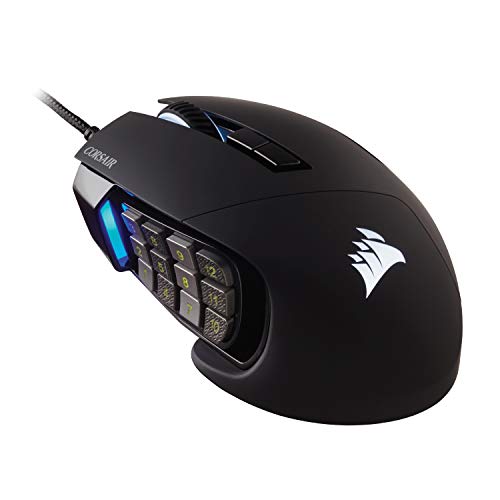
The Corsair Scimitar RGB Elite is a wired mouse aimed at MMO and MOBA players. Its key feature is a side panel with many buttons that you can position to better match your thumb. This adjustable layout can make it easier to reach game commands without changing your grip. It also has RGB lighting and software tools for setup.
The side controls offer more room for mapped actions than a standard gaming mouse. They can also feel crowded if you do not need so many commands. Its right-handed, MMO-focused shape makes it a specialist rather than a simple all-purpose pick. If you play games that use many abilities, the adjustable panel is a useful reason to consider it.
Pros:
- Adjustable side panel can help match button reach to your thumb.
- Many side controls suit MMO and MOBA commands.
- RGB lighting supports a custom desk setup.
- Software lets you configure mouse behavior.
- Wired design means no charging between sessions.
Cons:
- The button panel can feel crowded for simple games.
- It is designed for right-handed use.
- Setup and practice are needed to use many commands well.
What Amazon Buyers Are Saying
Before buying, read recent Amazon reviews about the adjustable panel, button reach, and software setup. The main question is whether the keys sit comfortably under your thumb. Look for comments from MMO or MOBA players, since their needs differ from those of FPS players. Check the listing carefully for the exact model and current included features.
My Recommendation
The Scimitar RGB Elite is a strong specialist choice when a game asks you to use many skills or shortcuts. Its adjustable side panel gives it a clear purpose beyond RGB lighting. I would not buy it for a simple shooter or if you prefer a very light mouse. For MMO and MOBA play, it can make a complex control setup easier to manage.
How to Choose the Best Wired Gaming Mouse
The best wired gaming mouse is the one that fits your hand, works for your games, and feels easy to control. Do not choose by DPI or lighting alone. Shape, button placement, weight, and software all affect daily use. A good fit can matter more than a long feature list.
1. Match the shape and weight to your grip
Start with hand size and grip style. A large, sculpted mouse with a thumb rest can feel steady in a palm grip. A smaller or lighter mouse may suit quick movements or a fingertip grip. If possible, compare the mouse’s size with one you already use. Check whether your thumb rests naturally and whether you can reach the side buttons without shifting your hand.
Weight is also personal. A heavier mouse can feel planted, while a lighter one may be easier to lift and move fast. Neither style is best for everyone. Think about the games you play and how much you move the mouse. For fast aim, a lighter design may appeal; for long work sessions and many controls, a larger shape may feel more supportive.
2. Choose controls and sensor features for your games
For shooters, simple buttons and smooth tracking may be all you need. For MMO or MOBA games, a side-button grid can put skills within reach. Scroll wheel options can help if you also browse or work at your desk. Make sure each button sits where you can press it without losing your grip. Extra buttons only help when they are easy to find and use.
DPI tells you how sensitive the pointer can be, but a bigger maximum is not automatically better. Most players set a comfortable level well below the top number. Polling rate describes how often the mouse reports movement to the computer. A high rate can appeal to competitive users, but the game, computer, and personal preference all matter. Choose features you will use, not just impressive figures.
3. Check the cable, software, and value
A wired mouse avoids charging and wireless pairing, but its cable still matters. Check whether it moves freely on your desk and does not tug during quick turns. A mouse bungee or a tidy cable route may help if the cord catches on an edge. Also think about whether the mouse software works with your computer and whether you want to install it for custom controls or profiles.
Compare the full feature set with the price. A lower-cost model may offer all the buttons and sensitivity settings you need. A premium model may add a better fit, more controls, or a lighter body. Read recent reviews for details on comfort, button feel, and long-term use. Before ordering, confirm the exact model, seller, color, and return terms on the product page.
Final Verdict: Which Should You Buy?
The Logitech G502 X is my best wired gaming mouse pick for most players. It brings useful controls, flexible scrolling, and a comfortable right-handed shape together in one capable design.
Choose the DeathAdder V3 for light competitive play, or an MMO mouse for extra commands. The best wired gaming mouse is the one that fits your hand and makes your games feel easier to control.
FAQs Of best wired gaming mouse
Is a wired gaming mouse better than a wireless one?
A wired mouse does not need charging and connects directly to your computer. Wireless models avoid cable drag. The better choice depends on your desk and play style.
What DPI should I use for a wired gaming mouse?
There is no single best DPI. Start with a moderate setting, then adjust it until you can aim and move the pointer with control.
Do I need an 8K polling rate for gaming?
No. An 8K polling rate is a specialized feature. Many players can enjoy games without it, so choose a mouse that fits well first.
Which wired gaming mouse is best for MMO games?
The Corsair Scimitar RGB Elite and Redragon M908 suit MMO play because they offer many side controls. Pick the one whose button layout feels easier to reach.
How do I choose the right gaming mouse size?
Compare its shape and size with a mouse you already find comfortable. Check whether your fingers and thumb reach the controls without strain.