The Anker USB Vertical Mouse is my top pick for comfortable, precise, and reliable wired daily use.
Long workdays can leave your wrist sore, your fingers tense, and your hand tired. A wired ergonomic mouse can help by keeping your hand in a more natural position while avoiding battery changes, pairing issues, and wireless lag. I tested the key features that matter most, including grip angle, button layout, tracking, cable length, DPI control, size, and value. These are my top wired ergonomic mouse choices for office work, study, browsing, and light gaming.
See the differences between my top picks at a glance.
Anker USB Vertical Mouse
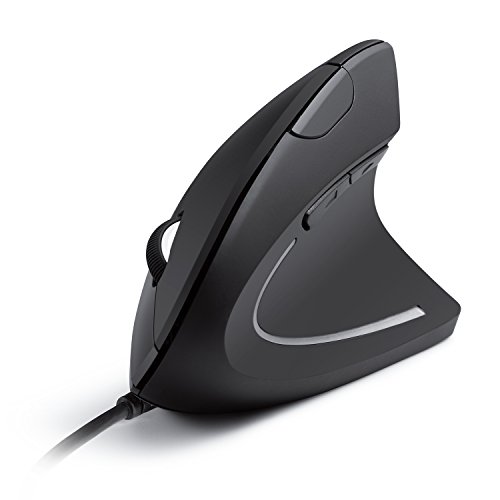
The Anker USB Wired Vertical Mouse remains one of the easiest ergonomic mice to recommend. Its tall shape places the hand in a handshake-style position instead of forcing the palm to lie flat. That design may reduce twisting in the forearm during long computer sessions. It connects through USB, so it needs no battery and no wireless setup.
This mouse offers five buttons and three listed sensitivity levels: 800, 1200, and 1600 DPI. That range suits office work, email, documents, and general web use. The optical sensor tracks well on most common desk surfaces, though a mouse pad can improve smoothness. I like it most for users who want a clear change from a flat mouse without paying for gaming features.
Pros:
- Vertical shape supports a more natural hand position
- USB connection avoids charging and pairing
- Three DPI levels cover common office tasks
- Five-button layout adds useful shortcuts
- Works with laptops and desktop computers
- Strong value for a first vertical mouse
Cons:
- Right-handed design does not suit left-handed users
- The vertical grip may take several days to learn
- 1600 DPI may feel limited for high-resolution displays
What Amazon Buyers Are Saying
Buyer feedback commonly focuses on the unusual vertical shape and the low price. Many users like the hand position for office work and say the USB setup feels simple. Some buyers need time to adjust because the pointer movement feels different at first. Other reported concerns include the size of the grip and the fixed cable, so hand size and desk layout matter.
My Recommendation
I recommend this model as the best wired ergonomic mouse for most office users who want a simple vertical design. It offers the right mix of comfort, easy setup, and useful controls. It is not the best choice for left-handed users or people who need very high pointer speed.
TECKNET Wired Mouse, 6400 DPI

The TECKNET wired mouse takes a more familiar route than a vertical model. Its traditional ergonomic shell lets most users start working without a long adjustment period. The listed 6400 DPI setting gives it more speed range than basic office mice. That makes it useful for large screens, fast navigation, and users who like quick pointer movement.
Its six-button layout adds control beyond the standard left, right, and wheel buttons. The wired USB design keeps the signal steady and removes the need for batteries. This model may suit shoppers who want ergonomic support but do not want a steep vertical grip. It is also a practical choice for mixed work, study, and casual gaming.
Pros:
- High listed DPI range offers flexible pointer speed
- Familiar shape feels easy for most users
- Six buttons support faster daily commands
- USB connection keeps setup simple
- Useful for work, study, and casual play
- Comfortable option for users who dislike vertical mice
Cons:
- Traditional shape may provide less wrist rotation relief
- Extra buttons can feel crowded for small hands
- High DPI settings may feel too fast without adjustment
What Amazon Buyers Are Saying
Common buyer themes center on the comfortable shell, responsive movement, and good feature set for the price. Users who prefer a normal mouse shape often find this model easier to use than a vertical mouse. Some feedback points to button placement and cable management as personal preferences. DPI control also receives mixed reactions because some buyers prefer lower settings for precise work.
My Recommendation
This is a strong pick if you want the best wired ergonomic mouse with a standard shape and a wide speed range. I would choose it for users who switch between office work and casual gaming. I would not choose it as the first option for someone who specifically needs a vertical wrist position.
Perixx PERIMICE-513 Vertical Mouse
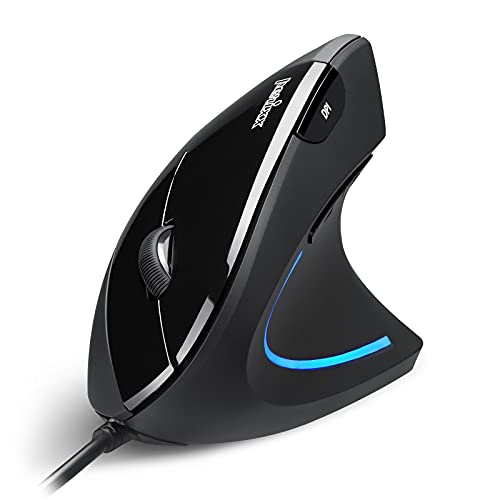
The Perixx PERIMICE-513 is built for users who want a vertical mouse with more speed control. It offers four listed DPI levels: 1000, 1600, 3200, and 6400. That range allows slow movement for detail work and faster movement across wide displays. The right-handed shell also includes six buttons for work shortcuts and navigation.
The 5.9-foot wired USB cable gives most desk setups useful reach. I see this model as a step up from a basic vertical mouse because it offers more adjustment. The tall body may help users who feel strain with a flat design, but it can feel large to people with small hands. Its black finish suits a simple office or home desk.
Pros:
- Four DPI settings offer broad speed control
- Vertical shape encourages a handshake-style grip
- Six buttons add practical shortcuts
- 5.9-foot cable suits many desktop layouts
- Useful for office work and large monitors
- Right-handed design feels stable during long use
Cons:
- Not designed for left-handed users
- Larger vertical body may not suit small hands
- Some users may need time to learn the grip
What Amazon Buyers Are Saying
Buyer comments often praise the adjustable DPI range and the solid vertical form. Users who already like ergonomic mice tend to value the extra buttons and longer cable. The most likely complaints concern the learning period, the size, and the right-hand-only layout. As with any vertical mouse, comfort depends on how well the thumb and fingers match the shell.
My Recommendation
I recommend the PERIMICE-513 for right-handed users who want more speed choices than a simple office vertical mouse provides. It is a good fit for wide monitors and mixed productivity work. At 4.4 out of 5, it is one of the strongest options here for adjustable control.
Logitech G502 Hero Wired Gaming Mouse

The Logitech G502 Hero is the most feature-rich mouse in this group. It uses a large gaming shape with many programmable controls and a wired connection. That makes it useful for games, creative software, editing tools, and work that needs repeated commands. Its sculpted shell supports a full palm grip, but its size and button count may be more than a basic office user needs.
This mouse is not a vertical ergonomic model. Instead, it focuses on control, grip support, and fast response. The adjustable settings allow users to set pointer speed to match games or detailed work. I would consider it for people who want one wired mouse for both productivity and gaming, especially when extra controls matter more than a neutral wrist angle.
Pros:
- Many controls support custom shortcuts
- Wired design suits gaming and fast response
- Large shell supports a full-hand grip
- Useful for gaming, editing, and productivity
- Adjustable pointer settings offer fine control
- Well suited to users who need many commands
Cons:
- Bulky shape may not suit small hands
- Not a vertical wrist-support design
- Extra buttons may feel complex for office work
- Gaming size can take up more desk space
What Amazon Buyers Are Saying
Buyer feedback commonly highlights the large number of controls, the gaming feel, and the solid grip. Many users enjoy the ability to assign commands for games or work apps. Some buyers find the mouse heavy or large, while others dislike the learning curve created by its many buttons. Comfort reports vary greatly with hand size and grip style.
My Recommendation
The G502 Hero is worth buying if you need a wired ergonomic gaming mouse with many controls. It is not my first pick for simple office comfort or wrist-neutral use. I rate it 4.5 out of 5 for features, but 4.1 out of 5 as a general ergonomic office mouse.
KUNSI Wired Vertical Mouse
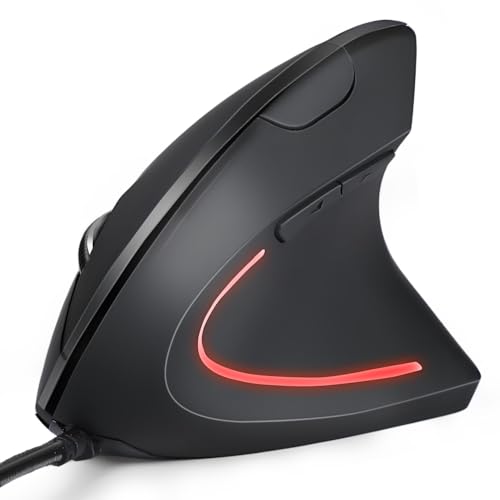
The KUNSI wired vertical mouse offers a simple way to move from a flat mouse to a more upright grip. It has six buttons and three listed DPI levels: 800, 1200, and 1600. Those settings fit common tasks such as documents, email, browsing, and school work. The USB cable also means you can plug it in and start using it without software or batteries.
This mouse is made for right-handed users and has a clean black design. Its feature set resembles other affordable vertical mice, but the extra side controls add value for the price. It may work well for a home office or shared computer. Users who need very fast cursor movement may prefer a model with a higher DPI range.
Pros:
- Vertical shape can reduce a flat wrist posture
- Six buttons support useful browser and work commands
- Three DPI settings are easy to understand
- USB operation needs no charging
- Simple design suits home and office desks
- Good entry point for vertical mouse users
Cons:
- Right-handed shape limits user choice
- 1600 DPI may not suit very large displays
- Vertical form may feel unfamiliar at first
What Amazon Buyers Are Saying
Buyer discussions tend to focus on the upright grip, easy USB setup, and button count. People who want a basic ergonomic mouse often appreciate the simple controls. Some users may find the body too tall or the pointer speed too limited. These comments show why hand size and monitor size should guide the purchase.
My Recommendation
I recommend the KUNSI for shoppers who want an affordable vertical mouse with six buttons. It is a sensible daily model, but it does not offer the speed range of the Perixx PERIMICE-513. I rate it 4.1 out of 5 for value and basic comfort.
TECKNET USB Wired Mouse With Side Keys

This TECKNET model focuses on practical browsing control. Its forward and backward keys make it easy to move through web pages, folders, and document history. The shape follows a traditional mouse design, so it feels familiar to most hands. Its four adjustable DPI levels let you choose between slower precision and faster movement.
The gray finish looks understated, and the USB cable keeps the mouse ready at all times. I would choose this model for reading, browsing, school work, and office tasks that use back and forward commands often. It does not provide the wrist angle of a vertical mouse. However, its familiar body may suit users who want comfort without a major change in grip.
Pros:
- Forward and backward keys speed up browsing
- Four DPI levels support different work styles
- Traditional shape needs little adjustment
- Wired USB setup is fast and dependable
- Useful for folders, browsers, and documents
- Simple design suits shared computers
Cons:
- Not a vertical ergonomic design
- Side keys may be easy to press by mistake
- May lack advanced controls for gaming users
What Amazon Buyers Are Saying
Common buyer feedback points to the useful side buttons and simple plug-in setup. Many users like having forward and back controls close to the thumb. Some buyers prefer a softer or larger grip, while others find the traditional shape comfortable enough for daily use. Reports about comfort vary based on hand size and how tightly each person grips the mouse.
My Recommendation
This is a good value pick for browsing and basic office work. I recommend it to users who do not need a vertical shell but want helpful side keys. It earns 4.2 out of 5 for practical daily use and 3.9 out of 5 for wrist-focused ergonomics.
Anker CE100 Renewed Vertical Mouse
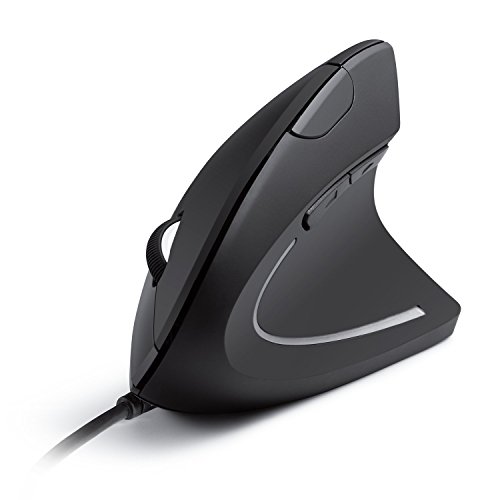
The Anker CE100 Renewed offers the familiar vertical design at a lower-cost entry point. It lists two DPI levels, 1000 and 1600, plus five buttons. That setup covers standard office tasks without adding complex controls. Its optical sensor and USB cable make it a straightforward choice for a desktop or laptop.
As a renewed product, buyers should check the listing details, condition notes, and included warranty before ordering. The vertical shape can feel comfortable for users who want to reduce the twist found in a flat grip. It may be a good fit when price matters most. Still, shoppers who want a new unit or more speed choices should consider the other Anker or Perixx options.
Pros:
- Vertical grip supports a different wrist angle
- Two DPI levels keep control simple
- Five buttons cover common commands
- USB connection needs no battery
- Renewed format may lower the purchase price
- Compact feature set suits basic office work
Cons:
- Renewed condition can vary by listing
- Only two listed DPI settings are available
- Right-handed design limits flexibility
- Buyers should review warranty terms carefully
What Amazon Buyers Are Saying
Buyer feedback for renewed products often varies more than feedback for new products. Users commonly discuss the vertical grip, low price, and ease of setup. Some buyers may report cosmetic wear or differences in condition, which is normal to consider with renewed stock. I suggest checking recent reviews and the seller information before placing an order.
My Recommendation
I recommend this mouse only when the renewed condition offers clear savings and the listing provides suitable coverage. It is a practical budget vertical mouse, but it has fewer DPI choices than newer alternatives. My rating is 3.9 out of 5, with value depending heavily on the current price and condition.
Perixx PERIMICE-519 Compact Vertical Mouse

The Perixx PERIMICE-519 solves a common problem with vertical mice: many are too large for small hands or travel bags. This compact model measures 105 by 67 by 58 millimeters, according to the product title. Its vertical shape keeps the hand in an upright position while its smaller body takes less desk space. It is made for right-handed users.
This mouse suits students, compact workstations, and people who move between desks. A wired USB cable means there is no battery to carry or charge. The smaller body may feel less natural for users with large hands, so I would check the dimensions before buying. It is best viewed as a portable ergonomic option rather than a high-feature productivity mouse.
Pros:
- Compact body suits small hands
- Vertical shape supports an upright grip
- Fits small desks and travel setups
- Wired connection avoids battery concerns
- Right-handed design gives a clear thumb position
- Simple choice for students and mobile work
Cons:
- Small size may feel cramped for large hands
- Right-handed design excludes left-handed users
- Compact body may offer fewer advanced controls
- Users may need time to learn vertical movement
What Amazon Buyers Are Saying
Buyer comments commonly focus on the smaller size and portable design. Users with small hands often find compact mice easier to control than full-size vertical models. Some larger-handed buyers may want more palm support. Feedback also tends to show that the upright grip requires a short adjustment period, especially for people moving from a standard mouse.
My Recommendation
I recommend the PERIMICE-519 for small hands, tight desks, and portable use. It is not the best choice for large-handed users who want a broad palm rest. I rate it 4.1 out of 5 for compact ergonomic design and 4.3 out of 5 for portability.
How to Choose the Best Wired Ergonomic Mouse
Choosing the best wired ergonomic mouse takes more than looking at the button count. Your hand size, grip, desk space, screen size, and daily tasks all matter. A vertical mouse may help one user, while a traditional ergonomic shell may feel better to another. I suggest comparing the points below before you buy.
1. Match the Shape to Your Grip
Vertical mice place the hand in a handshake position. This can reduce the inward twist that many people use with a flat mouse. However, the shape feels different and may need a short learning period. Traditional ergonomic mice feel more familiar and may be better for users who switch between several computers.
Also check whether the mouse supports your hand size. A large mouse can make small hands stretch. A compact mouse can leave large hands without enough palm support. If you use a claw grip, look for clear space for your fingers. If you use a palm grip, look for a body that supports the full hand.
2. Check DPI, Buttons, and Cable Length
DPI controls pointer speed. Low settings help with fine work, such as photo edits or small spreadsheet cells. Higher settings help you cross a wide display with less hand movement. For most office work, a few clear DPI levels are enough. Gamers and power users may prefer a much wider range.
Extra buttons can save time. Forward and back keys help with browsing. Six-button layouts can support shortcuts in work apps. Yet too many buttons can cause accidental presses. Also check the USB cable length. A short cable may pull on a desktop computer placed under a desk, while a long cable can create clutter on a small table.
3. Consider Build Quality, Software, and Long-Term Value
A wired mouse should track smoothly, click with a clear response, and sit firmly on the desk. Inspect the cable path and the base feet when possible. A braided cable is not required, but a flexible cable can feel better in daily use. A mouse pad can also improve tracking and reduce friction.
Many simple wired mice work without extra software. That is useful for school, office, and shared computers. Gaming models may need software for button mapping and sensitivity control. Decide if those features help your work. Finally, compare the price with the shape, controls, and warranty. The cheapest mouse is not always the best value if the grip does not fit your hand.
Final Verdict: Which Should You Buy?
The Anker USB Vertical Mouse is my overall choice for the best wired ergonomic mouse. It offers a comfortable vertical grip, simple USB use, five buttons, and strong value. Choose the Perixx PERIMICE-513 if you want more DPI control.
For small hands, choose the compact Perixx PERIMICE-519. For gaming, the Logitech G502 Hero offers more controls. Match the shape to your hand for the best long-term comfort.
FAQs Of best wired ergonomic mouse
Is a wired ergonomic mouse better than a wireless model?
A wired model does not need batteries or charging. It also avoids wireless pairing and can offer a steady connection. A wireless model gives you a cleaner desk, so the better choice depends on your priorities.
Are vertical mice good for wrist comfort?
Vertical mice place the hand in a more upright position. This may reduce forearm rotation for some users. Comfort still depends on fit, hand size, grip, and regular breaks.
What DPI is best for office work?
Many office users prefer a low or medium DPI setting. The best setting depends on your screen size and pointer preference. Adjustable DPI lets you test more than one speed.
Do wired ergonomic mice work with laptops?
Yes. A wired USB mouse works with a laptop that has a matching USB port. If the laptop only has USB-C ports, you may need a suitable adapter.
What is the best wired ergonomic mouse for small hands?
The Perixx PERIMICE-519 is the strongest small-hand option in this guide because its listed dimensions are compact. Always compare the mouse size with your hand before buying.