Yes, this HP Ryzen 7 laptop is worth considering for everyday work, study, multitasking, and entertainment.
If your current laptop slows down when you have several browser tabs, documents, video calls, and streaming apps open, a stronger everyday machine can make a noticeable difference. The HP 15-fc0057wm combines an AMD Ryzen 7 processor with 16GB of memory and a 512GB SSD, giving typical home and office users a practical performance package.
For a U.S. student, remote worker, small-business owner, or household user, the 15.6-inch touchscreen also adds flexibility. It is not positioned as a dedicated gaming workstation, but its combination of processing power, storage, connectivity, and portability makes it a sensible general-purpose Windows laptop.
Is HP 15-fc0057wm Good?
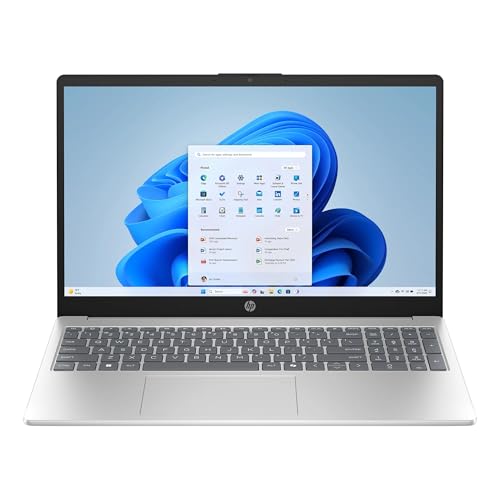
The HP 15-fc0057wm is a well-balanced everyday laptop built around an AMD Ryzen 7 7730U processor, 16GB DDR4 memory, and a 512GB PCIe NVMe SSD. Its 15.6-inch Full HD IPS touchscreen gives it useful versatility for productivity, browsing, streaming, and casual creative work.
Its strongest point is the overall balance rather than one extreme feature. The eight-core Ryzen 7 7730U provides plenty of CPU capability for ordinary multitasking, while the 16GB RAM and SSD are a practical combination for keeping Windows and frequently used applications responsive. The main limitation is the integrated Radeon graphics, which makes this more appropriate for everyday computing than demanding modern gaming.
One practical observation is that the touchscreen can make navigation more convenient when using the laptop around the home. Another is that the 512GB SSD provides a comfortable starting point for documents, applications, photos, and media without immediately requiring external storage.

My First Impression for HP 15-fc0057wm
The natural silver finish and relatively slim chassis give the HP 15-fc0057wm a straightforward, modern appearance. At about 3.52 pounds and roughly 0.73 inches thick, it is reasonably portable for a 15.6-inch laptop, although smaller ultraportables will be easier to carry every day.
The setup experience follows the familiar Windows laptop process: connect the charger, complete Windows setup, sign in, install available updates, and configure the applications you use. The included webcam, Wi-Fi 6, Bluetooth 5.3, USB ports, HDMI, and audio connection also reduce the need for extra accessories during normal use.
The 15.6-inch Full HD IPS touchscreen is particularly useful for people who prefer occasional touch interaction. Its 1920 x 1080 resolution is appropriate for office documents, websites, video calls, and entertainment, while the anti-glare treatment is helpful in typical indoor environments.

What Makes It Stand Out / Key Features
- AMD Ryzen 7 7730U Processor: The eight-core, 16-thread Ryzen 7 7730U is designed for responsive everyday computing and heavier multitasking than entry-level laptop processors. It can reach up to 4.5 GHz and includes 16MB of L3 cache.
- 16GB DDR4 Memory: The 16GB DDR4 configuration gives Windows users useful headroom for multiple browser tabs, office applications, communication tools, and other everyday workloads running together.
- 512GB PCIe NVMe SSD: The 512GB solid-state drive provides considerably more practical storage than many entry-level configurations and supports quick application and file access.
- 15.6-inch Full HD IPS Touchscreen: The 1920 x 1080 IPS touchscreen combines a familiar Full HD workspace with touch input. Its 300-nit rating and anti-glare treatment make it suited to typical indoor productivity and entertainment.
- Integrated AMD Radeon Graphics: The integrated Radeon graphics handle everyday display output, video playback, browsing, and lighter graphical workloads without requiring a separate graphics processor.
- Modern Wireless Connectivity: Wi-Fi 6 and Bluetooth 5.3 provide current wireless connectivity for compatible networks, headphones, mice, keyboards, and other peripherals.
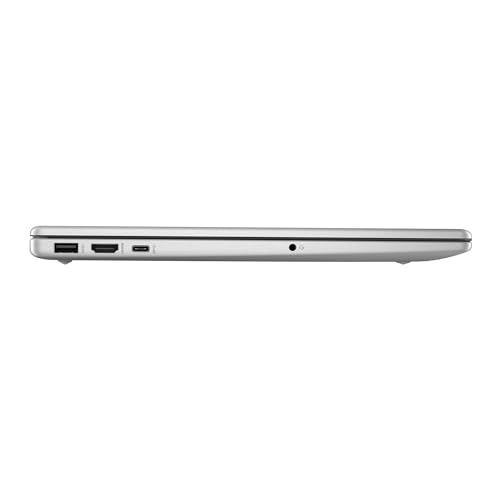
- Useful Port Selection: The laptop includes one USB-C port, two USB-A ports, HDMI, and a combined headphone and microphone jack, giving users several straightforward ways to connect accessories and external displays.

✅ What I Like
- ✔ The Ryzen 7 7730U provides strong everyday processing capability for multitasking, office work, browsing, and productivity applications.
- ✔ 16GB of DDR4 RAM is a practical capacity for users who regularly keep many applications and browser tabs open.
- ✔ The 512GB PCIe NVMe SSD provides useful storage space for applications, documents, photos, and media.
- ✔ The 15.6-inch Full HD IPS touchscreen offers a comfortable workspace while adding convenient touch interaction.
- ✔ Wi-Fi 6 and Bluetooth 5.3 provide useful wireless connectivity for modern home and office setups.
- ✔ The combination of USB-C, USB-A, HDMI, and an audio jack makes connecting common peripherals straightforward.
- ✔ The 3.52-pound chassis is reasonably manageable for a 15.6-inch everyday laptop.
⚠️ What Could Be Better
- ✖ Integrated Radeon graphics are not intended to replace a dedicated GPU for demanding modern AAA gaming or intensive GPU-focused workloads.
- ✖ The 60Hz display is suitable for normal productivity and entertainment but does not target buyers specifically looking for a high-refresh-rate gaming screen.
- ✖ The display’s 45% NTSC color coverage may be less appealing to professional creators who need a wider-gamut, color-critical panel.

My Recommendation
I would consider this HP a strong fit for buyers who want one laptop for work, school, web browsing, video meetings, streaming, and general home computing. The Ryzen 7 processor and 16GB of RAM give it a useful performance cushion compared with basic laptops designed primarily for light tasks.
I would be more cautious if your main goal is serious gaming, professional video production, 3D rendering, or other workloads that depend heavily on dedicated graphics. In those cases, a laptop with a discrete GPU or a newer performance-oriented platform may make more sense.
| Best For | Why It Fits |
|---|---|
| College Students | The Ryzen 7 processor, 16GB RAM, touchscreen, webcam, and 512GB SSD provide a versatile setup for research, documents, presentations, online classes, and entertainment. |
| Remote Workers | The large Full HD display, webcam, wireless connectivity, and strong multitasking capability work well for video meetings, browser-based applications, and office software. |
| Home and Family Users | The touchscreen, substantial SSD capacity, and everyday performance make it suitable for browsing, streaming, personal documents, photos, and common household tasks. |
| Small-Business Users | The combination of Ryzen 7 processing, 16GB memory, multiple ports, and Windows 11 provides a practical foundation for common business applications. |
Alternative Products You Can Consider
| Product | Best For | Key Difference |
|---|---|---|
| HP 15-fc0057wm | Balanced everyday performance | Combines Ryzen 7 processing, 16GB RAM, 512GB SSD storage, and a 15.6-inch Full HD touchscreen in one configuration. |
| Acer Aspire 5 | Configuration flexibility | The Aspire 5 family is offered in a wide variety of configurations, so buyers can select a model based on their preferred hardware. |
| Lenovo IdeaPad Slim 3 | Everyday school and home use | Focuses on mainstream productivity with multiple size and hardware configurations across the product family. |
| ASUS Vivobook 15 | Mainstream productivity | Offers another 15-inch Windows laptop option with different configurations depending on the specific model. |

Final Verdict: Which Should You Buy?
The HP 15-fc0057wm makes the most sense for buyers who want a capable everyday Windows laptop without stepping into a dedicated gaming-machine category. Its Ryzen 7 7730U processor, 16GB RAM, 512GB NVMe SSD, Full HD touchscreen, and practical connectivity create a well-rounded package for work, school, home use, and entertainment.
The biggest reason to choose it is the balance between CPU capability, memory, storage, and usability. The biggest limitation is the integrated graphics and relatively standard 60Hz display, so demanding gamers and professional graphics users should look toward a laptop with a dedicated GPU or a more specialized display.
For students, remote workers, families, and small-business users, this configuration deserves serious consideration when its price is competitive with similarly equipped alternatives. Before buying, verify the exact listing configuration because laptop families can change specifications between models and sellers.