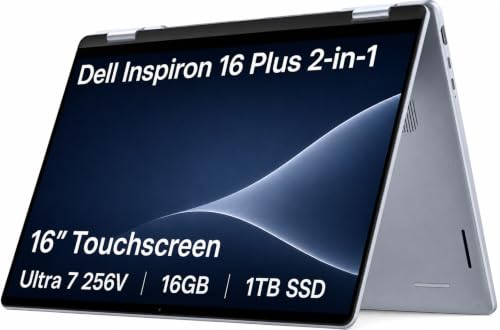
The Dell Inspiron 16 Plus 2-in-1 is worth considering for flexible everyday productivity, study, and creative work.
A typical laptop can feel limiting when you need a comfortable screen for work during the day but want tablet-style flexibility later. Students, remote workers, and families often want one Windows PC that can handle documents, video calls, streaming, and casual creative tasks without requiring separate devices.
That is where a large convertible laptop becomes appealing. The Dell Inspiron 16 Plus 2-in-1 targets buyers who value a roomy display, flexible hinge, and practical Windows experience in one machine.
Is Dell Inspiron 16 Plus 2-in-1 Good?
The Dell Inspiron 16 Plus 2-in-1 is a strong choice for buyers who want a larger convertible Windows laptop for productivity, schoolwork, entertainment, and everyday multitasking. Its biggest appeal is the combination of a spacious 16-inch-class workspace and a 2-in-1 design that can adapt to different ways of using a PC.
The main trade-off is portability. A large convertible notebook is less convenient to carry and use as a handheld tablet than a smaller 13- or 14-inch 2-in-1. My main takeaway is that this type of design makes the most sense for someone who prioritizes screen space and versatility over the smallest possible footprint.

My First Impression for Dell Inspiron 16 Plus 2-in-1
The first thing that stands out is the larger convertible form factor. Instead of feeling like a compact tablet with a keyboard attached, it is designed primarily as a full-size laptop that can also change modes when the situation calls for it.
Setup follows the familiar Windows process, so getting started should be straightforward for most buyers. Once configured, the larger workspace is useful for arranging multiple applications side by side, while the convertible hinge adds flexibility for presentations, media viewing, and touch-oriented tasks.
For everyday usability, the design is more about practicality than extreme portability. Buyers should consider where they will use it most often because the larger chassis is better suited to a desk, kitchen counter, home office, or classroom workspace than constant one-handed tablet use.

What Makes It Stand Out / Key Features
- 16-Inch-Class Workspace: The larger display area gives productivity apps, spreadsheets, documents, web pages, and entertainment more room than a typical compact laptop.
- 2-in-1 Convertible Design: The flexible hinge allows the laptop to be repositioned for different activities, making it useful for laptop-style work as well as presentations, viewing, and touch-focused interaction.
- Windows Productivity: The familiar Windows environment makes it suitable for common school, office, communication, browsing, and personal computing tasks.
- Multitasking-Friendly Layout: The generous screen footprint is helpful when you regularly keep several windows open, such as a browser beside a document, spreadsheet, or video call.
- Flexible Everyday Use: The convertible format gives one computer several practical positions, which can be convenient for watching content, sharing a screen, or changing how you interact with the device.
- Full-Size Laptop Approach: Its larger design favors a conventional laptop experience with a spacious working area rather than trying to replace a small tablet completely.

✅ What I Like
- ✔ The large display provides more comfortable room for documents, spreadsheets, research, and multitasking.
- ✔ The 2-in-1 hinge gives the computer more flexibility than a conventional clamshell laptop.
- ✔ The Windows platform works well for common productivity, education, communication, and entertainment needs.
- ✔ The larger format can be especially useful for users who dislike working on cramped laptop screens.
- ✔ The convertible design can make presentations, media viewing, and touch interaction more convenient.
- ✔ The overall concept combines laptop productivity and flexible positioning without requiring a separate everyday computer.
⚠️ What Could Be Better
- ✖ The larger chassis is less convenient to carry and use as a handheld tablet than a smaller 2-in-1.
- ✖ Buyers should verify the exact configuration before purchase because processor, memory, storage, display, and other specifications can vary by model.
- ✖ A large convertible design may be more laptop than some users need if their priority is maximum portability.

My Recommendation
I would recommend this type of Inspiron to buyers who want one flexible Windows computer and place a high value on screen space. It is particularly appealing for people who spend substantial time working with documents, browser tabs, spreadsheets, online classes, or entertainment content.
Before ordering, check the exact Amazon configuration rather than relying only on the product family name. Convertible laptops can be sold with different internal hardware and display options, so the specific listing configuration should match your workload and storage needs.
| Best For | Why It Fits |
|---|---|
| Students | The larger workspace can make research, coursework, online learning, and document editing more comfortable while the convertible design adds flexibility. |
| Remote and Home-Office Workers | A spacious screen is useful for managing browser tabs, documents, communication apps, and other everyday work tools. |
| Everyday Home Users | The combination of laptop functionality and flexible positioning works well for browsing, streaming, personal tasks, and general computing. |
| Light Creative Users | The larger touch-oriented convertible format can be useful for compatible creative and visual applications, provided the specific configuration meets the software requirements. |

Alternative Products You Can Consider
| Product | Best For | Key Difference |
|---|---|---|
| Dell Inspiron 16 Plus 2-in-1 | Large-screen convertible laptop users | Combines a spacious laptop workspace with flexible 2-in-1 positioning. |
| HP Envy x360 16 | Shoppers comparing large HP convertibles | Offers a competing large-format convertible approach with HP’s design and configuration options. |
| Lenovo Yoga 7i 16 | Buyers who prefer Lenovo Yoga convertibles | Provides another large-screen 2-in-1 option with Lenovo’s Yoga design philosophy. |

Final Verdict: Which Should You Buy?
The Dell Inspiron 16 Plus 2-in-1 makes the most sense for buyers who want a spacious Windows laptop without giving up the ability to change how they use the computer. Its large working area is the central attraction, while the convertible design adds useful flexibility for viewing, presentations, and touch interaction.
Choose it if screen space and versatility are more important than having the lightest possible machine. If you mainly want a compact laptop for frequent travel or a device that feels natural as a handheld tablet, a smaller 2-in-1 may be the better direction. The biggest buying consideration is the size itself, so make sure the large format fits your daily routine and confirm the exact configuration before checkout.